Operator and Shift Apps
Tablet apps at the line show targets, counts and downtime reasons. In manufacturing app development this is often the first win, because it replaces paper shift logs.
Paperless shift logs
App Development for Manufacturing
We build web and mobile apps that operators, maintenance crews and plant managers actually use. Each one reads live data from MES, ERP and machines, and works when the Wi-Fi drops.
LineView
Line 3 · Shift B
LineView
Line 3 · Shift B
⟳ Design in progress
Most plants still run on clipboards, spreadsheets and green-screen terminals. Manufacturing app development replaces those with focused tools that fit how shifts really work. Operators log downtime in two taps. Technicians close work orders at the machine. Managers see the line without walking it.
Our team builds these apps on top of the systems you already run. That means MES, ERP, CMMS, historians and PLC data. We do not ask you to rip anything out. We give each role a clean screen that reads and writes the right records.
This guide explains what good manufacturing app development looks like in 2026. It covers the app types that pay back fastest, the architecture, the integration traps, the delivery plan, and how to pick a partner.
Manufacturing app development is the design and build of web, mobile and tablet software for factory roles. Users include machine operators, maintenance technicians, quality inspectors, warehouse staff and plant leaders.
These apps differ from office software in three ways. They must run on rugged devices with gloves and noise. They must survive patchy networks inside steel buildings. And they must stay in sync with MES and ERP records that auditors rely on.
Done well, manufacturing app development turns tribal knowledge into guided workflows. Every scan, reading and sign-off becomes structured data. That data then feeds OEE reporting, traceability and continuous improvement.
Working definition
“Manufacturing app development is building role-specific software that captures and acts on shop floor events in real time, integrated with the plant's systems of record.”
Foundations
Each app serves one job. An operator sees their line, not the whole ERP. Fewer fields mean faster adoption and cleaner data.
Local storage and background sync keep the app usable in dead zones. Records upload when the device reconnects, with conflict handling.
The app never becomes a new silo. Work orders, lots and counts flow to MES, ERP or CMMS through tested APIs.
Every action carries a user, time, asset and lot. That gives quality and compliance teams an audit trail without extra effort.
Core capabilities
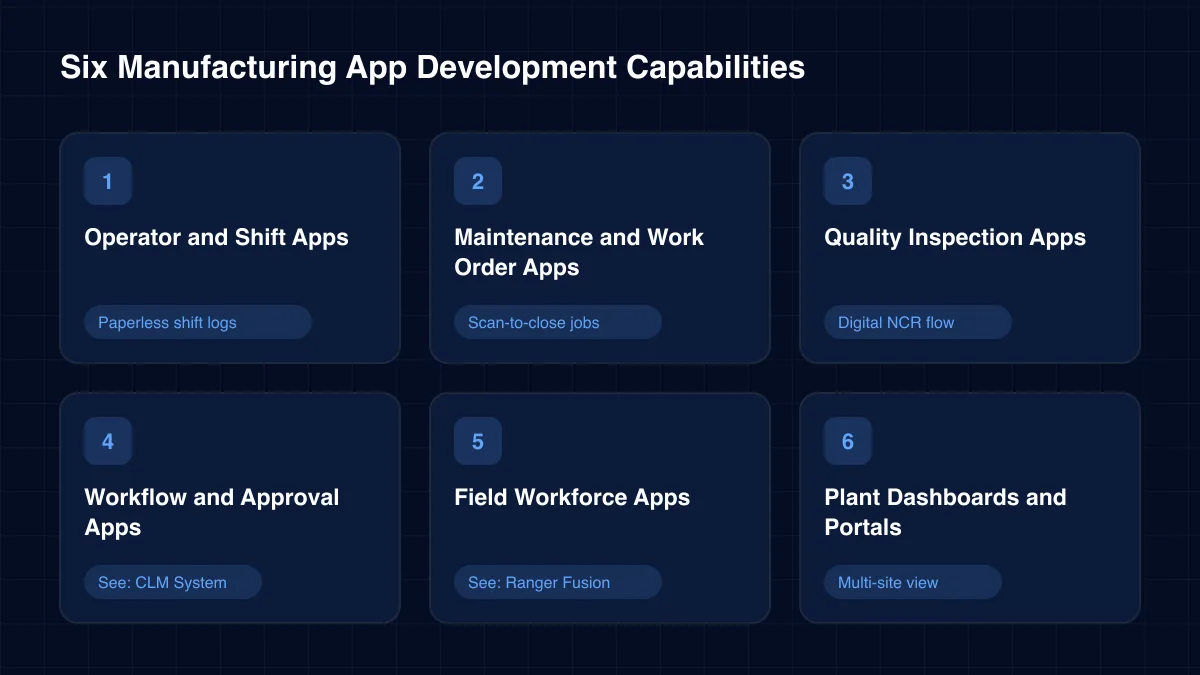
These are the builds plants ask us for most. Each one can start small and grow into a wider manufacturing app development programme.
Tablet apps at the line show targets, counts and downtime reasons. In manufacturing app development this is often the first win, because it replaces paper shift logs.
Paperless shift logs
Technicians scan an asset tag, see its history and close the job with photos. The app syncs to your CMMS or SAP PM so planners see status live.
Scan-to-close jobs
Guided checklists capture measurements, photos and signatures. Out-of-tolerance readings trigger holds and nonconformance reports automatically.
Digital NCR flow
Contracts, change requests and supplier documents move through defined approval levels. Our contract lifecycle build for a global manufacturer is the model.
See: CLM System →Supervisors assign tasks, track attendance and review progress for industrial field teams. Our Ranger Fusion platform shows how manufacturing app development extends beyond the plant walls.
See: Ranger Fusion →Web dashboards pull OEE, scrap and throughput from MES and historians. Leaders get one view across lines and sites, on desktop or phone.
Multi-site view
Architecture
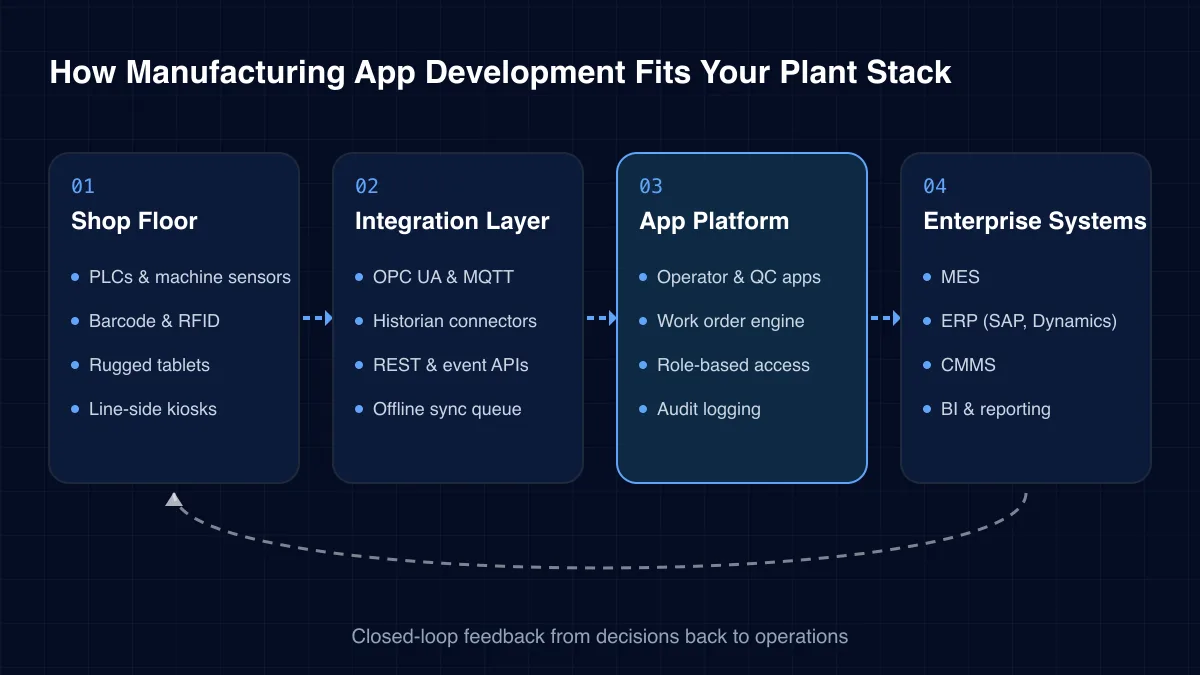
We follow ISA-95 thinking. Apps sit between the people on the floor and the systems that plan and record production. Data moves in both directions.
01
02
03
04
Challenges we solve
Plants rarely lack data. They lack a clean, trusted way to capture it at the source. These are the failure modes we see most often.
Operators write codes at shift end from memory. Pareto charts then point at the wrong losses. A line-side app captures the reason when the stop happens.
Paper tickets and radio calls leave jobs half-done and undocumented. A mobile work order app keeps history, parts and photos on each asset.
Check sheets live in binders and spreadsheets. Finding one lot's evidence during a customer audit can take days. Digital inspection keeps it one search away.
Engineering changes, contracts and deviations wait on busy signatories. Automated routing and reminders keep each stage moving and accountable.
Older MES and ERP screens demand training most shift staff never get. A focused app exposes only the fields each role needs.
Some apps look great but never write back to MES or ERP. That creates double entry. We design the integration first, then the interface.
Manufacturing app development projects fall into four broad shapes. Most plants run more than one at once.
There is no single right tool. The table shows where custom manufacturing app development beats the alternatives, and where it does not.
| Need | MES built-in screens | Low-code apps | Custom apps |
|---|---|---|---|
| Role-specific UX | Partial | ✓ Yes | ✓ Yes |
| Offline on the floor | No | Partial | ✓ Yes |
| Deep PLC and historian data | ✓ Yes | Partial | ✓ Yes |
| Fast approval workflows | No | ✓ Yes | ✓ Yes |
| Full control of roadmap | No | Partial | ✓ Yes |
The gains grow as more roles move from paper to apps that share one data model.
Delivery
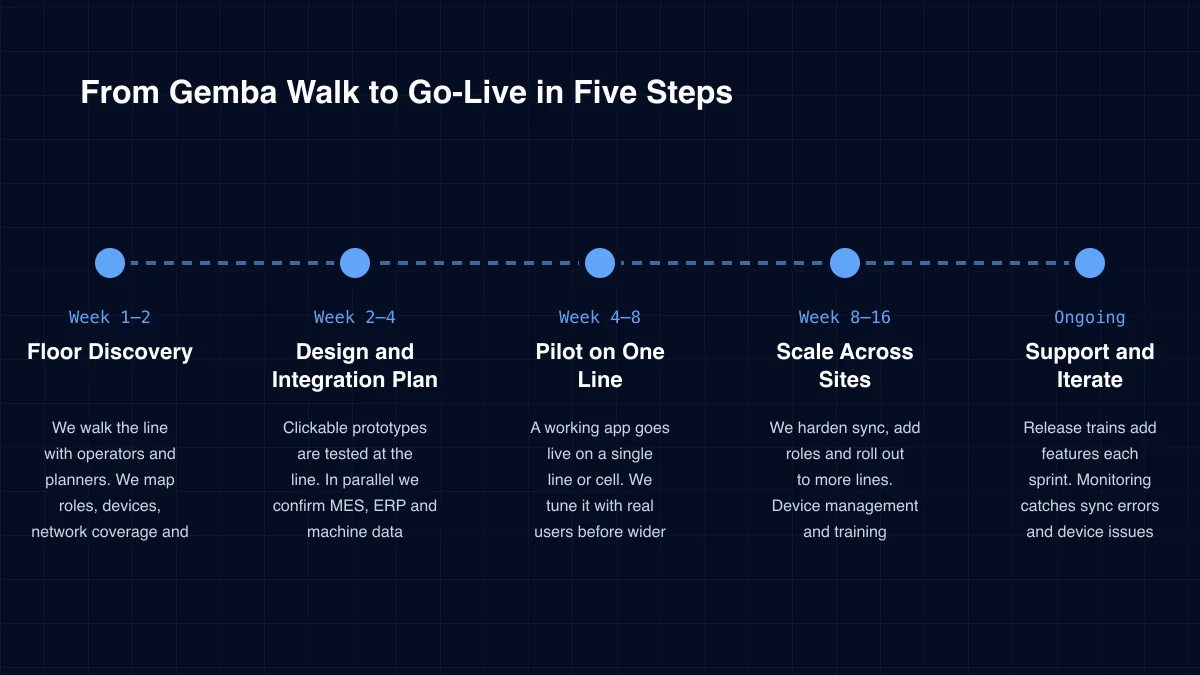
Week 1–2
We walk the line with operators and planners. We map roles, devices, network coverage and the systems each workflow touches.
Week 2–4
Clickable prototypes are tested at the line. In parallel we confirm MES, ERP and machine data contracts.
Week 4–8
A working app goes live on a single line or cell. We tune it with real users before wider rollout.
Week 8–16
We harden sync, add roles and roll out to more lines. Device management and training material ship with it.
Ongoing
Release trains add features each sprint. Monitoring catches sync errors and device issues before shifts notice.
Case study
A global mining and manufacturing leader managed high-value contracts through manual paperwork and scattered notes. Approvals stalled between departments. Our team built a unified contract lifecycle system on the Microsoft Power Platform. It delivered a 100% standardized workflow across departments and removed approval bottlenecks.
“A contract waiting in an inbox is not a paperwork delay. It is a business risk.”Read the full case study →
Power Apps · SharePoint
One system of record for legal and operational agreements, replacing scattered files.
Power Automate · Azure AD
Three-level approvals for HOD, MAD and stakeholders, with e-signature integration.
Microsoft Graph API
Interactive views of contract health, alerts and task ownership across departments.
Plenty of agencies can build a pretty app. Fewer understand a changeover or a lot genealogy. We recommend checking five things first.
In our experience, integration depth decides whether manufacturing app development pays back. A beautiful app that causes double entry will be abandoned within a quarter.
ICANIO works under ISO 9001 and ISO 27001 certified processes. Every app uses role-based access, single sign-on where available, and encrypted storage on the device.
We keep plant data in your cloud tenancy or on premises. Apps talk to OT systems through controlled gateways, never directly from the public internet. Device loss is handled through mobile device management and remote wipe.
Start with one measurable loss. Examples are unrecorded downtime, maintenance travel time, or hours spent assembling audit evidence. Put a value on one hour of it.
Then track the same measure before and after the pilot line goes live. We agree these baselines with you during discovery. That way every manufacturing app development phase is judged on your own numbers, not on vendor claims.
Technology stack
We pick the stack per plant. These are the tools we reach for most often.
Mobile
Web
PWA offline
Backend
Plant Integration
OPC UAHistorian APIs
Low-Code
Power AppsPower AutomateSharePointMicrosoft Graph
Cloud & Delivery
CI/CD pipelinesMDM
Most manufacturing app development programmes start with one painful paper process. Downtime logging, maintenance work orders and quality checklists are the usual first picks. They are small, visible and easy to measure.
Yes. Integration is the core of our manufacturing app development work. We connect to MES, SAP, Microsoft Dynamics, CMMS tools and historians through their APIs or middleware. Where no API exists, we scope a safe connector during design.
Yes. We build offline-first. The app stores records locally and syncs when the device reconnects. Conflicts are resolved by clear rules we agree with your team.
It depends on the job. Scanner-heavy frontline apps often suit Flutter or native code. Approval workflows often suit Power Apps. We recommend the lightest option that still meets offline, security and integration needs.
A pilot on one line typically follows a few weeks of discovery and design. Multi-site rollout follows once the pilot is stable. We give you a dated plan after discovery, based on your systems and scope.
We do, if you want us to. Our support covers releases, sync monitoring, device issues and new features. Many clients keep one ICANIO team for build and support so knowledge stays in one place.
Plants have plenty of systems. What they often lack is software that fits the people on the floor. Manufacturing app development closes that gap with focused, connected tools.
ICANIO brings mobile, web, low-code and integration engineers into one team. We start with a pilot on one line, prove it on your own numbers, and scale from there. Our manufacturing app development work then continues through structured support.
By ICANIO Application Engineering Team · Published · Updated
Book a free discovery call with our team. We will map one plant workflow to an app, its integrations and a pilot plan. Contact us to get started.
Contact Our App Team