Member & Client CRMs
Custom CRM development for organisations that manage members, donors or clients. Our Church CRM unified members, events and staff oversight in one platform.
50% faster lifecycle work →Custom CRM Development
ICANIO builds CRMs, employee portals and workforce platforms that match your relationships, roles and approvals. No forced pipelines, no per-seat surprises, no spreadsheets on the side.
Community CRM
Member follow-ups
Community CRM
Member follow-ups
⟳ Design in progress
Off-the-shelf CRMs are built for a sales funnel. Many organisations do not run one. A church tracks members, volunteers and certificates. A field services firm tracks crews, sites and payroll. Custom CRM development gives each of them a system that speaks their language from the first screen.
Our team designs and builds relationship platforms around your real entities, roles and approvals. That includes member and client CRMs, internal employee portals and workforce platforms with mobile apps. Each one replaces scattered spreadsheets with a single system of record and role-based dashboards.
This guide explains when custom CRM development beats a packaged product, how we architect it, and what it takes to get people to use it. It draws on ICANIO builds for a church community, our own staff and an industrial workforce.
Custom CRM development is the design and engineering of a relationship management system built for one organisation. Instead of bending your process to a vendor's objects, the data model starts from the people and records you actually manage.
Those people might be customers, donors, members, patients, employees or field crews. The records might be deals, visits, certificates, timesheets or service requests. A bespoke CRM holds them all, with the rules and approvals that connect them.
The scope usually covers a web console for staff, dashboards for leaders, and often a mobile app for people in the field. It also covers integrations with email, calendars, accounting, payroll and ERP systems, so data is entered once.
A custom build is not always right. When your process matches a standard sales pipeline, a packaged CRM with light configuration is cheaper. Custom CRM development earns its cost when the workflow is distinctive, the user count is high, or the data is too sensitive for a shared multi-tenant service.
Working definition
“Custom CRM development is building a relationship management platform around an organisation's own entities, roles, workflows and integrations, rather than configuring a generic sales-focused product.”
Foundations
Members, households, crews or accounts become first-class records with the links between them, not custom fields bolted onto a lead object.
Admins, managers and frontline staff each see the view they need. Nobody wades through data that is not theirs.
Attendance, check-ins and approvals are recorded where they happen, often on a phone, so reports are live instead of reconstructed.
Reminders, approval chains and status changes run on rules. Staff spend time with people, not chasing paperwork.
Core capabilities
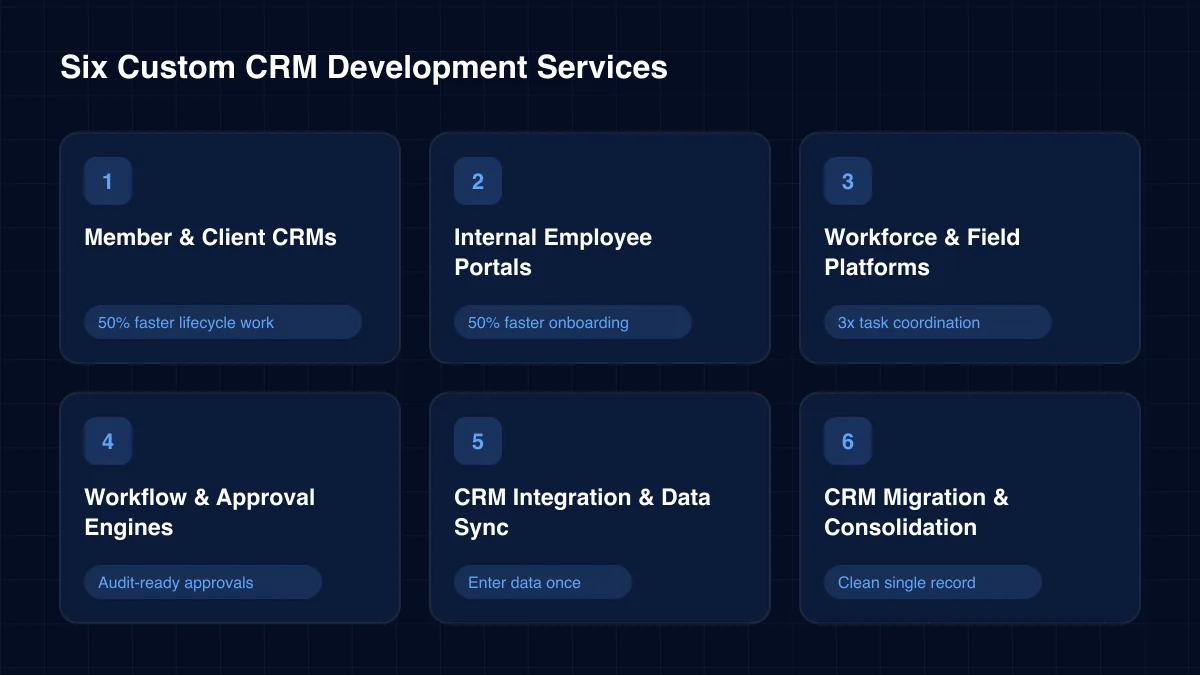
Each service can stand alone or combine into one platform. Our custom CRM development work spans community, client and workforce relationships.
Custom CRM development for organisations that manage members, donors or clients. Our Church CRM unified members, events and staff oversight in one platform.
50% faster lifecycle work →Self-service portals for HR, finance and project data. ICANIO built its own internal employee portal with automated onboarding, attendance and timesheets.
50% faster onboarding →HRM, payroll, task assignment and site supervision with multilingual iOS and Android apps. Ranger Fusion and Shengel connect head office with industrial field teams.
3x task coordination →Configurable approval chains for certificates, leave, quotes or service requests. Every step is timestamped and visible on the right dashboard.
Audit-ready approvals
Two-way sync with ERP, accounting, email, calendars and identity providers. Our wider application development practice designs these contracts in week one.
Enter data once →Move records out of spreadsheets or an outgrown CRM. We de-duplicate contacts, map history and keep attachments linked during cutover.
Clean single record
Architecture
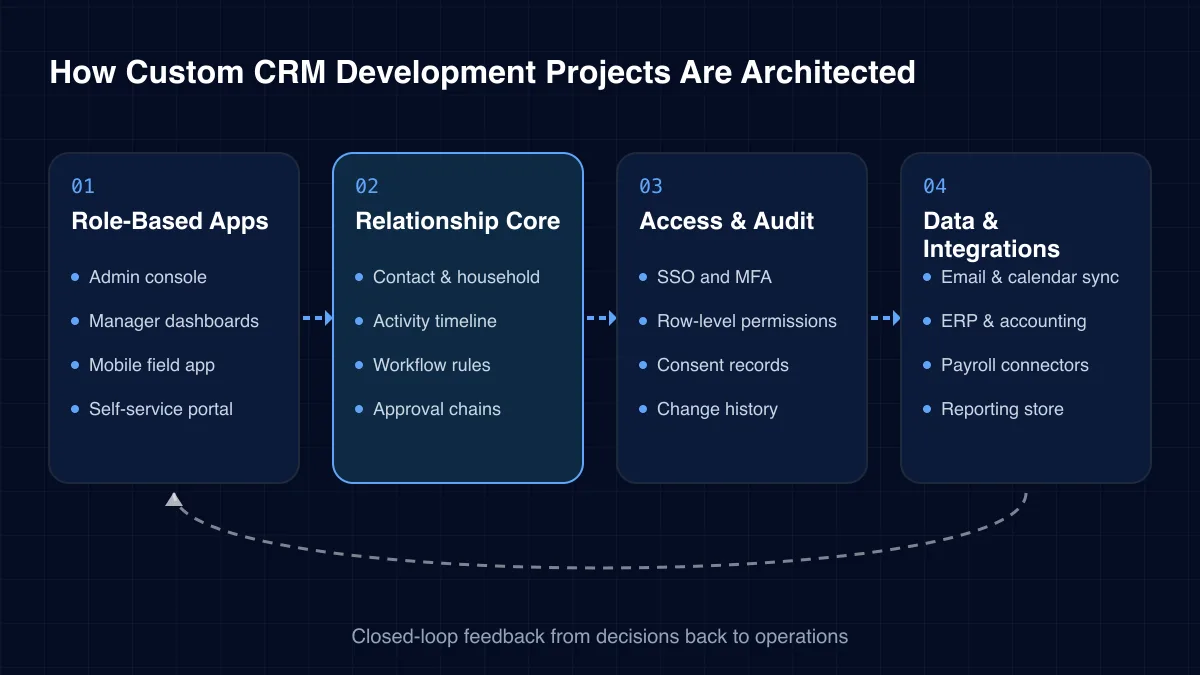
A relationship platform has more readers than writers, and more roles than most apps. Our four-layer pattern keeps permissions, workflows and reporting clean as both grow.
01
02
03
04
Challenges we solve
Most CRM projects start because the current mix of tools has quietly stopped working. These are the signs we see most.
The official CRM exists, but staff keep their own sheets. Data never matches and reports take days to compile.
Members are not leads and crews are not opportunities. Forcing them into a sales pipeline creates confusing workarounds.
Licence fees rise with every user, so only managers get access. Frontline data then never reaches the system.
Certificates, leave and quotes move by email. Nobody knows where a request is stuck or who owns it.
Supervisors on site cannot see head-office data, and head office cannot see the site. Decisions wait for phone calls.
Contacts, payroll and finance live in separate products. Without integration, every report is a manual merge.
Relationship platforms differ mostly by who the relationship is with. Each type needs a different data model and set of roles.
Before committing to custom CRM development, compare it honestly with the two options most teams already use.
| Criterion | Spreadsheets | Packaged CRM | Custom CRM |
|---|---|---|---|
| Fits your own entities | Partial | Partial | ✓ Yes |
| Role-based dashboards | No | ✓ Yes | ✓ Yes |
| Per-user licence fees | No | ✓ Yes | No |
| Mobile field capture | No | Partial | ✓ Yes |
| Best for | Very small teams | Standard sales pipelines | Distinctive workflows |
A relationship platform built for your work changes behaviour, not just reporting.
Delivery
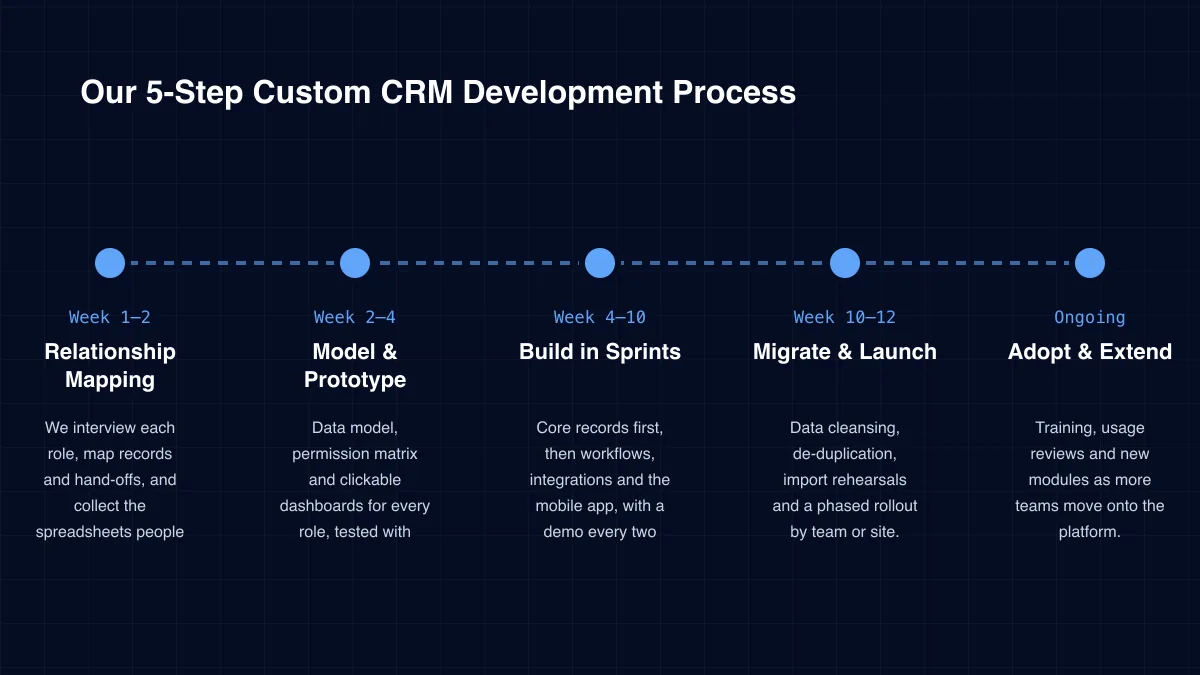
Week 1–2
We interview each role, map records and hand-offs, and collect the spreadsheets people really use.
Week 2–4
Data model, permission matrix and clickable dashboards for every role, tested with real users.
Week 4–10
Core records first, then workflows, integrations and the mobile app, with a demo every two weeks.
Week 10–12
Data cleansing, de-duplication, import rehearsals and a phased rollout by team or site.
Ongoing
Training, usage reviews and new modules as more teams move onto the platform.
Case study
A church managed members, attendance, events and staff with spreadsheets and disconnected tools. Reporting was slow and leadership lacked visibility. ICANIO built a centralised Church CRM with dashboards for admins, staff and pastors. Automated attendance, event and certificate workflows delivered 50% faster member lifecycle management and a threefold improvement in staff and volunteer tracking.
Read the full case study →Admin · Staff · Pastor views
Each role gets real-time visibility of the data it needs, and nothing more.
Tracking and scheduling modules
Members, volunteers and staff are tracked accurately, and events get scheduled with resources attached.
Automated certificates · RBAC
Certificate and leadership tracking runs on dashboards, secured by role-based access.
Specialist services within our mobile & web application development practice.
A good partner will challenge whether you need custom software at all. We recommend checking these five things.
Custom CRM development only pays off if people use the result every day. Our team designs for that outcome first.
A CRM holds personal data, so access control is the core of the design. We apply role-based and row-level permissions, SSO with MFA, encryption in transit and at rest, and a full change history on sensitive records.
Consent and retention are modelled as data, not policy documents. That makes GDPR requests, such as access or erasure, a routine task. ICANIO delivers under ISO 9001 and ISO 27001 certified processes, and you keep ownership of the data and code.
Begin with time. Measure how long staff spend compiling reports, chasing approvals and re-entering data across tools. Add licence fees for products the new platform replaces, multiplied across every user who needs access.
After launch, track adoption by role, approval cycle time and report lead time. Our case studies show the scale of change possible: faster onboarding, less manual work and better tracking accuracy. Later, machine learning can add lead scoring or churn alerts once the data is clean.
Technology stack
We choose proven, well-supported technology so your CRM stays maintainable for years.
Web Apps
Mobile
Offline sync
Backend
Data
Integration
REST APIsWebhooksMessage queuesMicrosoft Graph
Cloud & Identity
MFA
Custom CRM development wins when your records are not leads and deals, when many staff need access, or when data must stay in your own environment. For a standard sales pipeline, a packaged CRM is usually the better choice.
A first release with core records, dashboards and one or two integrations usually takes ten to twelve weeks. Mobile apps and complex payroll or ERP sync are added in later phases.
Yes. We clean, de-duplicate and map records, rehearse the import on staging, and keep history and attachments linked. Teams switch over in phases so nobody loses access.
It can. Field teams usually need one for check-ins, tasks and approvals. Ranger Fusion, for example, ships multilingual iOS and Android apps for distributed crews.
We design dashboards per role, use your own terminology and test prototypes with real users. After launch we track usage by role and fix whatever slows people down.
You do. The source code, data and cloud accounts belong to you. Our team can hand over fully or stay on to support and extend the platform.
How we deliver custom crm development and the wider app development practice in each sector.
A CRM only works when people trust it more than their own spreadsheet. That trust comes from screens that fit the job, data captured where work happens and approvals that never get lost.
Custom CRM development gives you that fit, plus ownership of the code and data. Whether you run a community, a client base, a distributed workforce or a manufacturing dealer network, ICANIO can scope a first release that proves value fast. Contact us to start with a relationship mapping session.
By ICANIO Application Engineering Team · Published · Updated
Book a free 30-minute call. We will map your relationships, roles and approvals, then outline a first CRM release your team will actually use.
Contact Our CRM Team