TYPO3 Development & Upgrades
Site builds, extension work and major-version upgrades on TYPO3. Our TYPO3 CMS development work moved an enterprise core from v12 to v14 LTS with full data preservation.
Zero-downtime upgrade →CMS Development
ICANIO builds, upgrades and migrates TYPO3, Liferay DXP and headless content platforms. Editors publish on their own, developers ship safely, and every page stays fast and accessible.
Content Hub
Publishing queue
Content Hub
Publishing queue
⟳ Design in progress
Marketing wants a new landing page by Friday. The website team says it needs a developer, a ticket and a release window. That gap is what good CMS development removes. Editors should change content on their own, and releases should never put the site at risk.
Our team specialises in enterprise content platforms: TYPO3, Liferay DXP and headless CMS stacks. We build new sites, upgrade ageing cores and migrate content between platforms. Every project ships with reusable templates, governed workflows and an automated release pipeline.
This guide explains what CMS development covers today, how we architect a content platform, and how to choose between traditional, hybrid and headless models. It also walks through a real TYPO3 modernization that moved a global enterprise to v14 LTS with zero downtime.
CMS development is the engineering work behind a content management system. It covers content models, page templates, editor workflows, integrations and the delivery pipeline. The aim is a site that non-technical staff can run without breaking.
A content platform is not just a website theme. It stores structured content, manages translations and permissions, and often feeds several sites or channels at once. Enterprise CMS development also has to satisfy accessibility law, security policy and brand rules.
Most projects fall into three groups. New builds start from a clean content model. Upgrades move an existing platform to a supported major version. Migrations move content from one system to another, for example from a legacy CMS to TYPO3 or to a headless stack.
Industries vary in what they need. Manufacturing firms publish product catalogues and dealer portals in many languages. Universities and banks run large multi-site estates. The hardest part is rarely the code. It is agreeing how content should be structured, who approves what, and how the platform will grow. We settle those questions in discovery, before any template is written.
Working definition
“CMS development is the design and engineering of a content platform, including its content model, templates, workflows, integrations and release process, so editors can publish safely at scale.”
Foundations
We model content as typed fields and relations, not free-form pages. Structured content can be reused across sites, apps and search.
Drag-and-drop layouts, reusable blocks and clear previews let marketing teams publish without waiting on developers.
Roles, approval steps and version history keep every change traceable. Nothing reaches production without the right sign-off.
Code, configuration and extensions move through a CI/CD pipeline to cloud or on-premise hosting. Releases are repeatable, tested and reversible.
Core capabilities
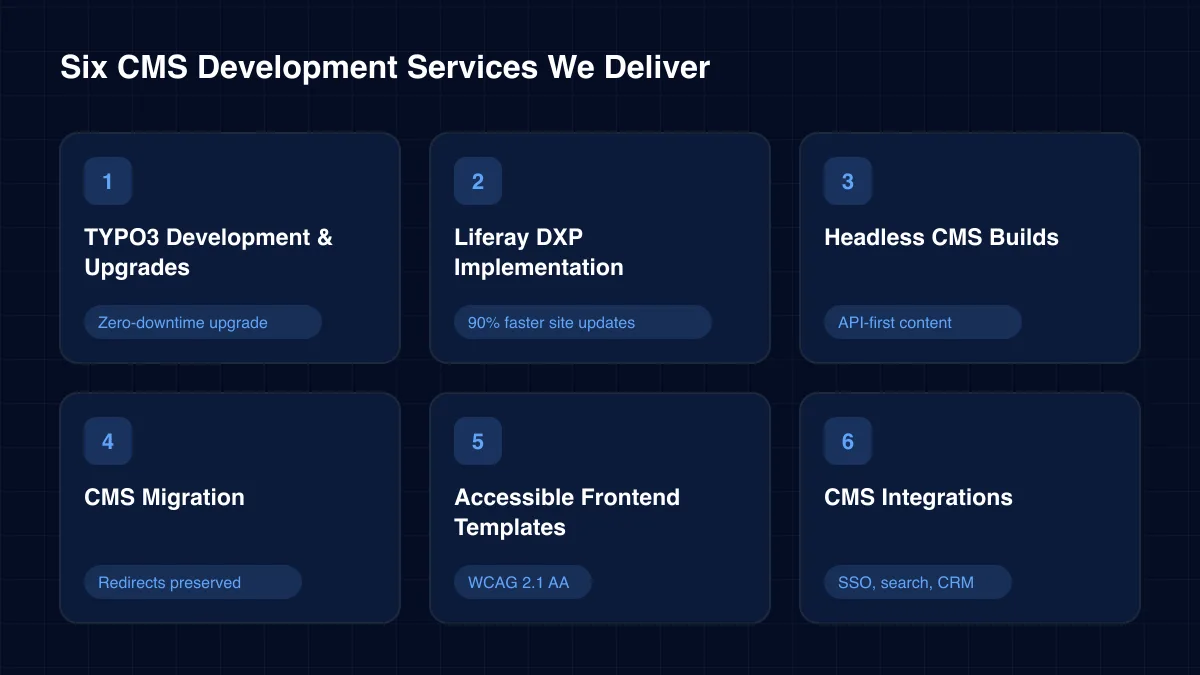
Each service can run alone or as part of a wider programme. Our CMS development team works across TYPO3, Liferay DXP and headless platforms, so the recommendation follows your needs, not a single vendor.
Site builds, extension work and major-version upgrades on TYPO3. Our TYPO3 CMS development work moved an enterprise core from v12 to v14 LTS with full data preservation.
Zero-downtime upgrade →Portals and digital experience sites on Liferay DXP. We automated an events section with Asset Publisher and gave editors drag-and-drop page builders.
90% faster site updates →Headless CMS development pairs an API-first content store with a React or Next.js frontend. One content source can then feed websites, mobile apps and kiosks.
API-first content
Content audits, field mapping, scripted imports and redirect maps. We move pages, media and metadata between platforms without losing rankings or history.
Redirects preserved
Mobile-first templates built to WCAG 2.1 AA. Reusable components keep every new page consistent with the brand and the accessibility standard.
WCAG 2.1 AA
Connect the content platform to CRM, search, analytics, identity and commerce. See how our wider application development practice handles integration-heavy builds.
SSO, search, CRM →Architecture
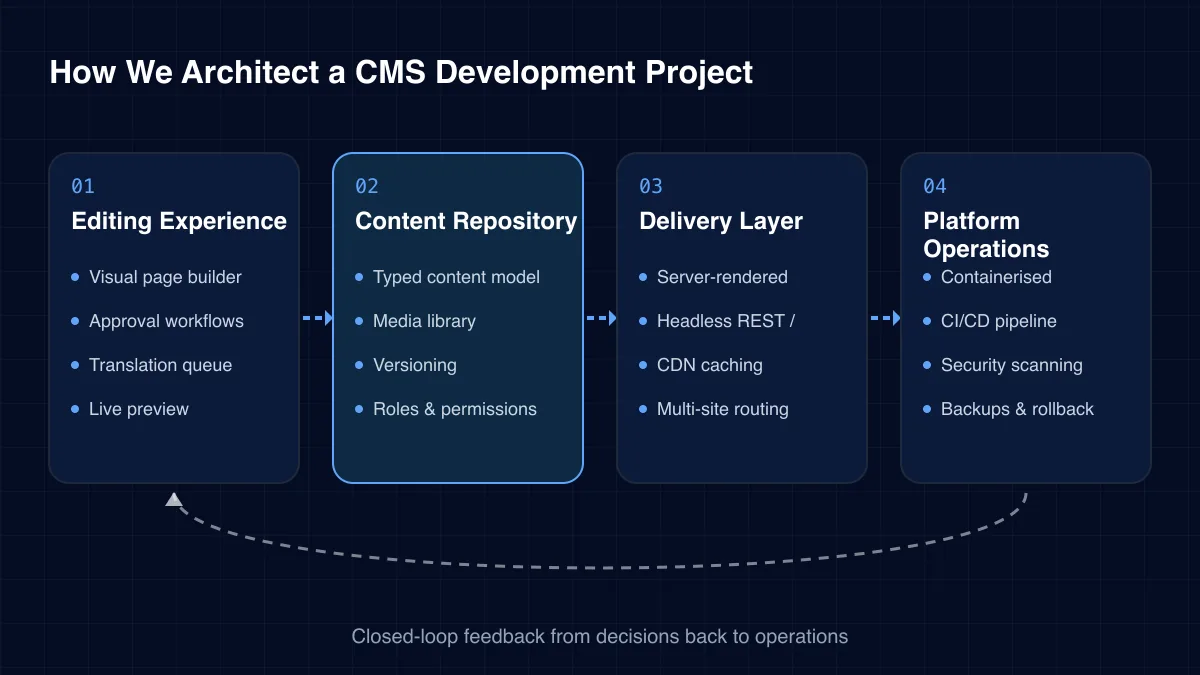
Our content platforms follow a four-layer pattern. It keeps editing, content storage, delivery and operations separate, so each can change without breaking the others.
01
02
03
04
Challenges we solve
Content platforms usually fail slowly. Small workarounds pile up until every change needs a developer and every release feels risky.
Rigid templates force editors to raise tickets for simple updates. Reusable blocks and page builders hand that control back to content teams.
Older major versions stop receiving security fixes. A planned upgrade removes that risk before it becomes an incident.
Legacy frontends often fail WCAG checks on contrast, headings and keyboard use. Patching page by page rarely fixes the root cause.
Hand-copied files and late-night deploys lead to outages. A pipeline with staging and rollback makes releases routine.
Translations drift, and regional teams copy pages by hand. A proper multi-site setup keeps shared content in sync.
Content stored as page markup cannot feed apps or search. A structured model makes the same content reusable everywhere.
The right model depends on how many channels you publish to and how much control editors need over layout.
No single platform wins every project. This table shows where each option fits in enterprise CMS development.
| Criterion | TYPO3 | Liferay DXP | Headless CMS |
|---|---|---|---|
| Open source core | ✓ Yes | Partial | Varies |
| Visual page editing | ✓ Yes | ✓ Yes | Partial |
| Multi-site & multi-language | ✓ Yes | ✓ Yes | ✓ Yes |
| Portals & user accounts | Partial | ✓ Yes | No |
| Best for | Content-rich sites | Portals & intranets | Omnichannel apps |
A well-built content platform pays back every week that editors use it.
Delivery
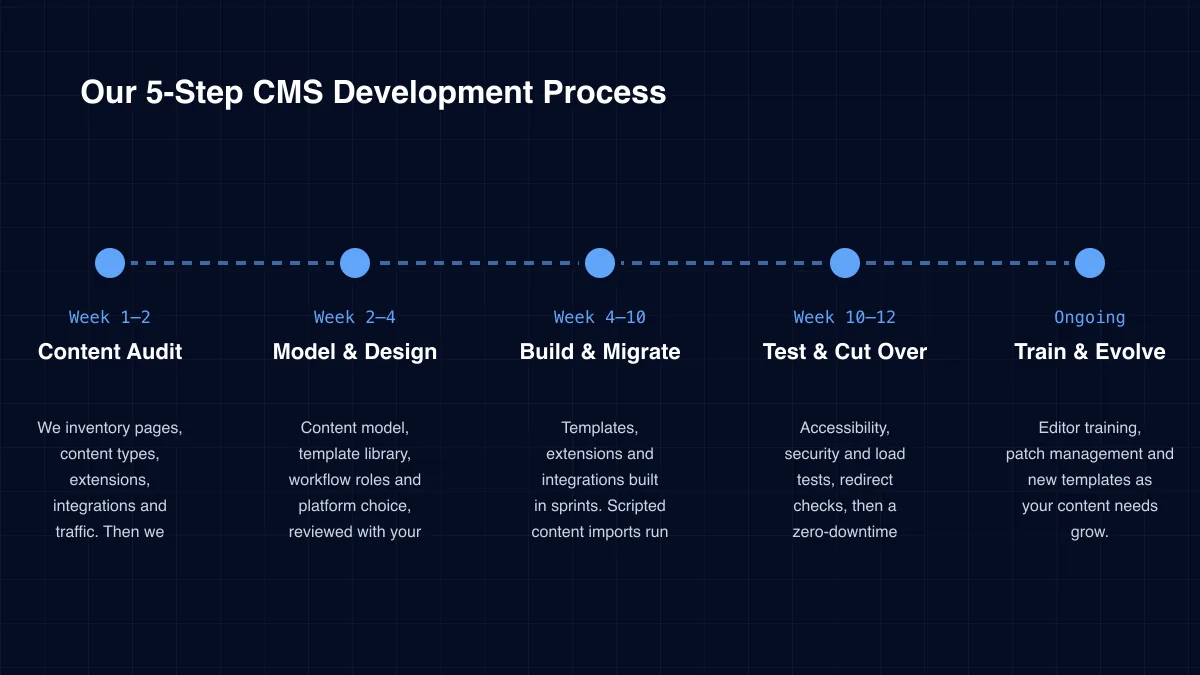
Week 1–2
We inventory pages, content types, extensions, integrations and traffic. Then we agree scope and success measures.
Week 2–4
Content model, template library, workflow roles and platform choice, reviewed with your editors.
Week 4–10
Templates, extensions and integrations built in sprints. Scripted content imports run against staging.
Week 10–12
Accessibility, security and load tests, redirect checks, then a zero-downtime release.
Ongoing
Editor training, patch management and new templates as your content needs grow.
Case study
A global enterprise ran an ageing TYPO3 v12 core that limited performance, releases and multi-language growth. ICANIO upgraded it to TYPO3 v14 LTS with 100% data preservation. We rebuilt the frontend for WCAG 2.1 AA and replaced manual releases with containerised CI/CD. OWASP-aligned VAPT validated the platform before a zero-downtime go-live.
Read the full case study →TYPO3 v14 LTS
Schema optimisation and a sequenced migration carried every content record across.
WCAG 2.1 AA
A mobile-first, responsive frontend replaced templates that could not meet the standard.
Jenkins · Terraform · Docker
Containerised environments and CI/CD made releases repeatable, secure and outage-free.
Specialist services within our mobile & web application development practice.
Platform logos are easy to list. We recommend testing a partner on these five points instead.
The best CMS development partners leave your team more independent than before. That is the standard we hold ourselves to.
Content platforms are public by design, so they attract attacks. We keep the core and every extension on supported versions and scan dependencies in the pipeline. Admin access uses SSO and least-privilege roles.
Before go-live we run OWASP-aligned vulnerability assessment and penetration testing. Where personal data is stored, such as form submissions or member accounts, we design for GDPR and your retention policy. ICANIO works under ISO 9001 and ISO 27001 certified processes.
Start with editor time. Count how many content changes need a developer today and how long each one waits. That queue is usually the biggest hidden cost of a weak platform.
Then add release effort, incident cost and licence fees for any tools the new platform replaces. Machine learning can then help with content tagging and site search on top of the same structured model. After launch, track publishing lead time, page speed and accessibility errors. Our CMS development roadmaps agree these measures up front, so value shows in your own numbers.
Technology stack
We pick the platform that fits your content, team and hosting, then build on proven tooling around it.
Platforms
Liferay DXPHeadless CMS
Frontend
Fluid templates
Backend
PHP
Data & Search
Delivery
CDN
Quality
WCAG audits
CMS development includes the content model, page templates, editor workflows, integrations and the release pipeline. It can be a new build, a version upgrade or a migration between platforms.
TYPO3 suits content-rich, multi-language websites. Liferay DXP suits portals and intranets with user accounts. A headless CMS suits teams publishing to many channels. We recommend a platform after a short content audit.
Yes. We run the upgrade on staging, migrate content with scripts and release through CI/CD. Our TYPO3 v12 to v14 LTS project went live with zero downtime and full data preservation.
A focused site build or upgrade usually takes ten to twelve weeks. Large multi-site migrations run in phases, one site or language group at a time. The number of custom extensions affects timing most.
Not if the migration is planned well. We map every old URL to its new address, keep metadata and test redirects before cutover. Rankings stay tied to the same content.
Yes. We build reusable blocks and page builders, then train your editors on real pages. Our team can also stay on for patches, upgrades and new templates.
How we deliver cms development and the wider app development practice in each sector.
A content platform should make publishing easy and releases boring. When editors wait on developers, or upgrades are postponed for years, the platform has become a constraint on the business.
Our CMS development work brings content modelling, frontend engineering, DevOps and security into one team. Contact us to review your current platform and plan the next step, whether that is an upgrade, a migration or a new build.
By ICANIO Application Engineering Team · Published · Updated
Book a free 30-minute call with our content platform engineers. We will review your site, editors and integrations, then outline a clear, phased plan.
Contact Our CMS Team