ERP Platform Build
Custom ERP development of a full suite or a focused core, with finance, sales, inventory and operations sharing one database and one set of rules.
One live data model
Custom ERP Development
ICANIO builds ERP platforms and business portals that run finance, sales, inventory, manufacturing, projects and people in one system. Every module follows your processes, not a vendor's template.
ERP Console
Month-end close
ERP Console
Month-end close
⟳ Design in progress
Most mid-size companies run on a patchwork. Accounting sits in one tool, stock in another and orders in spreadsheets. Custom ERP development replaces that patchwork with one platform where every team works from the same live data.
Our team designs and builds ERP systems and business portals for mid-size companies and enterprises. We cover finance, sales, purchasing, inventory, manufacturing, projects, HR, marketing and customer portals. Each module is shaped around how your business actually runs, then connected to the systems you keep.
This guide explains what custom ERP development includes, the modules we deliver, the industries we serve and how a rollout works. It draws on ICANIO builds such as a retail ERP integration, a smart farm ERP and an internal employee portal.
Custom ERP development is the design and engineering of an enterprise resource planning system for one organisation. The data model, workflows and screens start from your products, sites, approvals and reports.
An ERP connects the core functions of a business. Sales orders create invoices, invoices update the ledger, and stock moves trigger purchasing and production. Custom ERP development makes those links follow your rules instead of a generic template.
The scope can be a full suite or a targeted set of modules. Many clients keep a working accounting or payroll tool and build the rest around it. Others replace several old systems at once. Business portals for customers, vendors and staff are often part of the same platform.
A custom build is not always the right answer. When your processes are standard and your team is small, a packaged ERP with light configuration costs less. Custom ERP development pays off when workflows are distinctive, user counts are high or several legacy systems must be consolidated.
Working definition
“Custom ERP development is building an enterprise resource planning platform, with its modules, workflows, integrations and portals, around one organisation's own processes rather than configuring a generic product.”
Foundations
Customers, products, stock and money live in one data model. Every module reads the same records, so reports agree.
Approvals, pricing rules and production steps follow how you work today, then improve with each release.
Start with the modules that hurt most. Add finance, HR or portals later without rebuilding the core.
Banks, tax portals, marketplaces, payroll and legacy tools connect through documented APIs, so data is entered once.
Core capabilities
Each service stands alone or combines into one programme. Our custom ERP development work spans new platforms, extensions, integrations and portals.
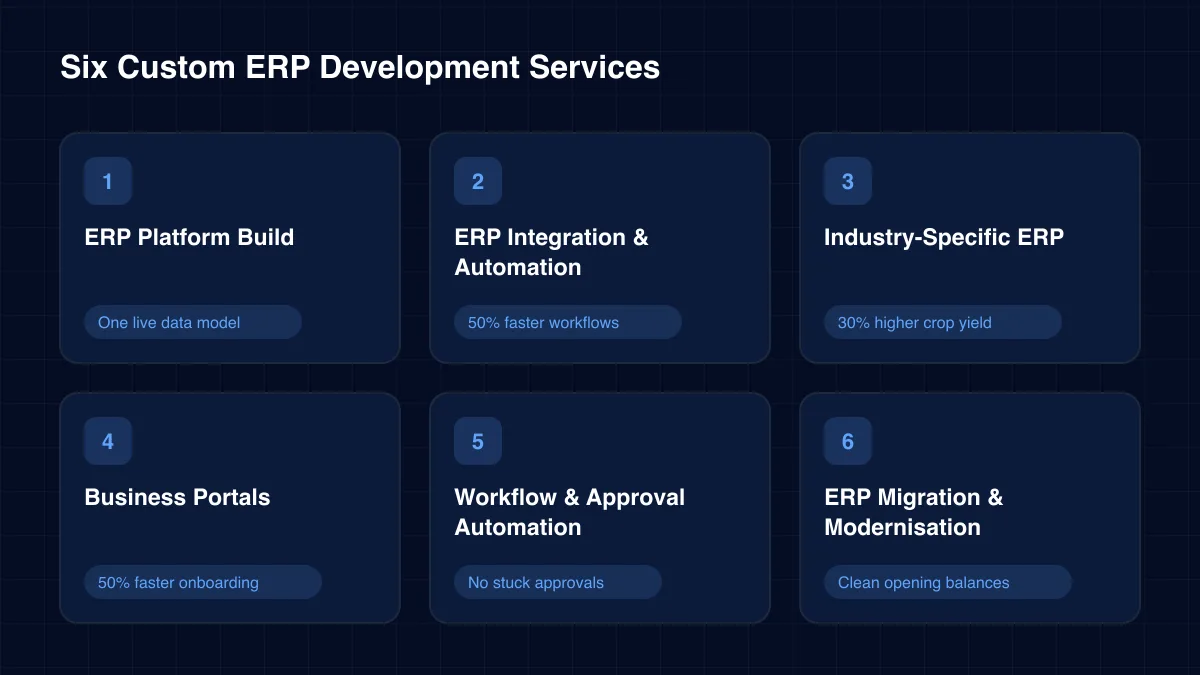
Custom ERP development of a full suite or a focused core, with finance, sales, inventory and operations sharing one database and one set of rules.
One live data model
Two-way sync between ERP, retail and back-office systems. Our retail ERP integration automation removed duplicate entry across stores and head office.
50% faster workflows →ERP modules for specialised operations. Our smart farm ERP replaced manual logbooks with real-time crop, labour and input tracking.
30% higher crop yield →Self-service portals for employees, customers, vendors and partners. ICANIO's internal employee portal brings HR, finance and project data into one place.
50% faster onboarding →Rule-based approvals for purchases, contracts, expenses and discounts. Our contract lifecycle system removed approval bottlenecks for a global manufacturer.
No stuck approvals →Move from spreadsheets, an outgrown ERP or several legacy tools. We map, clean and rehearse data loads, then cut over by site or module.
Clean opening balances
Modules
Custom ERP development usually starts with a few modules and grows. These are the modules we deliver, grouped by the team that uses them. Pick any combination.
Ledgers, billing and compliance that close the books faster.
From first contact to repeat orders, in one pipeline.
Stock, purchasing and warehouses with live quantities.
Plan, build and check products on the shop floor.
Deliver projects and field work on time and on budget.
The full employee lifecycle in one place.
Win and keep customers from the same platform.
Collaborate, approve and report without leaving the ERP.
Architecture
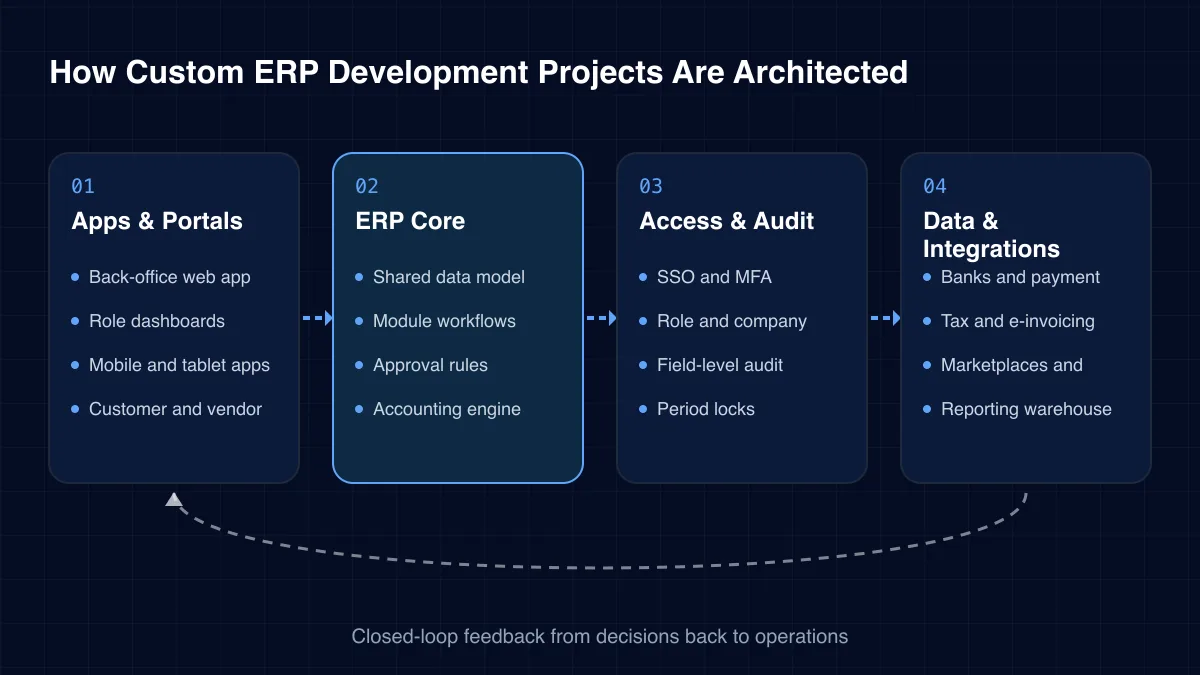
An ERP has many modules, many roles and data that must always balance. Our four-layer pattern keeps modules independent while they share one trusted core.
01
02
03
04
Challenges we solve
Most ERP projects start when growth exposes the limits of the current tools. These are the signs we see most often.
Sales, stock and finance each keep their own figures. Month-end becomes a week of reconciliation.
Planning, pricing and approvals live in files on laptops. One wrong formula reaches customers and auditors.
The packaged system cannot handle a second company, a new warehouse or your pricing rules without costly workarounds.
Per-user fees mean only managers get access. Shop floor and field data never reaches the system.
Purchases, discounts and contracts move by email. Nobody knows who holds a request or why it is late.
Customers and vendors phone for order status and statements because there is no portal to check themselves.
Industries
The core of an ERP is similar everywhere. Custom ERP development adds the rules, documents and workflows each industry needs on top.
Bills of materials, work orders, quality checks, maintenance and costing for discrete and process manufacturers.
See our manufacturing work →Multi-warehouse stock, price lists, credit limits, dropshipping and route-based delivery for distributors and traders.
Point of sale, online store, loyalty and stock synced across stores, warehouses and marketplaces.
See our retail & e-commerce work →Clinic, pharmacy and laboratory operations with inventory, billing and sample tracking.
See our healthcare & labs work →Admissions, fees, staff, timetables and student portals for schools, colleges and training providers.
See our education work →Fleet, trips, freight billing and warehouse operations with driver and customer apps.
See our logistics & transportation work →Client onboarding, fee billing, document workflows and reporting for advisory and wealth firms.
See our financial services work →Project costing, subcontractors, property leases, rent collection and maintenance requests.
Projects, timesheets, resource planning and billing for agencies, consultancies and IT firms.
Restaurant point of sale, kitchen workflows, recipes and purchasing across outlets.
Crop cycles, labour, inputs and traceability from farm to buyer, often offline-first.
Members, donations, events, volunteers and grant accounting in one platform.
Custom ERP development projects differ mostly by how much they replace. Each type needs a different plan for data migration and rollout.
Before committing to custom ERP development, compare it honestly with the two options most teams already use.
| Criterion | Spreadsheets | Packaged ERP | Custom ERP |
|---|---|---|---|
| Fits your own processes | Partial | Partial | ✓ Yes |
| Single source of truth | No | ✓ Yes | ✓ Yes |
| Per-user licence fees | No | ✓ Yes | No |
| Industry-specific workflows | No | Partial | ✓ Yes |
| Best for | Very small teams | Standard processes | Distinctive or growing operations |
An ERP built around your operations changes how decisions are made, not just how reports look.
Delivery
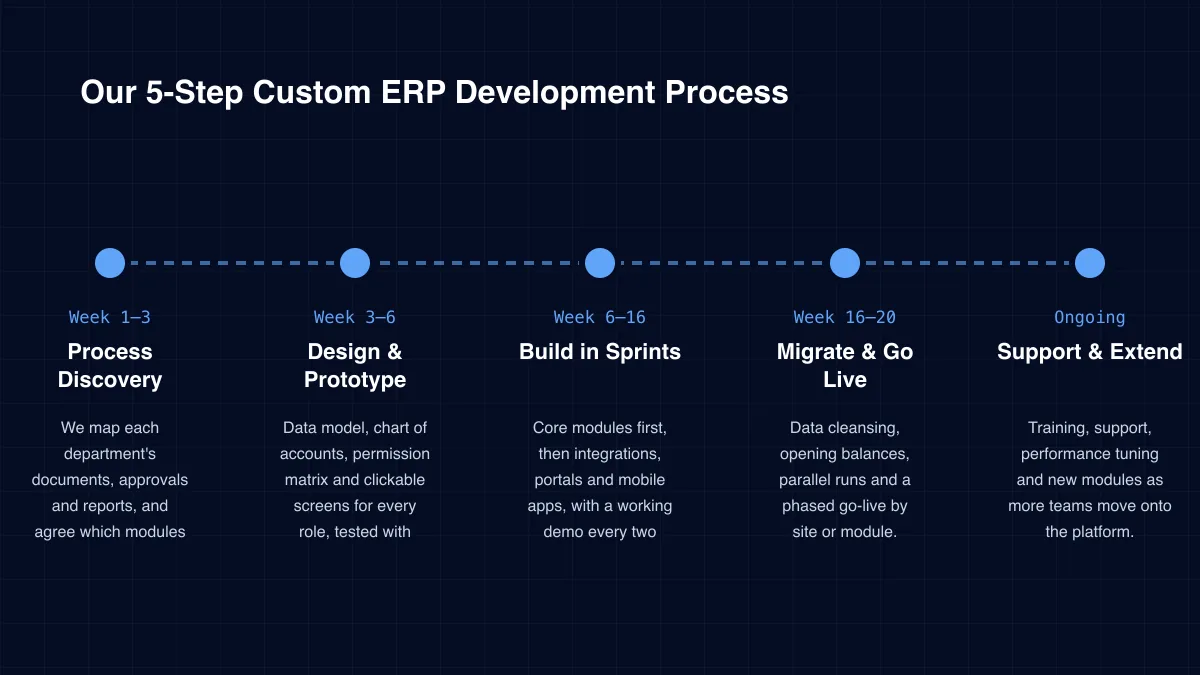
Week 1–3
We map each department's documents, approvals and reports, and agree which modules come first.
Week 3–6
Data model, chart of accounts, permission matrix and clickable screens for every role, tested with real users.
Week 6–16
Core modules first, then integrations, portals and mobile apps, with a working demo every two weeks.
Week 16–20
Data cleansing, opening balances, parallel runs and a phased go-live by site or module.
Ongoing
Training, support, performance tuning and new modules as more teams move onto the platform.
Case study
A retail business ran its front office and back office on separate systems that did not talk to each other. Staff re-keyed data, legacy packages slowed the database and reports lagged behind the stores. ICANIO upgraded the legacy packages, tuned database performance and exposed structured services for real-time sync. The result was 50% faster workflows, 40% less manual effort and three times better data accuracy.
Read the full case study →Package upgrades · DB tuning
Outdated packages were upgraded and slow queries optimised before any new integration was built.
APIs between ERP and retail systems
Documented services replaced manual exports, so each record is created once and shared.
Event-driven data sync
Front-office and back-office data now update together, so reports match what happens in stores.
Specialist services within our mobile & web application development practice.
A good partner will question whether you need custom software at all. We recommend checking these five things.
Custom ERP development only pays off when teams trust the numbers and use the system every day. Our team designs for that outcome first.
An ERP holds financial, customer and employee data, so access control sits at the core of the design. We apply role, company and record-level permissions, SSO with MFA, encryption in transit and at rest, and a field-level audit trail on sensitive records.
Period locks, approval logs and segregation of duties support audits and statutory reporting. ICANIO delivers under ISO 9001 and ISO 27001 certified processes, and you keep ownership of the data, the code and the cloud accounts.
Start with time and errors. Measure how long month-end close takes, how often stock counts differ from the system and how many hours staff spend re-keying data. Add the licence fees for every product the new platform replaces.
After go-live, track close time, order cycle time, stock accuracy and approval delays. Our case studies show the scale of change possible: faster workflows, less manual effort and better data accuracy. Once the data is clean, forecasting and AI assistants can be added on top.
Technology stack
Our custom ERP development stack uses proven, well-supported technology, so your ERP stays maintainable and secure for years.
Web Apps
Mobile
Offline sync
Backend
Data
Integration
REST APIsWebhooksMessage queuesEDI
Cloud & Identity
MFA
Custom ERP development wins when your workflows are distinctive, when many staff need access or when several legacy systems must be consolidated. For standard processes and a small team, a packaged ERP is usually cheaper.
A first release with core modules, such as sales, inventory and invoicing, usually takes four to five months. Further modules, portals and integrations follow in phases of six to ten weeks.
We build finance and accounting, sales and CRM, purchasing and inventory, manufacturing, projects and field service, HR and payroll, marketing, websites and portals. You can start with a few and add the rest later.
Yes. We clean and map master data, load opening balances, rehearse the migration on staging and run old and new systems in parallel before cutover.
Yes. We integrate banks, payment gateways, tax and e-invoicing portals, marketplaces, logistics partners, payroll and legacy systems through documented APIs.
You do. The source code, data and cloud accounts belong to you. Our team can hand over fully or stay on to support and extend the platform.
How we deliver custom erp development and the wider app development practice in each sector.
An ERP only works when every team trusts its numbers. That trust comes from one data model, workflows that match the business and data entered once at the source.
Custom ERP development gives mid-size companies and enterprises that fit, plus full ownership of the code and data. Whether you manufacture, distribute, retail or deliver services, ICANIO can scope a first release that proves value fast. Contact us to start with a process discovery session.
By ICANIO Application Engineering Team · Published · Updated
Book a free 30-minute call. We will map your departments, documents and approvals, then outline a first ERP release your teams will actually use.
Contact Our ERP Team