Visual Quality Inspection
Computer vision solutions that spot scratches, cracks, missing parts and misalignment on production lines. They are a core of AI in manufacturing.
Every part checked →Data & AI · Computer Vision
ICANIO trains image and video models that inspect parts, count stock, track movement and read documents. They run on cameras, phones or cloud GPUs and send results straight into your workflow.
Line 2 camera, cast housing #8812
Capture
Detect
Segment
Decide
⟳ Model running…
Computer vision solutions give software a pair of eyes that never tire. They check every part on a line, every shelf in a store and every frame of a video feed. People then spend their time on the cases that need judgement, not on staring at screens.
Our team builds the whole system, not just the model. We plan camera placement and lighting, collect and label images, train detection and segmentation models, then deploy them on edge devices or cloud GPUs. Results flow into MES, ERP, WMS or mobile apps as tasks and alerts.
This page explains the main vision tasks, how we deliver them, common pitfalls and how to judge a partner. It includes a real ICANIO build that uses YOLO detection and OCR to track players across live game footage.
Computer vision solutions are software systems that extract useful information from images and video. They classify what is in a picture, detect and locate objects, outline exact shapes, track movement over time and read text.
Modern systems rely on deep learning. Convolutional networks and vision transformers learn visual patterns from labelled examples, such as thousands of photos of good and faulty welds. Once trained, they process each frame in milliseconds.
The model is only part of the job. Lighting, lens choice, frame rate, labelling quality and how results reach operators decide whether a project works on a real site. We engineer all of it together.
Working definition
“Computer vision solutions are end-to-end systems of cameras, trained image models and integrations that turn visual data into reliable decisions, alerts or records inside a business workflow.”
Foundations
Consistent lighting, angle and resolution beat a bigger model. We fix the image before we tune the network.
Clear labelling guides, expert review and agreement checks. Noisy labels cap accuracy no matter the architecture.
Compact models for edge cameras, larger ones in the cloud. Latency and hardware budgets shape the choice.
Low-confidence cases go to a reviewer, and their decisions become new training data.
Core capabilities
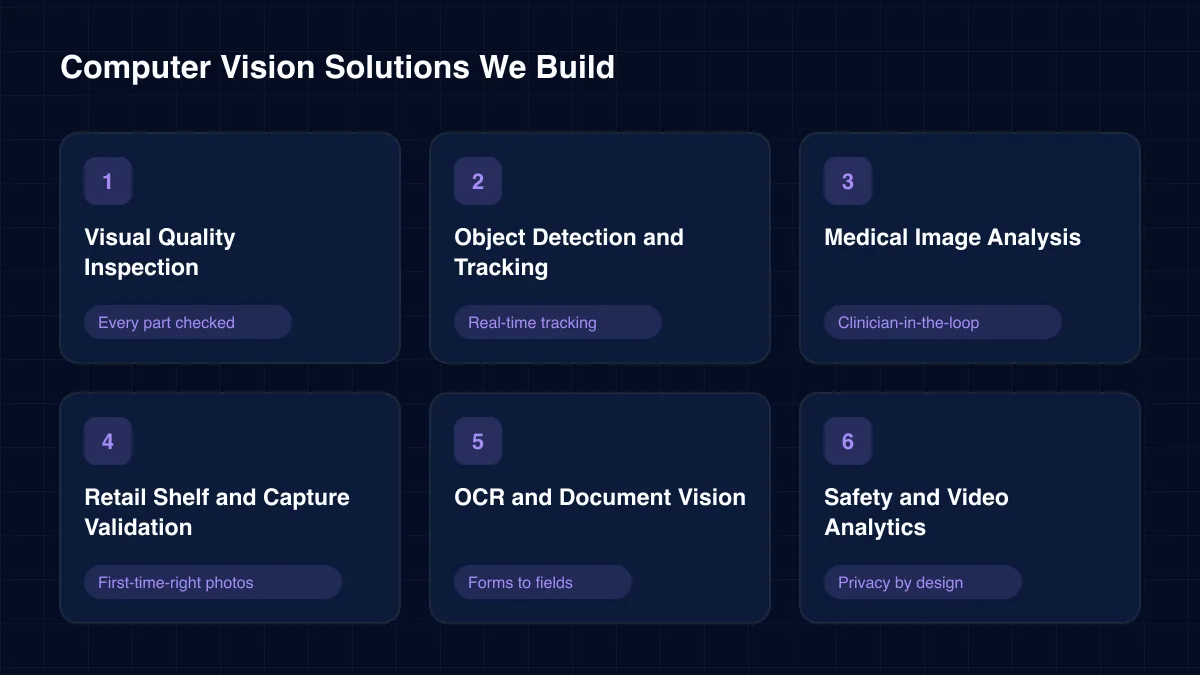
Our computer vision solutions cover six task families. Many projects combine two, such as detection plus OCR or tracking plus classification.
Computer vision solutions that spot scratches, cracks, missing parts and misalignment on production lines. They are a core of AI in manufacturing.
Every part checked →YOLO-family detectors with multi-object tracking for people, vehicles, pallets or players. Our sports build cut manual video review by 70%.
Real-time tracking →Deep learning that flags abnormalities in scans for clinician review. Our diagnostic system made image analysis 60% faster and triage three times quicker.
Clinician-in-the-loop →On-device checks for tilt, blur and overlap, plus shelf gap and planogram detection. Field teams capture usable photos on the first try.
First-time-right photos →Text and layout extraction from forms, labels, invoices and records. Our record digitisation work cut manual data entry by 60%.
Forms to fields →PPE detection, restricted-zone alerts and occupancy counts on existing CCTV. These computer vision solutions are designed for privacy, with no face identification by default.
Privacy by design
Architecture
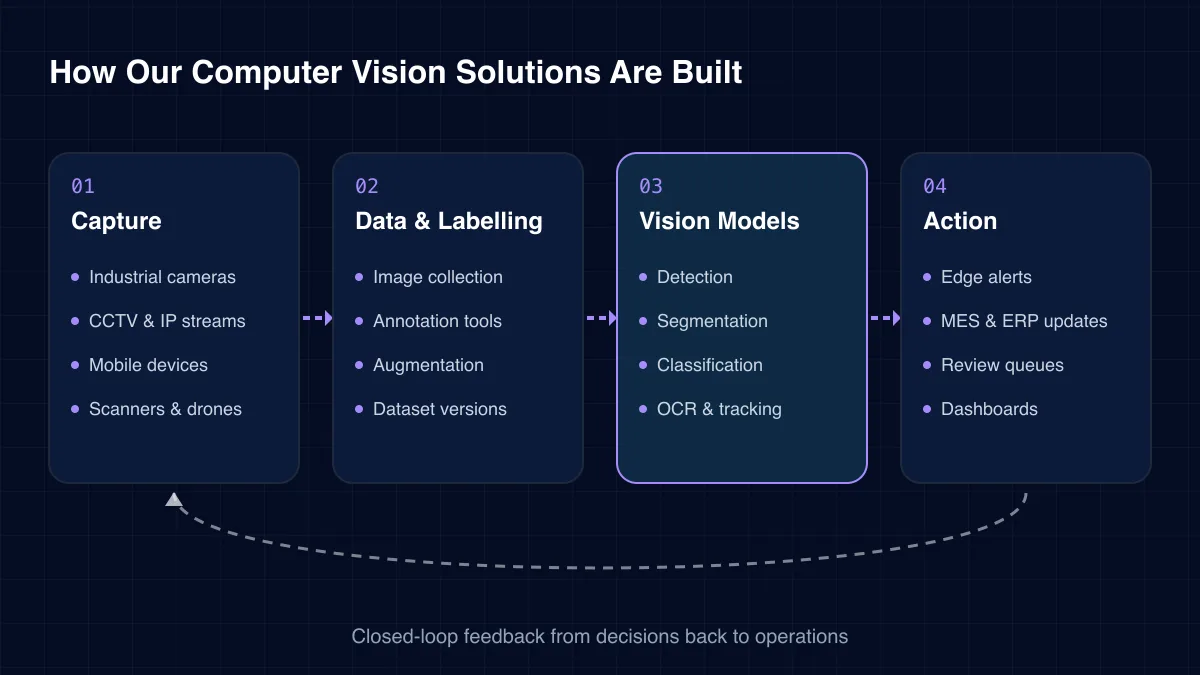
Every deployment follows four layers. Pixels are captured at the edge, models interpret them, and results become actions in business systems.
01
02
03
04
Challenges we solve
Most buyers come to us with a visual task that is slow, tiring or inconsistent when done by people.
Attention fades after hours of repetitive checks. A model applies the same standard on the first part and the ten-thousandth.
Analysts tag video frame by frame, or not at all. Automatic detection and tracking turn footage into searchable data.
Blurry or tilted images reach the back office days later. On-device checks reject them while staff are still on site.
Forms, labels and records are typed in by hand. OCR with layout understanding fills fields automatically.
Supervisors cannot watch every zone. Video analytics flag missing PPE or unsafe distances as they happen.
A model trained on lab images breaks under real lighting. We collect data on the actual line, store or ward from day one.
Computer vision solutions are built from four core task types. Choosing the right one keeps labelling cost and latency in check.
Where the model runs affects speed, cost and privacy. We recommend deciding early, because it shapes model size and camera choice.
| Criterion | Edge device | Cloud GPU | Hybrid |
|---|---|---|---|
| Latency | Milliseconds | Seconds | Milliseconds |
| Works offline | ✓ Yes | No | Partial |
| Video leaves site | No | ✓ Yes | Partial |
| Model size limit | Small | Large | Mixed |
| Best for | Lines, safety | Batch, medical | Multi-site fleets |
Vision projects pay off where visual checks are frequent, costly or risky.
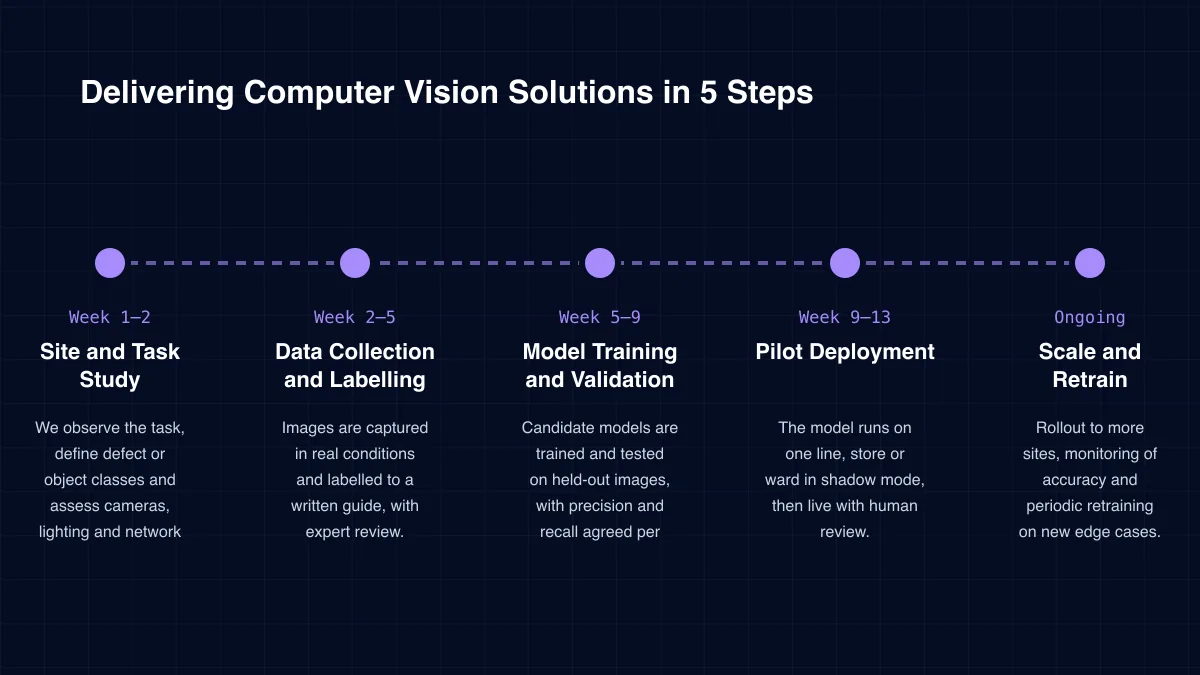
Delivery
Week 1–2
We observe the task, define defect or object classes and assess cameras, lighting and network on site.
Week 2–5
Images are captured in real conditions and labelled to a written guide, with expert review.
Week 5–9
Candidate models are trained and tested on held-out images, with precision and recall agreed per class.
Week 9–13
The model runs on one line, store or ward in shadow mode, then live with human review.
Ongoing
Rollout to more sites, monitoring of accuracy and periodic retraining on new edge cases.
Case study
Coaching analysts tagged game video frame by frame, so most insight stayed locked in raw footage. ICANIO built a computer vision pipeline with a YOLO detection engine, a jersey OCR identity engine and KMeans team classification by kit colour. Manual video review time fell by 70%, and player and jersey recognition reached 90% accuracy.
“Manual video tagging was treated as an unavoidable cost of coaching, not a solvable vision problem.”Read the full case study →
YOLO
Finds and tracks players across every frame of raw footage.
Jersey OCR
Keeps each player's identity through occlusion, overlap and fast movement.
KMeans clustering
Separates squads by kit colour with no manual roster setup.
Specialist services within our data & artificial intelligence practice.
Vision demos look impressive on curated images. We recommend checking five things before you commit.
Our computer vision solutions include site surveys and integration in every engagement, because most vision failures start with capture or hand-off, not with the model.
ICANIO works under ISO 9001 and ISO 27001 certified processes. Video can be processed entirely on edge devices, so raw footage never leaves the site.
When people appear in frame, we minimise what is kept. Detection events store cropped or blurred images, and retention periods are set with your data protection lead. We do not build face recognition unless there is a clear lawful basis.
Medical imaging tools are designed as decision support. A clinician reviews every flagged case, and models are documented with their known limits and validation data.
Count the visual checks done today and what each costs in labour. Add the cost of misses, such as scrap, returns, rework or incidents. Together they set the value ceiling.
Pilot results then provide hard numbers: defects caught, false alarms, review time saved and throughput. We run the pilot beside the current process so the comparison is fair.
Hardware and compute are the main running costs. Compact models on low-cost edge devices often beat cloud GPUs for always-on video. That keeps computer vision solutions affordable across many lines or stores.
Technology stack
We select computer vision solutions tooling based on accuracy targets, hardware and deployment site.
Models
YOLO (Ultralytics)Detectron2Segment AnythingVision transformers
Frameworks
Labelling
CVATLabel StudioRoboflowActive learning
OCR
TesseractPaddleOCR
Edge Runtime
TensorRTOpenVINO
Video & Ops
GStreamer
Computer vision solutions excel at frequent, visual and rule-based checks. Examples include defect inspection, counting, safety monitoring, shelf audits and reading labels or forms. Tasks needing deep context still need a person.
It depends on the task and variety. A focused defect class may need a few hundred good examples to start. Transfer learning from pre-trained models cuts the requirement sharply, and we add more images as the pilot runs.
Often yes, especially for safety and counting on CCTV. Fine inspection usually needs industrial cameras and controlled lighting. We assess your current setup during the site study.
Both are possible. Edge devices suit real-time lines and privacy-sensitive video. Cloud GPUs suit batch work such as medical images or document backlogs. Many clients use a hybrid.
Accuracy is set per task and measured on your own images. We agree precision and recall targets for each class, and route uncertain cases to people. Our sports build reached 90% player and jersey recognition accuracy.
Manufacturing uses our computer vision solutions for inspection, retail for shelf audits, healthcare for image triage, logistics for parcel and dock monitoring, and sports for player tracking.
How we deliver computer vision solutions and the wider data & ai practice in each sector.
Cameras are everywhere, yet most visual data goes unused. Computer vision solutions change that by turning pixels into checks, counts and alerts that people can act on.
ICANIO handles the full chain, from camera placement to model training to system integration. Contact us to assess a visual task and plan computer vision solutions that work on your real site.
By ICANIO Data & AI Engineering Team · Published · Updated
Book a free 30-minute discovery call. We will review your visual task, cameras and data, then outline a pilot with clear accuracy targets.
Contact Our Computer Vision Team