
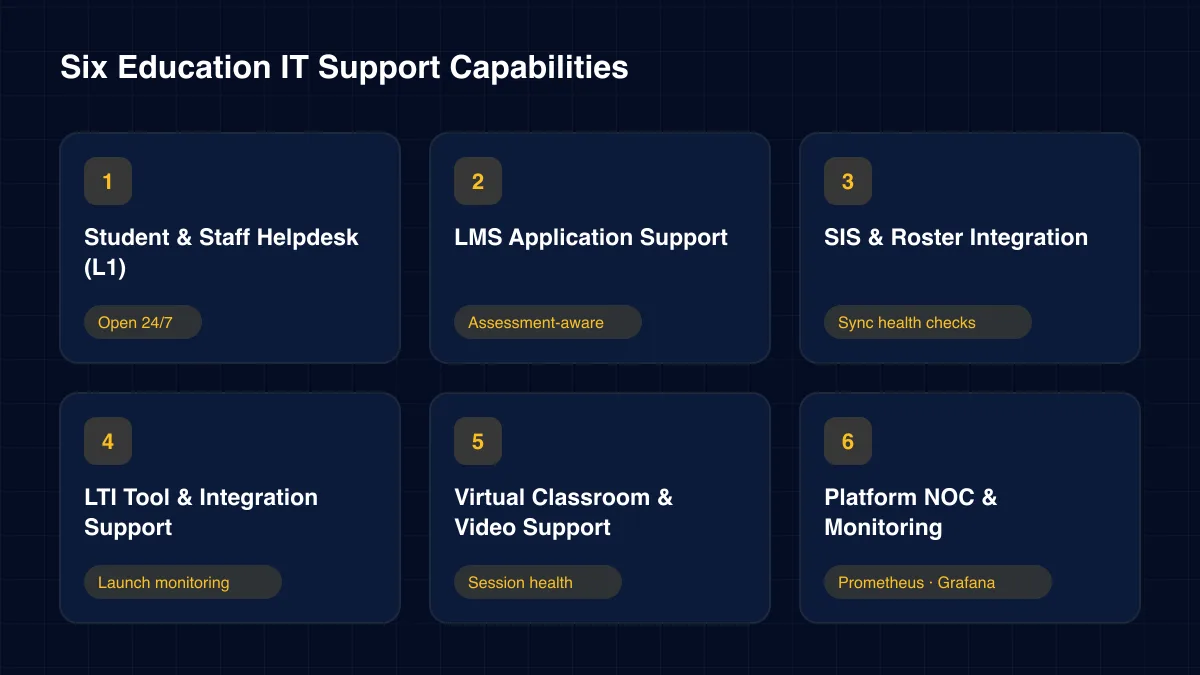
Student & Staff Helpdesk (L1)
Our L1 desk handles password resets, SSO problems, course access, device setup and campus Wi-Fi. This is education IT support that students actually meet, so it runs late into the night.
Open 24/7
Support Engineering · Education
A 24/7 team for the systems teaching runs on: the LMS, student information system, LTI tools, single sign-on, proctoring, virtual classrooms and campus networks.
128
Resolved today
100%
Within SLA
24/7
On shift
An LMS that slows down during a timed exam does real harm. Students lose answers, staff lose trust, and the complaints land on the dean's desk. Education IT support is the team that keeps that exam running.
Our team runs education IT support as a 24/7, tiered service for universities, schools, training providers and edtech companies. L1 engineers help students and staff with logins, devices and course access. L2 engineers own the LMS, student information system and LTI tool integrations. L3 engineers handle databases, cloud platforms and performance at term start and exam time.
Below we explain what that service covers, the failures it prevents, how student data is protected, and how to choose a partner that understands the academic calendar.
Education IT support is the ongoing operation of the systems that teaching, learning and administration depend on. The centre is usually a learning management system and a student information system. Around them sit identity, video, proctoring, library, assessment and communication tools.
Most of these are joined by standards such as LTI, which lets outside tools launch inside the LMS. That makes the estate flexible, but it also creates many small failure points. A single expired key can break a tool for every course that uses it.
Demand is uneven. Enrolment weeks, term start and exam periods create sharp peaks, while holidays are quiet. Education IT support has to scale up for the peaks and use the quiet weeks for upgrades.
The audience is also unusual. Users range from first-year students to professors, parents and administrators. Many are not technical, and many are using their own devices. Support has to be patient, clear and available when they are actually studying.
Working definition
“Education IT support is a tiered, always-on service that monitors, maintains and restores learning, student record and campus systems, with priorities set by teaching impact and capacity planned around the academic calendar.”
Foundations
A failing exam submission outranks a slow staff report. Priority follows what a delay means for learners.
Change freezes cover exams and term start. Upgrades are scheduled for quiet weeks.
Grade syncs, roster feeds and LTI launches are monitored, because that is where most faults start.
Students and teachers get short, friendly answers. Nobody needs to know what SAML means to get back in.
Core capabilities
Each capability covers a point where a system failure interrupts teaching, assessment or student services.
Our L1 desk handles password resets, SSO problems, course access, device setup and campus Wi-Fi. This is education IT support that students actually meet, so it runs late into the night.
Open 24/7
L2 engineers maintain the LMS, from course templates and enrolments to quiz engines and gradebooks. Performance is watched closely before and during assessment windows.
Assessment-aware
Roster feeds and grade syncs between the SIS and LMS are monitored end to end. Failed records are fixed and resent before a student's enrolment or grade goes missing.
Sync health checks
We keep third-party learning tools launching cleanly. Education IT support here means tracking keys, certificates and tool versions across every course that relies on them.
Launch monitoring
We support lecture capture, video platforms and online proctoring. Recordings that fail to upload and sessions that drop are triaged quickly so no class is lost.
Session health
A NOC watches cloud platforms, databases and campus networks with tuned alerting. We built this kind of Prometheus and Grafana stack for an enterprise partner, reaching 99.9% uptime.
Prometheus · Grafana →Architecture
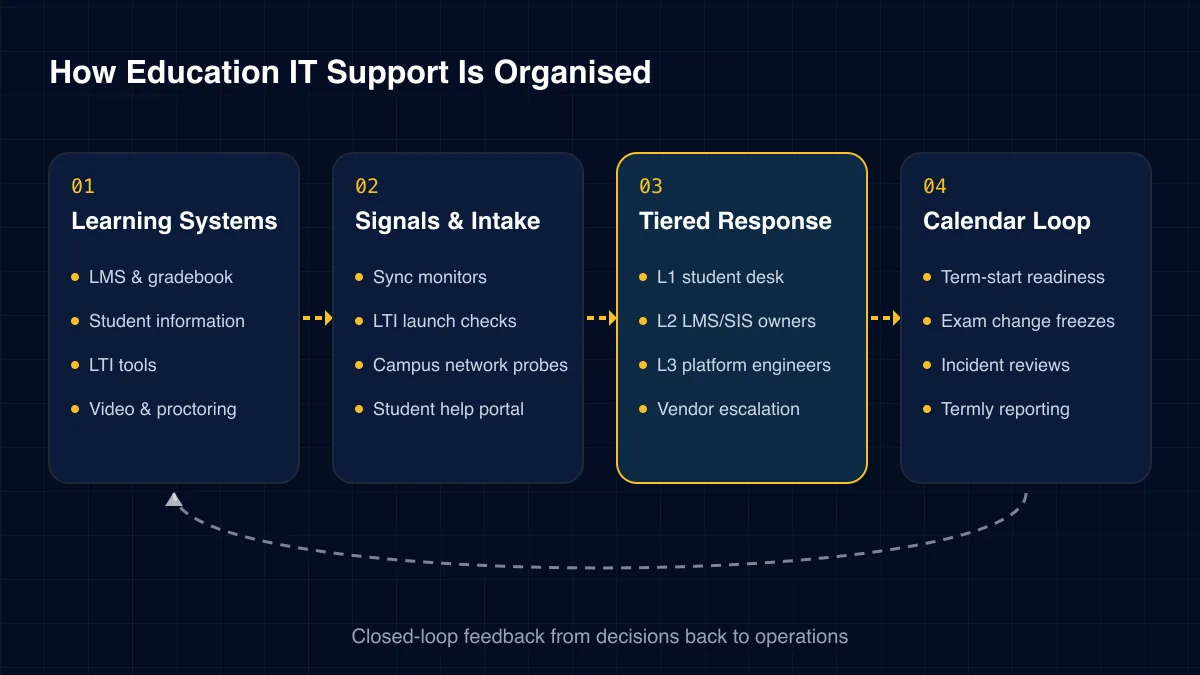
Our education IT support model has four layers. Signals come from learning and campus systems. Tiered engineers resolve them, and a calendar loop keeps the next peak in view.
01
02
03
04
Challenges we solve
Education systems tend to fail at the worst times. These are the patterns we see across institutions and edtech platforms.
Thousands of students submit at once and the quiz engine slows. Some answers are lost, and appeals follow.
A grade sync fails quietly. Students see blank results, and staff spend days reconciling by hand.
An LTI key expires over a weekend. On Monday, a tool used in dozens of courses will not open.
New students all try to sign in during the same week. Identity systems strain and the helpdesk queue explodes.
Online and international students study late. A desk that closes at five leaves them stuck until morning.
A platform update lands mid-term and changes a workflow teachers rely on. Classes are disrupted and trust drops.
Institutions and edtech vendors need different mixes. Education IT support usually starts in one of four ways.
This table compares specialist education IT support with a general provider and an internal team on its own.
| Capability | Generic MSP | In-house only | ICANIO campus support |
|---|---|---|---|
| 24/7 student coverage | Partial | Rarely | ✓ Yes |
| LMS and SIS skills | No | ✓ Yes | ✓ Yes |
| LTI launch monitoring | No | Partial | ✓ Yes |
| Exam-period freezes | Partial | ✓ Yes | ✓ Yes |
| Term-start surge plans | No | Partial | ✓ Yes |
The value of education IT support shows up in calmer exam weeks, fewer lost grades and happier students.
Delivery
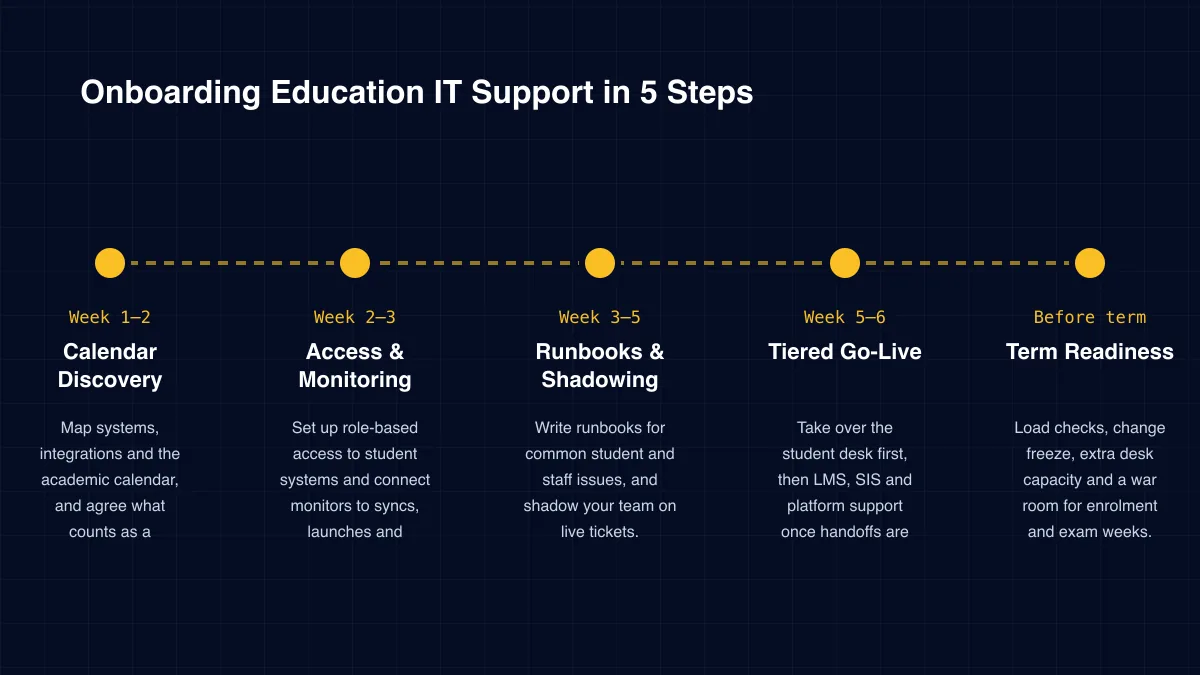
Week 1–2
Map systems, integrations and the academic calendar, and agree what counts as a teaching-impact incident.
Week 2–3
Set up role-based access to student systems and connect monitors to syncs, launches and platforms.
Week 3–5
Write runbooks for common student and staff issues, and shadow your team on live tickets.
Week 5–6
Take over the student desk first, then LMS, SIS and platform support once handoffs are proven.
Before term
Load checks, change freeze, extra desk capacity and a war room for enrolment and exam weeks.
Education needs a partner who understands terms, exams and students. We recommend checking five points.
The first point decides most outcomes. Education IT support that ignores the academic calendar will always meet its peaks unprepared.
ICANIO runs support under ISO 9001 and ISO 27001 certified processes. Access to student systems is role-based, logged and reviewed each term.
In the United States, FERPA protects the privacy of student education records. Our education IT support is designed to fit inside your FERPA obligations. Engineers see only the records a ticket requires, and every access is logged for your records office.
Our SOC watches identity systems and endpoints for account takeover, unusual logins and phishing follow-ups. These are common threats to schools and universities, especially at term start.
When an account looks compromised, we lock it and notify the owner through a known channel. For staff accounts with wide access, we also alert your security lead. The aim is fast containment without locking a class out of its course.
Start with the incidents that hurt most: exams disrupted, grades delayed, tools that would not open. Count how many hit last year and how many staff hours each one consumed.
Add after-hours tickets that waited until morning, and internal IT time spent on routine requests instead of projects. Those are the baselines for education IT support. We agree them with you during discovery and report against them every term.
Some returns are harder to price. Teachers stop building workarounds for tools that fail. Students stop emailing lecturers about login problems. The IT team gets its evenings back. We note these in each termly review, so leadership sees more than ticket counts.
Technology stack
Our education IT support team works with the platforms you already run. These are the most common groups.
Learning
BlackboardGradebooks
Student Records
Student information systemsAdmissionsTimetablingRoster feeds
Integration
LTI 1.3 toolsGrade passbackAPIsSingle sign-on
Classroom
Video platformsLecture captureOnline proctoringCampus devices
Monitoring
AlertmanagerSynthetic checks
Security
MFAEndpoint protectionEmail securityAccess logging
 Free white paper · Support EngineeringSupport EngineeringEnsuring Operational Excellence and Business Continuity Through Proactive, Intelligent OperationsGet the white paper →
 Free white paper · EducationEducation & E-LearningDigital Transformation Solutions for the Global EdTech LandscapeGet the white paper →
Education IT support covers the LMS, student information system, LTI tools, identity and single sign-on, video and proctoring platforms, campus networks and devices. It also includes the cloud infrastructure and security monitoring behind them.
Yes. Our desk runs 24/7, which matters for online and international learners. Urgent issues during exams page an L2 or L3 engineer straight away.
We agree the exam calendar with you and freeze changes during assessment windows. Before each window we check LMS capacity and review recent incidents. During it, engineers watch submission performance live.
FERPA compliance belongs to your institution. Our education IT support is designed to fit inside it, with role-based access to student records, full logging and clear rules on data use.
Yes. Edtech vendors use our team as their product support desk. We handle L1 for their customers, L2 for configuration and integrations, and L3 for the platform.
Most institutions reach full coverage in about six weeks. We plan go-live away from exams and term start, so the handover happens in a calm period.
Learning now depends on a web of connected platforms. Education IT support keeps that web working, from a midnight password reset to a timed exam for thousands of students.
ICANIO delivers education IT support as a 24/7, L1–L3 service under ISO 27001 certified processes. We plan with your academic calendar, watch the integrations that break most often, and protect student records in every ticket. To talk about your next term, contact our team.
By ICANIO Support Engineering Team · Published · Updated
Book a free discovery call. We will map your learning systems and calendar, review last term's incidents, and propose a support model with clear response targets.
Contact Our Support Team


