Performance Tuning
We profile slow queries, read execution plans and fix indexes and statistics. In our database administration services, every tuning change is measured before and after.
Faster queries
Database Administration Services
Expert DBAs who tune slow queries, test every backup, plan safe upgrades and lock down access. Your data stays fast, safe and recoverable.
128
Resolved today
100%
Within SLA
24/7
On shift
Database administration services keep your most valuable asset, your data, fast, safe and recoverable. A skilled DBA team tunes performance, runs and tests backups, plans upgrades and controls who can see what. When the database is healthy, every application on top of it feels faster.
Many teams run production databases without a dedicated DBA. Developers add indexes when things get slow and hope backups work. That holds until a disk fills at night, a query locks the order table or a restore is needed and fails.
This page explains how ICANIO delivers database administration services across relational, document and search engines. It covers tuning, backup and recovery, high availability, upgrades and security. It also shows how we moved a fintech firm's Elasticsearch cluster from v7.15 to v8.8.1 with zero data loss across 1000GB.
Database administration services are the ongoing work of running production databases well. They cover installation, configuration, performance, backup, recovery, replication, upgrades, security and capacity. The service can be fully remote, on-site or a mix.
Two numbers shape most DBA decisions. The recovery point objective, or RPO, says how much data you can afford to lose. The recovery time objective, or RTO, says how long you can be down. Backup design, replication and failover all follow from these targets.
Performance work is the other half. DBAs read execution plans, add or remove indexes, rewrite heavy queries and tune memory and connection settings. They also choose isolation levels with care, because the wrong choice causes blocking or inconsistent reads.
Good database administration services are proactive. They watch growth, replication lag, long-running queries and failed jobs every day, so problems are fixed long before users feel them.
Data shape also varies by industry. Fintech platforms need strict consistency and audit trails. Retail systems face sudden peaks during sales. Manufacturing and IoT workloads write huge volumes of time-stamped readings. Database administration services must fit the engine, schema and tuning to each pattern.
Working definition
“Database administration services are a managed, expert-led service that keeps production databases performant, available, recoverable and secure through tuning, tested backups, planned upgrades and access control.”
Foundations
Backups that match your RPO, and restores tested on a schedule, not on the worst day.
Queries, indexes and configuration tuned to real workload, not default settings.
Replication and failover designed and drilled to meet your RTO.
Least-privilege access, encryption and auditing on every production instance.
Core capabilities
Our database administration services cover the full life of a database, from first configuration to its next major version.
We profile slow queries, read execution plans and fix indexes and statistics. In our database administration services, every tuning change is measured before and after.
Faster queries
Full, incremental and log backups are scheduled to meet your RPO. We run restore drills, including point-in-time recovery, so the plan is proven.
Tested restores
Phased upgrades with full backups and planned windows. For a fintech firm we moved Elasticsearch from v7.15 to v8.8.1 with zero data loss across 1000GB.
Zero data loss →We design streaming replication, availability groups or replica sets, then drill failover. Database administration services must prove that the standby really takes over.
Drilled failover
Roles follow least privilege, connections use TLS, data at rest is encrypted and sensitive access is audited. Patching follows vendor advisories.
Least privilege
We track growth, lag, locks and slow queries daily and plan storage ahead of need. This work sits inside our wider support engineering services.
Daily health checks →Architecture
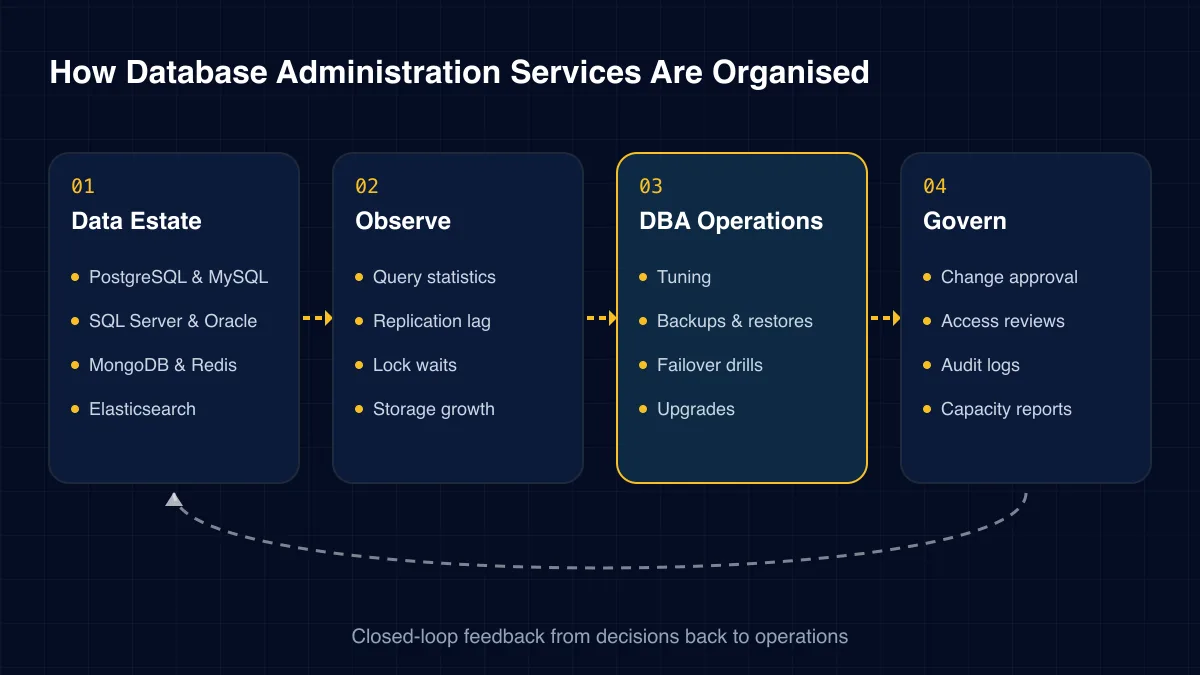
Our database administration services follow four layers. Engines are instrumented, health is watched, DBAs act on findings, and governance keeps changes controlled.
01
02
03
04
Challenges we solve
These issues hide until load rises or something fails. Each one is preventable with steady DBA care.
Jobs report success, yet nobody has tried a restore. The first real test happens during a crisis.
Data grows and plans change. Reports that took seconds now take minutes and lock other work.
Long transactions hold locks on busy tables. Checkouts and logins time out at peak hours.
The engine is several versions behind. Security fixes stop, and the upgrade gets harder every month.
Many people use one powerful login. Nobody can say who changed what, and audits fail.
A log or table grows faster than expected. The disk fills overnight and the database stops.
DBA work splits into four specialisms. Most estates need all of them at different times.
Here is how three common setups compare on the duties that protect data.
| Duty | Developers only | Single in-house DBA | Managed DBA service |
|---|---|---|---|
| Tested restore drills | No | Partial | ✓ Yes |
| 24/7 coverage | No | No | ✓ Yes |
| Multi-engine expertise | Partial | Partial | ✓ Yes |
| Planned upgrade path | No | ✓ Yes | ✓ Yes |
| Cover for leave | Partial | No | ✓ Yes |
Database health lifts every application that depends on it.
Delivery
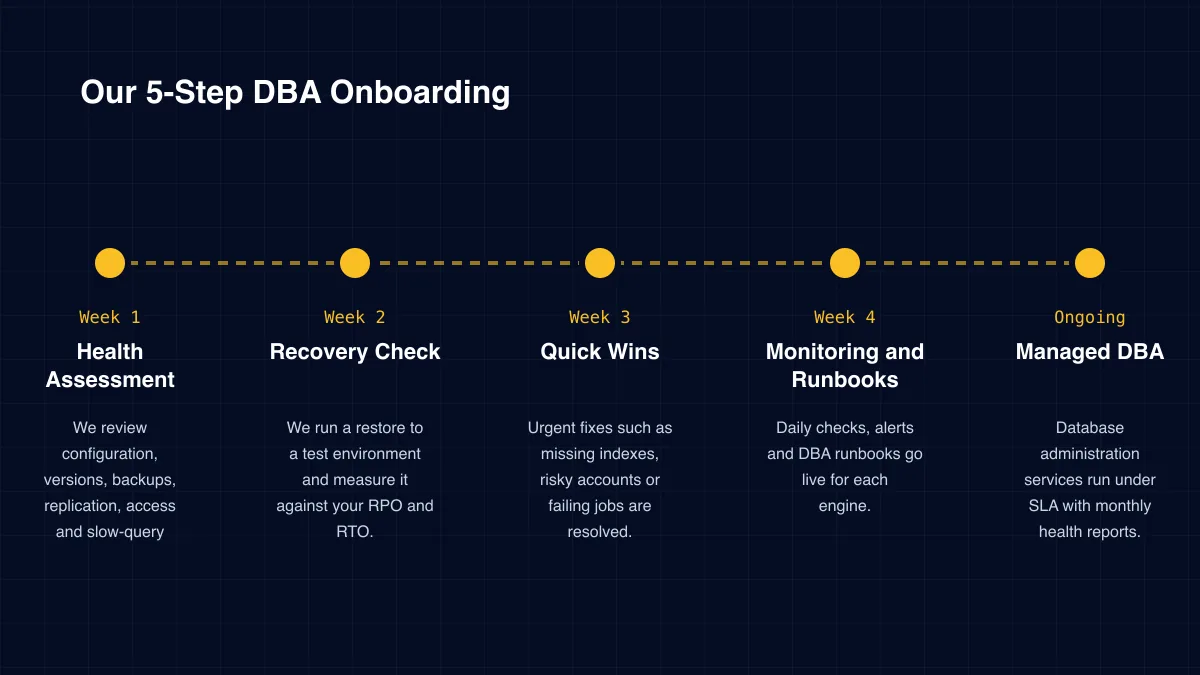
Week 1
We review configuration, versions, backups, replication, access and slow-query history.
Week 2
We run a restore to a test environment and measure it against your RPO and RTO.
Week 3
Urgent fixes such as missing indexes, risky accounts or failing jobs are resolved.
Week 4
Daily checks, alerts and DBA runbooks go live for each engine.
Ongoing
Database administration services run under SLA with monthly health reports.
Case study
A financial services firm ran an Elasticsearch v7.15 cluster nearing end of support, on ageing RHEL 7.0 hosts, with stale node metadata causing instability. ICANIO stabilised the cluster, backed up 1000GB of production data and upgraded in phases to v8.8.1, modernising Kibana and Logstash too. Work ran in planned maintenance windows. The result was zero data loss and a stable 3-node cluster.
Read the full case study →Node metadata reset
Communication issues were fixed before any version change.
1000GB full backup
A safe fallback existed before structural changes began.
v7.15 to v8.8.1
Intermediate steps replaced a single high-risk jump.
Specialist services within our technical support engineering practice.
Database mistakes are costly and sometimes permanent. We recommend checking five things.
The best database administration services are invisible to users. Queries stay fast and data stays safe. Our team works to keep it that way.
Databases hold the data attackers want. We apply least-privilege roles, remove default accounts, enforce TLS and enable encryption at rest. Sensitive tables get extra auditing.
ICANIO works under ISO 9001 and ISO 27001 certified processes. For regulated data we align with GDPR, HIPAA and PCI DSS controls, such as masking in non-production copies and logged access to cardholder or patient data.
Backups are protected as carefully as live data. They are encrypted, stored in a separate location and covered by the same access rules, because a stolen backup is still a breach.
Access reviews run on a fixed schedule. Leavers lose database access the same day, and service accounts are rotated. These routines sound simple, yet they are where many audits find gaps.
Start with risk. Estimate the cost of losing a day of data or being down for a day. Database administration services exist to make both events far less likely and far shorter.
Then track performance: p95 query time for key reports, lock waits, replication lag and failed jobs. These should improve within the first few months.
Report results in one monthly health summary. It should show restore drill outcomes, top slow queries fixed, storage forecasts and open risks. That summary lets leaders see what database administration services deliver, even in months when nothing goes wrong.
Include infrastructure savings. Tuned queries need less hardware, and right-sized cloud instances cost less. In some estates, those savings offset part of the service fee.
Technology stack
Our DBAs cover the engines most production systems run on, on-premise and in the cloud.
Relational
NoSQL & Search
Cassandra
Managed Cloud
Amazon RDS & AuroraCloud SQL
High Availability
PatroniAlways On AGsReplica sets
Backup
pgBackRestPercona XtraBackupNative snapshots
Monitoring
pg_stat_statementsQuery Store
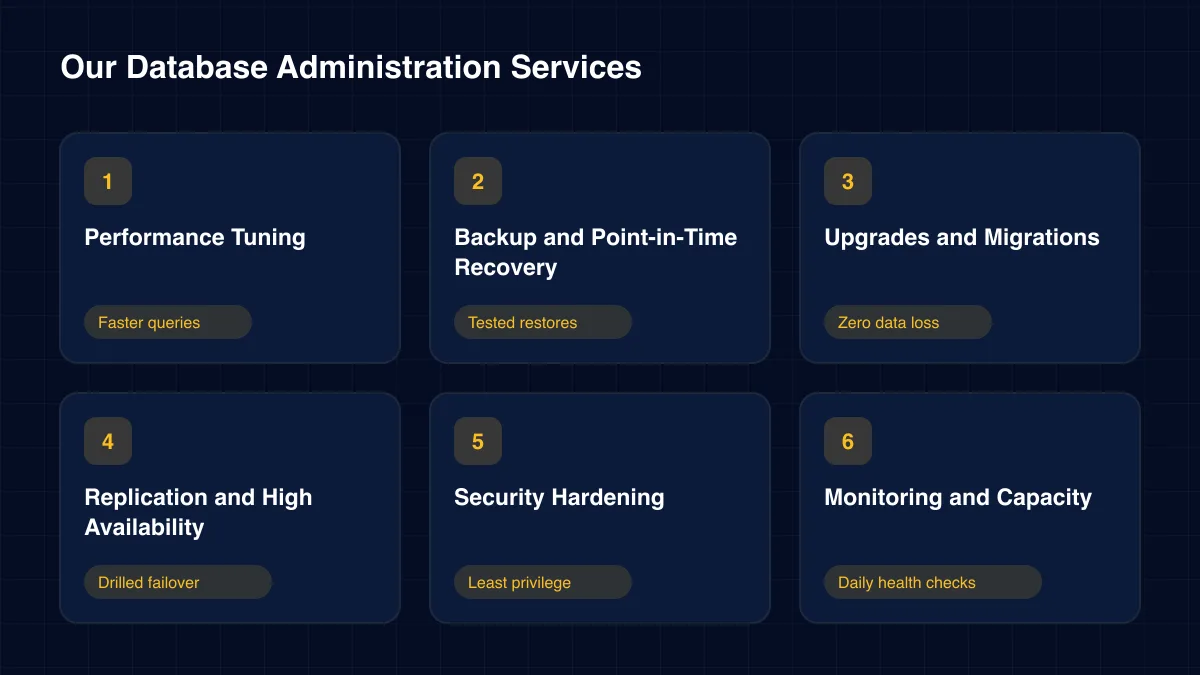
Our database administration services include performance tuning, backup and recovery, replication and failover, upgrades, security hardening, monitoring and capacity planning across your engines.
We support PostgreSQL, MySQL, MariaDB, SQL Server, Oracle, MongoDB, Redis and Elasticsearch, both self-hosted and on managed cloud platforms such as Amazon RDS and Azure SQL.
Yes. The provider handles hardware and some patching, but query tuning, schema design, access control, cost and restore testing remain your responsibility.
We restore backups to a separate environment on a schedule, check data integrity and record how long it took. That proves both your RPO and RTO.
Yes. Most of our DBA work is remote, using secure, audited access. On-site visits can be arranged for data centre work if needed.
We assess compatibility, take full backups, rehearse in a copy of production, then upgrade in phases during planned windows with a clear rollback path.
How we deliver database administration services and the wider support engineering practice in each sector.
Every application is only as reliable as the database beneath it. Database administration services give that layer the expert, daily care it needs.
ICANIO brings multi-engine DBA skills, tested recovery plans and careful upgrade practice. We support cloud and on-premise estates for fintech, healthcare, retail and manufacturing teams. Contact us for a database health assessment and see where database administration services could reduce your risk.
A first assessment often reveals quick wins, such as a missing index or an untested backup. Fixing those builds confidence for the bigger work that follows.
By ICANIO Support Engineering Team · Published · Updated
Book a free discovery call. We will review your engines, backups and slow queries, then share a prioritised DBA plan.
Contact Our DBA Team