SQL Server RCSI (Read Committed Snapshot Isolation) is one of the most valuable configuration changes for busy SQL Server applications. Most production databases run on Read Committed, the default isolation level. At low concurrency this works fine. As user volumes grow, a familiar set of symptoms appears. APIs slow down at peak hours. Read queries queue behind long-running updates. Dashboards time out under load.
The usual root cause is the shared locking built into standard Read Committed, where readers and writers compete for the same rows. Read Committed Snapshot removes this reader-writer contention, typically without application code changes. That makes it a high-value lever for teams running high-traffic systems.
ICANIO's Application Development and Data teams work on SQL Server concurrency design, blocking diagnostics, and database performance for enterprise applications. This guide explains how SQL Server RCSI works, what it costs in tempdb, how it compares with full Snapshot Isolation, and how to roll it out safely.
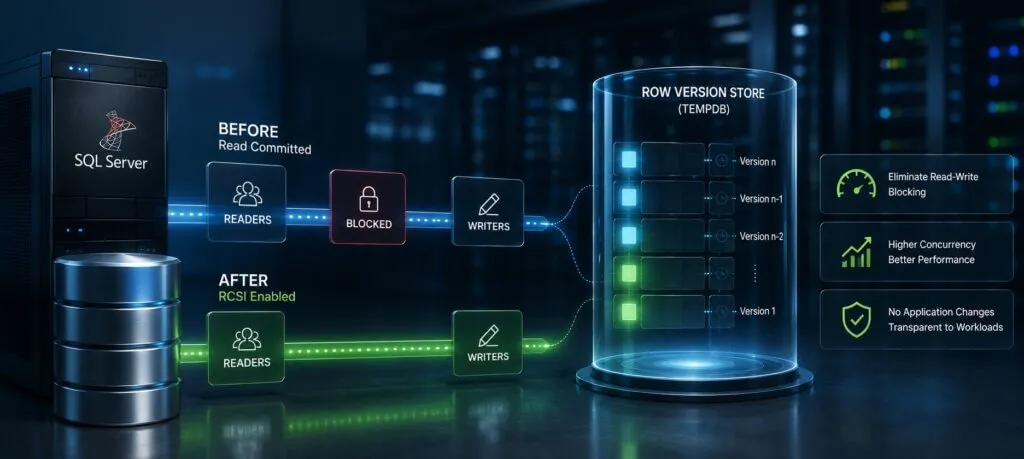
Key Takeaways
- Standard Read Committed uses shared locks, so readers and writers block each other under load.
- SQL Server RCSI reads the last committed row version instead, so readers and writers stop blocking each other.
- SQL Server row versioning stores old row versions in tempdb (or the user database with Accelerated Database Recovery), so monitor storage.
- RCSI gives statement-level consistency; full Snapshot Isolation gives transaction-level consistency but needs code changes.
- Diagnose SQL Server blocking first, then follow a 5-step rollout with testing and monitoring.
SQL Server Blocking: How Read Committed Creates Lock Contention
Standard Read Committed enforces isolation with locks. When a transaction reads data, SQL Server places a shared lock on the rows being read. When a transaction writes, it places an exclusive lock on the rows being changed. Shared and exclusive locks are incompatible. So in standard Read Committed, reads and writes block each other.
At low concurrency, this SQL Server blocking is rarely visible. Transactions finish quickly and locks are short-lived. At high concurrency, with long-running updates, it becomes a real operational problem.
A single long update holds exclusive locks that block every reader of those rows. The blocked readers queue up. Their lock waits appear in the application as slow API responses. The queue grows until the update commits and releases its locks. For high-traffic .NET applications, this is a common root cause of peak-load slowdowns that never appeared in development testing.
How SQL Server RCSI Uses Row Versioning
SQL Server RCSI replaces shared locks for reads with row versioning. Under Read Committed Snapshot, a reading statement does not take a shared lock. Instead, it reads the last committed version of each row. It sees the data as it existed when the statement started, so a writer's exclusive lock on the current version does not stop it.
The result is simple. Readers do not block writers, and writers do not block readers. Writers still take exclusive locks, so two sessions updating the same row still block each other. But reader-writer contention, which drives most SQL Server blocking in read-heavy applications, goes away.
The change is made at the database level. It applies to all existing Read Committed queries, stored procedures, and ORM-generated SQL. This approach is a form of multiversion concurrency control, the same idea used by many other database engines.
A Behaviour Change to Check
"No code changes" does not mean "no behaviour change". Some code relies on readers waiting for writers. Examples include check-then-insert logic, custom queue tables, and balance checks that assume a blocked read will see the newest value. Under SQL Server RCSI, those reads return the last committed version instead of waiting. Review such patterns before enabling it. Where blocking reads are truly required, the READCOMMITTEDLOCK table hint restores locking behaviour for that query.
SQL Server Row Versioning: What Happens in Tempdb
Understanding SQL Server row versioning helps teams plan the infrastructure impact. When SQL Server RCSI is active and a writer modifies a row, the previous version is copied to a version store before the new version is written. Each version is tagged with a transaction sequence number. A reader finds the right version based on when its statement started.
By default, the version store lives in tempdb. When Accelerated Database Recovery is enabled (available from SQL Server 2019), versions are kept in a persistent version store inside the user database instead. Either way, rows also gain a small versioning tag, which slightly increases row size.
The version store grows with the number of concurrent modifications and how long transactions stay open. Short write transactions create small, short-lived versions. Long transactions keep versions alive until they finish, which can grow storage sharply during big batch jobs. Our team recommends monitoring version store size closely in the first weeks after enabling SQL Server RCSI. Microsoft's transaction locking and row versioning guide covers the internals in depth.
SQL Server Blocking Diagnosis: Finding the Source
Before enabling SQL Server RCSI, confirm that reader-writer contention is your dominant blocking pattern. That ensures the change fixes the measured problem.
The sys.dm_exec_requests view shows active requests, their wait types, and the resources they wait on. Many requests with LCK_M_S waits (shared lock waits) mean readers are blocked by writers. That is exactly the pattern RCSI resolves.
The sys.dm_os_waiting_tasks view shows live lock waits, including the blocking and blocked session IDs. Joining it with sys.dm_exec_sessions and sys.dm_exec_sql_text reveals the exact queries in the blocking chain. A simple starting query looks like this:
SELECT r.session_id, r.blocking_session_id, r.wait_type, t.text
FROM sys.dm_exec_requests AS r
CROSS APPLY sys.dm_exec_sql_text(r.sql_handle) AS t
WHERE r.blocking_session_id <> 0;
If the blocked sessions are mostly readers waiting on writers, SQL Server RCSI will help. If they are writers waiting on writers, it will not, and you need to shorten transactions or improve indexing instead.
Workloads That Benefit Most From SQL Server RCSI
Some workload shapes gain more than others. SQL Server RCSI tends to help most when:
- Reporting dashboards query the same OLTP tables that users update all day.
- Read-heavy APIs run several queries per request against frequently updated rows.
- Batch jobs or data engineering loads write in large transactions while users browse.
- Background workers update status columns that many screens also read.
In each case, the pain comes from readers waiting on writers. If that matches your blocking chains, SQL Server row versioning is likely the right tool. If your workload is write-heavy with few concurrent readers, the gain will be smaller, and the version store overhead matters more.
SQL Server Concurrency: RCSI vs Snapshot Isolation
SQL Server offers two snapshot-based options: Read Committed Snapshot Isolation and full Snapshot Isolation. Choosing correctly matters for SQL Server concurrency.
| Feature | Read Committed | RCSI | Snapshot |
|---|---|---|---|
| Readers block writers | Yes | No | No |
| Writers block readers | Yes | No | No |
| Non-repeatable reads | Possible | Possible | Prevented |
| Phantom reads | Possible | Possible | Prevented |
| Code change needed | No | No | Yes |
SQL Server RCSI suits most enterprise web applications. It removes reader-writer contention without code changes. Full Snapshot Isolation adds transaction-level consistency, preventing non-repeatable reads and phantoms within a transaction. It needs ALLOW_SNAPSHOT_ISOLATION enabled on the database and an explicit SET TRANSACTION ISOLATION LEVEL SNAPSHOT in code. It can also raise update conflict errors that the application must handle. The SET TRANSACTION ISOLATION LEVEL documentation explains each level.
For a refresher on isolation levels and ACID properties, see our SQL Server ACID and isolation levels guide, and the general overview of database isolation.
Read Committed Snapshot: Enabling and Verifying
You enable Read Committed Snapshot at the database level with one command. It needs exclusive access to the database, so schedule a maintenance window or use a termination option:
ALTER DATABASE AppDb
SET READ_COMMITTED_SNAPSHOT ON
WITH ROLLBACK IMMEDIATE;
WITH ROLLBACK IMMEDIATE rolls back open transactions and disconnects other sessions, so use it with care. After the change, existing Read Committed queries use SQL Server row versioning automatically.
To verify, check sys.databases:
SELECT name, is_read_committed_snapshot_on
FROM sys.databases
WHERE name = 'AppDb';
A value of 1 confirms SQL Server RCSI is active. Note that Azure SQL Database enables RCSI by default, so cloud-hosted databases may already use it.
SQL Server RCSI Rollout: 5 Essential Steps
Our team recommends a five-step rollout for SQL Server RCSI in production:
- Diagnose. Confirm reader-writer blocking with the DMV queries above and capture a baseline of wait statistics and latency.
- Review code. Search for logic that depends on blocking reads, such as queue tables and check-then-insert patterns.
- Size storage. Plan tempdb (or user database) capacity for the version store, and find long-running transactions.
- Test under load. Enable RCSI in a staging copy and replay realistic traffic.
- Enable and monitor. Switch it on in a maintenance window, verify via sys.databases, and watch metrics closely.
This sequence keeps risk low and makes the improvement measurable. It also fits naturally into DevOps change management, with the ALTER command scripted and versioned like any other migration.
SQL Server RCSI in .NET Application Stacks
SQL Server RCSI pairs well with Entity Framework Core, one of the most common .NET data access stacks. EF Core uses the database default isolation level, which is Read Committed. So enabling RCSI benefits LINQ queries, compiled queries, and raw SQL from EF Core without code changes.
High-volume endpoints that run several reads per HTTP request benefit most. Before RCSI, a long write could block reads mid-request. After RCSI, reads use committed versions and stop waiting, which removes blocking-induced latency spikes from p95 and p99 response times. Related tuning advice appears in our article on entity tracking performance optimization.
Dapper, the lightweight micro-ORM often used alongside EF Core, also benefits transparently. It runs raw SQL under the connection's isolation level, which defaults to Read Committed. Mixed stacks that use EF Core for CRUD and Dapper for reporting gain better SQL Server concurrency on both paths.
Connection Pools and Isolation Level Hygiene
.NET connection pools reuse SQL Server connections. An isolation level set explicitly on a connection can persist when that connection returns to the pool. If code sets Serializable or Snapshot for one operation, the next pooled user might inherit it unexpectedly. Reset connections to Read Committed after any explicit override, or scope overrides inside a transaction. This is a standard review item in software development teams that enable RCSI.
Monitoring SQL Server RCSI After Enablement
Monitoring after enablement gives you a baseline for ongoing SQL Server concurrency work. Track these metrics:
- Version store size and cleanup rate.
- Frequency of SQL Server blocking, which should drop for reader-writer waits.
- Average and p99 lock wait times on the busiest tables.
- Tempdb autogrowth events, which signal faster version growth than planned.
- Long-running transactions that keep old versions alive.
Baselines from the first weeks help separate normal behaviour from real issues. Compare them with the pre-change baseline from step one, so the gain from SQL Server RCSI is visible in numbers rather than impressions. Automation helps here. Alerts on version store growth and long transactions catch problems early. Pair database metrics with application telemetry, as described in our guide to structured logging and production observability.
When SQL Server RCSI Is Not the Answer
RCSI is not a fix for every slowdown. Writer-writer contention, missing indexes, oversized transactions, and poor query plans all need separate work. If your waits are dominated by PAGEIOLATCH, CXPACKET, or writer lock waits, focus there first. SQL Server RCSI addresses one specific, very common problem very well.
Conclusion
SQL Server RCSI is one of the simplest ways to remove reader-writer blocking from busy applications. It swaps shared locks for row versions, so reads and writes stop waiting on each other, usually without code changes.
The trade-offs are manageable: plan version store storage, check code that depends on blocking reads, and monitor after go-live. Follow the five-step rollout and the improvement becomes both safe and measurable.
If your SQL Server application slows down under load, our application development services team can help diagnose it. Contact ICANIO to review your database concurrency.
References
- Microsoft Learn: SET TRANSACTION ISOLATION LEVEL
- Microsoft Learn: Transaction locking and row versioning guide
- Microsoft Learn: tempdb database
- Snapshot isolation (Wikipedia)
- Multiversion concurrency control (Wikipedia)
Frequently asked questions
What is SQL Server RCSI and how does it reduce blocking?
SQL Server RCSI (Read Committed Snapshot Isolation) replaces shared locks for reads with row versioning. Instead of taking a shared lock that conflicts with a writer's exclusive lock, a reader sees the last committed version of the row from the version store. This removes reader-writer SQL Server blocking, so reads and writes proceed concurrently.
Does enabling Read Committed Snapshot require application changes?
Usually not. Read Committed Snapshot is enabled at the database level with one ALTER DATABASE command, and existing Read Committed queries use row versioning automatically. However, review code that relies on readers waiting for writers, such as queue tables or check-then-insert logic, because those reads now return the last committed value instead of blocking.
What are the risks of enabling SQL Server RCSI?
The main consideration is extra version store usage, in tempdb or in the user database when Accelerated Database Recovery is on. Long-running transactions keep versions alive and grow storage. Rows also gain a small versioning tag. RCSI does not prevent non-repeatable or phantom reads, so use full Snapshot Isolation when those guarantees are required.
How does SQL Server RCSI differ from full Snapshot Isolation?
SQL Server RCSI gives statement-level consistency: each statement sees data committed before it started. Full Snapshot Isolation gives transaction-level consistency: every statement in the transaction sees data as of the transaction start. Snapshot needs ALLOW_SNAPSHOT_ISOLATION enabled, explicit code changes, and handling of update conflict errors.
How do you diagnose SQL Server blocking before enabling RCSI?
Query sys.dm_exec_requests for sessions with a non-zero blocking_session_id and LCK_M_S waits, which indicate readers blocked by writers. Join with sys.dm_exec_sql_text and sys.dm_exec_sessions to see the exact queries. If most blocking is reader-writer, SQL Server RCSI will help; writer-writer blocking needs other fixes such as shorter transactions or better indexes.
Can SQL Server RCSI be enabled for a single table?
No. SQL Server RCSI is a database-level setting, so it applies to every Read Committed query in that database. If a specific query must keep the old locking behaviour, add the READCOMMITTEDLOCK table hint to that query. This gives fine-grained control while the rest of the application benefits from row versioning and reduced blocking.
Is RCSI enabled by default in Azure SQL Database?
Yes. Azure SQL Database enables Read Committed Snapshot by default for new databases, while on-premises SQL Server defaults to locking Read Committed. Check is_read_committed_snapshot_on in sys.databases to confirm the setting on any database, especially after migrating between on-premises and cloud environments, because behaviour can differ.