MCP Tool Servers
We wrap your systems in Model Context Protocol servers with typed tools and clear descriptions. One AI agent integration then serves every framework you use.
Write once, reuse →AgenticOps · AI Agent Integration
An agent that cannot reach your ERP, CRM or ticket queue can only talk. We give agents safe, scoped tools to read and act in your real systems, with every call logged and every risky write approved.
⟳ Orchestrating agents…
every step traced · guardrails on · reversible
AI agent integration is the work of connecting agents to the business systems where data lives and work gets done. It covers which tools an agent may call, what each tool can read or change, how calls are authenticated and how failures are handled.
Our team builds these connections for ERP, CRM, ticketing, document stores and data warehouses. We expose each system through narrow, typed tools rather than raw database access. That keeps agents useful, predictable and safe to audit.
This page explains the integration patterns we use, the standards behind them, the mistakes that cause incidents and how to judge whether a partner can connect agents to your estate without opening new risks.
A language model on its own can only produce text. It becomes an agent when it can call tools: search a knowledge base, look up an order, create a ticket or update a record. AI agent integration is the engineering that makes those tools exist and behave well.
Enterprise application integration has long relied on APIs, message queues and middleware. Agents reuse that foundation but add new demands. Tools need descriptions a model can understand, inputs it can fill reliably and errors it can reason about.
The Model Context Protocol has become a common way to package such tools. An MCP server wraps a system, such as a CRM, and publishes a list of tools with schemas. Any compliant agent can then discover and call them, without custom glue for each framework.
Good integration is also about saying no. Most agents need far fewer permissions than a human user of the same system. Read tools come first. Write tools are added one by one, with limits, validation and, where impact is high, a human approval step.
Working definition
“AI agent integration is the design and operation of secure, typed tool interfaces that let AI agents read from and act in enterprise systems, under scoped credentials, rate limits, validation rules and full audit logging.”
Foundations
Give agents purpose-built functions such as get_order_status, never open SQL or admin APIs.
Each call carries the agent's own identity and, where needed, the user it acts for, so permissions match.
Inputs are checked against schemas and business rules before anything changes in a system of record.
Every request, response and error is recorded with a trace ID, so any action can be explained later.
Core capabilities
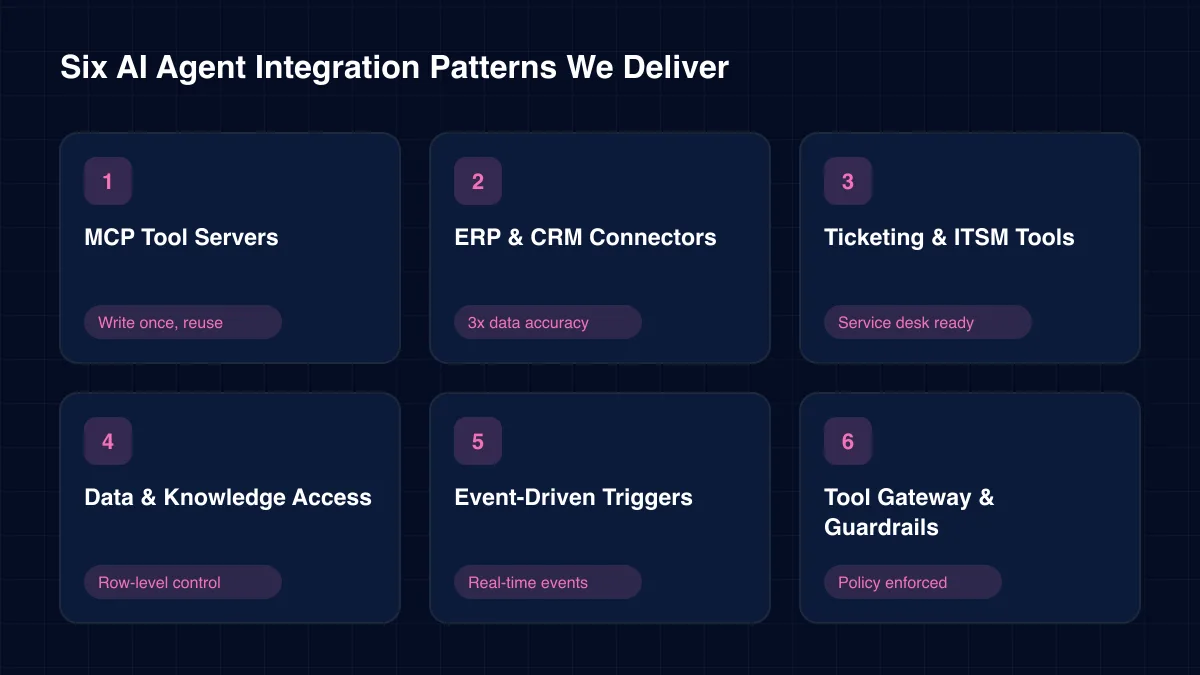
Each AI agent integration pattern is a reusable building block. Most clients start with two or three and add more as trust grows.
We wrap your systems in Model Context Protocol servers with typed tools and clear descriptions. One AI agent integration then serves every framework you use.
Write once, reuse →Read and write tools for ERP and CRM platforms built on their official APIs. Our ERP integration work with n8n, RabbitMQ and Apache Airflow delivered 3x data accuracy.
3x data accuracy →Agents that read, classify, update and close tickets in service desks. AI agent integration here focuses on safe status changes and complete audit notes.
Service desk ready
Governed query tools over warehouses and document stores, with row-level filters and retrieval pipelines. Agents get answers, not database credentials.
Row-level control
Webhooks and message queues wake agents when something happens: a failed payment, a late shipment, a new lead. This brings agents into live operations.
Real-time events →A central gateway that enforces authentication, rate limits, budgets and approval rules for every tool call. It is part of our wider AgenticOps platform.
Policy enforced →Architecture
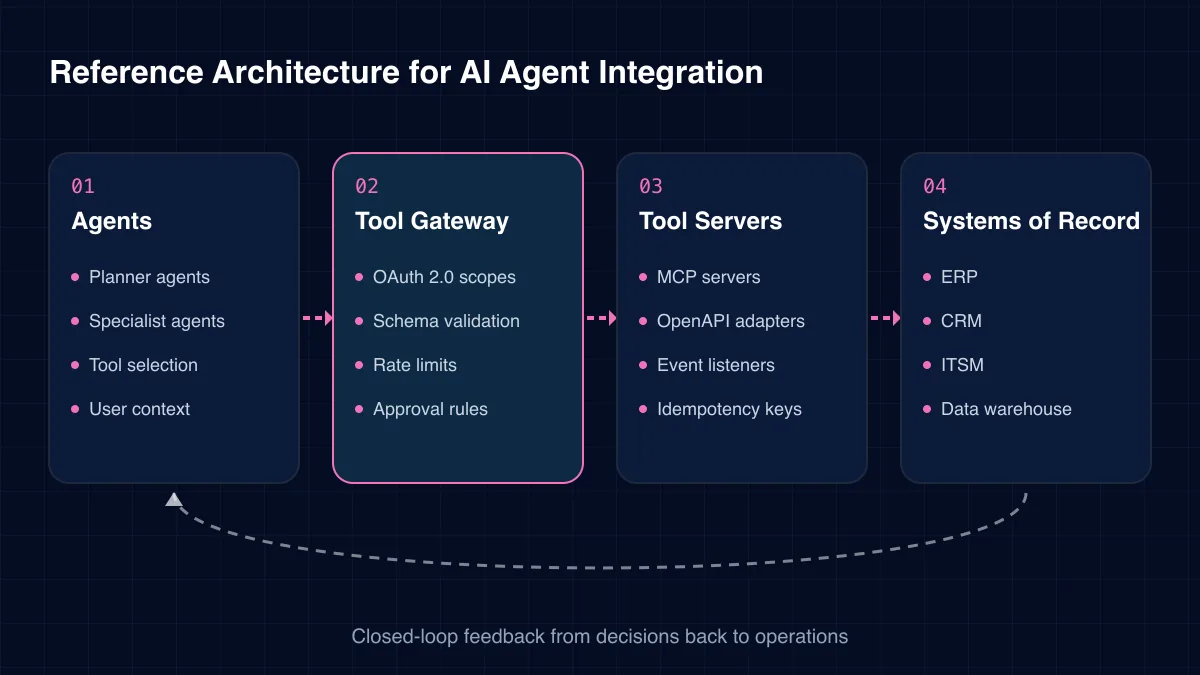
Agents never talk to systems directly. The tool gateway is the core: it authenticates, validates, limits and logs every call.
01
02
03
04
Challenges we solve
Most agent incidents we investigate trace back to weak AI agent integration, not to the model.
A shared admin credential gives the agent far more power than its task needs. One bad call can change anything.
The model cannot tell two similar tools apart, so it picks the wrong one with full confidence.
A retry after a timeout creates a second order or ticket because the tool has no idempotency key.
Tools return empty results instead of clear errors. The agent assumes nothing exists and moves on.
An agent asks for every record at once and floods the context window or the source system.
Text inside a ticket or email tells the agent to do something, and it does.
Each type of AI agent integration differs by what the agent is allowed to do. We usually move clients through these in order.
Three routes to AI agent integration, compared on what matters in production.
| Criterion | Direct API | MCP server | Screen bot |
|---|---|---|---|
| Reusable across frameworks | No | ✓ Yes | No |
| Typed inputs and outputs | Partial | ✓ Yes | No |
| Survives UI changes | ✓ Yes | ✓ Yes | No |
| Central policy control | Partial | ✓ Yes | No |
| Best for | One-off tools | Shared tools | Legacy apps only |
The gains below show up once AI agent integration runs through governed tools instead of improvised access.
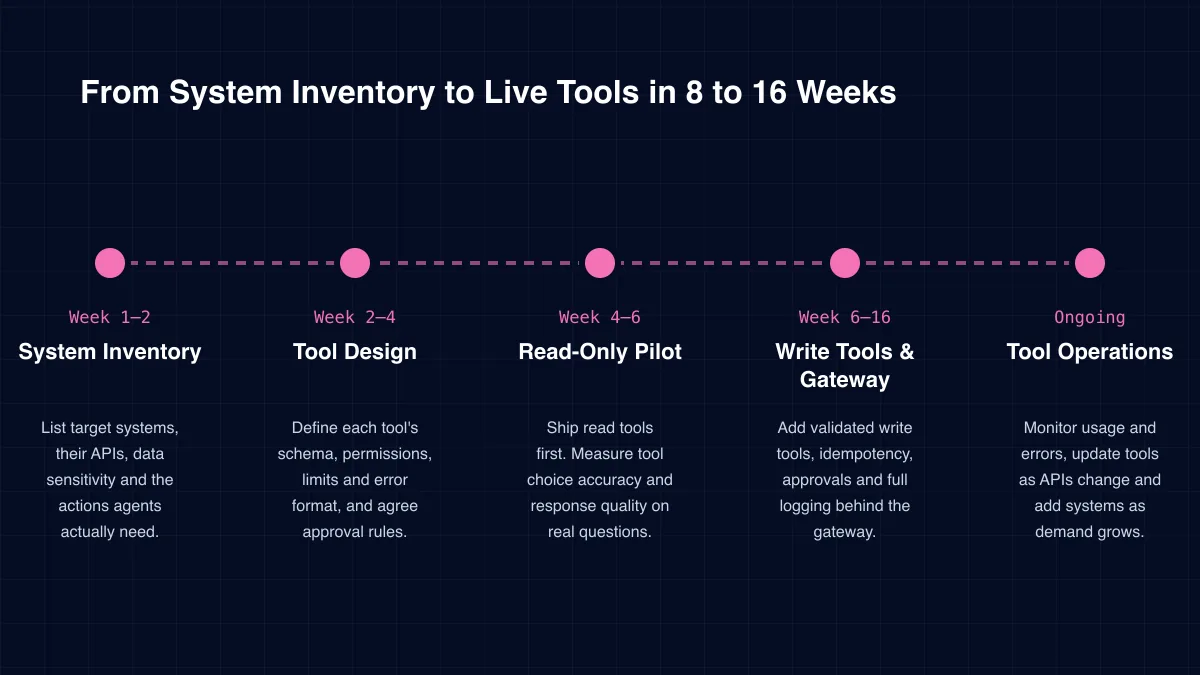
Delivery
Week 1–2
List target systems, their APIs, data sensitivity and the actions agents actually need.
Week 2–4
Define each tool's schema, permissions, limits and error format, and agree approval rules.
Week 4–6
Ship read tools first. Measure tool choice accuracy and response quality on real questions.
Week 6–16
Add validated write tools, idempotency, approvals and full logging behind the gateway.
Ongoing
Monitor usage and errors, update tools as APIs change and add systems as demand grows.
Specialist services within our agenticops practice.
We recommend asking any AI agent integration partner to show, not tell, on these five points.
In our experience, permission design is the point most teams skip. We start every integration with it.
Each agent gets its own service identity with OAuth 2.0 scopes limited to its tools. Where an agent acts for a user, the user's own permissions apply, so the agent can never see more than that person could.
Content returned by tools is treated as data, never as instructions. This follows the OWASP Top 10 for LLM applications, which ranks prompt injection and excessive agency among the leading risks.
ICANIO works under ISO 9001 and ISO 27001 certified processes. Secrets live in a vault, never in prompts, and every call is logged with a trace ID that links back to the agent run and any approval.
The value of AI agent integration shows up in tasks completed, not answers given. Before you start, count how many requests today end with a person copying data from one system to another.
After launch, track task completion rate, tool error rate, approval turnaround and time saved per request. Also track how often agents choose the wrong tool, which tells you where descriptions need work.
Reuse is the long-term win. Once a CRM tool server exists, the next agent that needs CRM data costs a fraction of the first. Integration becomes an asset, not a project cost.
Technology stack
For AI agent integration we build on open standards and your existing platforms wherever we can.
Protocols
Agent2Agent (A2A)
Identity
OAuth 2.0Secrets vaultsService accounts
Messaging
Webhooks
Business Systems
ERP platformsCRM platformsITSM toolsDocument stores
Data Access
Data warehousesVector databasesRAG pipelines
Gateway & Logs
API gatewaysAudit log store
AI agent integration connects agents to enterprise systems such as ERP, CRM and ticketing tools. It defines the tools agents can call, what each tool may read or change, and how calls are secured and logged.
The Model Context Protocol is an open standard for publishing tools to AI agents. You do not strictly need it, but it lets one AI agent integration serve many frameworks and vendors, which saves rework later.
Yes, with the right controls. Write tools validate inputs, use idempotency keys, respect rate limits and, for high-impact changes, wait for a named person to approve. We start read-only and add writes step by step.
Content returned by tools is labelled as data and never treated as instructions. Agents also cannot grant themselves new tools, and sensitive actions always pass policy checks in the gateway.
Any system with an API or message interface, including ERP, CRM, ITSM, document management and data warehouses. For legacy apps without APIs, screen automation is a last resort we use carefully.
Read-only tools for one or two systems often go live in four to six weeks. A full set of read and write tools behind a governed gateway usually takes eight to sixteen weeks.
How we deliver ai agent integration and the wider agenticops practice in each sector.
Agents create value only when they can reach the systems where work happens. AI agent integration decides whether that reach is safe, reliable and auditable, or a new source of risk.
ICANIO designs tools, gateways and permissions with the same care as any enterprise integration. In manufacturing, that can mean agents reading IoT telemetry, predictive maintenance alerts and machine learning forecasts from cloud platforms before raising a work order. Contact us to plan your first AI agent integration.
By ICANIO AgenticOps Engineering Team · Published · Updated
Tell us which systems your agents need to reach. We will map the tools, permissions and approvals for a safe first release.
Contact Our Integration Engineers