Process Discovery & Mapping
We map the current process in BPMN, measure volumes and find the steps where intelligent workflow automation pays off. Steps that rules already handle well stay as they are.
BPMN mapped →AgenticOps · Intelligent Workflow Automation
Rule-based bots stall the moment a form changes or an email arrives in the wrong format. We build workflows that understand messy inputs, follow your policies and hand people only the cases that need judgement.
⟳ Orchestrating agents…
every step traced · guardrails on · reversible
Intelligent workflow automation combines AI agents, document understanding and classic process engines to run work that used to need a person at every step. The workflow reads unstructured inputs, applies business rules, decides the routine cases and routes the rest to the right human.
Our team builds these workflows for finance, operations, customer service and HR teams. We start from the process you already run, not a blank page. Then we add reasoning only where fixed rules fall short, so the system stays predictable and auditable.
This guide covers how intelligent workflow automation differs from RPA, the variants we deliver, the tools behind them and how to measure whether the change is worth it.
Business process automation has existed for decades. Workflow engines move tasks between people, and robotic process automation (RPA) clicks through screens like a user would. Both work well when inputs are clean and rules never change.
Real work is messier. Invoices arrive as photos. Customers explain problems in long emails. Policies have exceptions nobody wrote down. Intelligent workflow automation adds an AI layer that reads such inputs, extracts the facts and reasons about what to do next.
The process engine still owns the flow. It knows the steps, deadlines and approvals. Agents sit inside specific steps where understanding is needed: reading a document, classifying a request, drafting a reply or choosing between options.
This split matters. A pure agent can wander. A pure rules engine breaks on variety. Combining them gives you the structure of a workflow with the flexibility of language models, and a clear audit trail for every case.
Industries adopt it for different reasons. Banks use it for KYC refresh and dispute handling. Insurers use it for claims intake. Logistics teams use it for shipment exceptions, and hospitals for referral and intake paperwork. The pattern is the same each time: varied inputs, clear policies and a need for proof.
Working definition
“Intelligent workflow automation is the use of AI agents, document understanding and process orchestration together, so that business workflows can interpret unstructured inputs, make routine decisions and escalate exceptions to people with full context.”
Foundations
Read emails, PDFs, scans and chat messages, and turn them into clean, structured data the workflow can use.
Apply policy and past decisions to clear the common cases automatically, with a confidence score on each one.
Send unclear or high-risk cases to the right person, with a summary of what was found and why it paused.
Post results into ERP, CRM or ticketing tools through governed APIs, never by fragile screen clicks alone.
Core capabilities
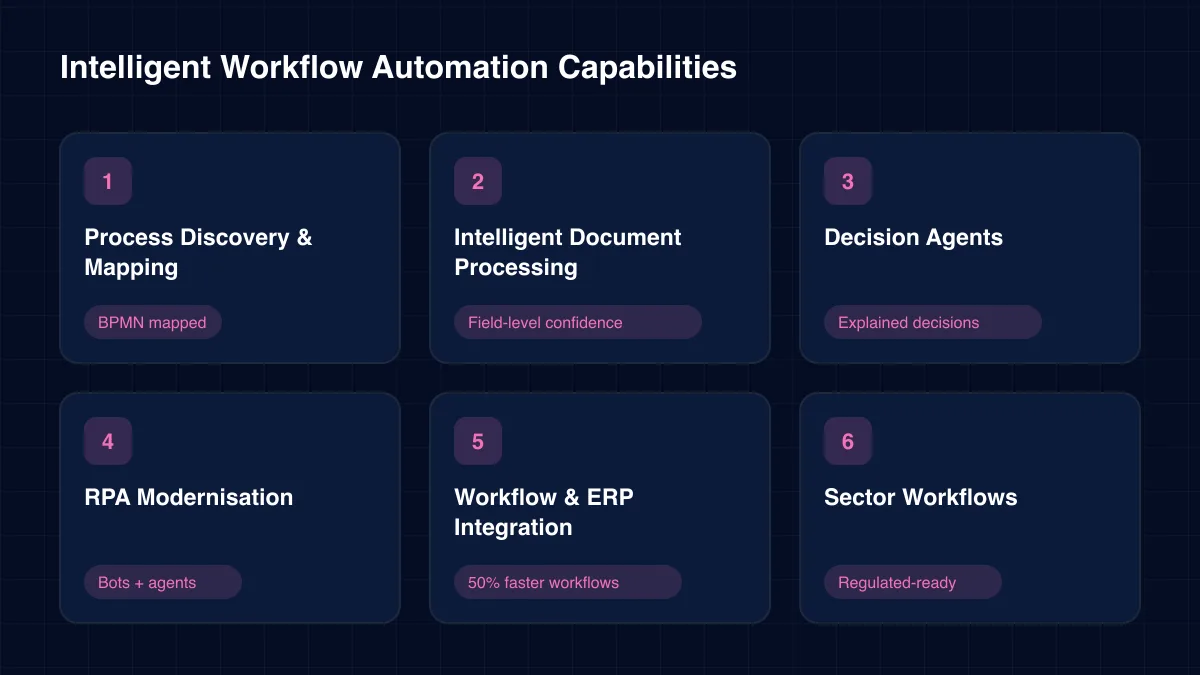
These are the pieces we design and deliver. Most projects use four or five of them together.
We map the current process in BPMN, measure volumes and find the steps where intelligent workflow automation pays off. Steps that rules already handle well stay as they are.
BPMN mapped →Language and vision models extract fields from invoices, claims, contracts and forms. Each field carries a confidence score, and low scores trigger a human check.
Field-level confidence
Agents that classify requests, apply policy and choose the next step. Every decision is explained in plain language, which keeps intelligent workflow automation auditable.
Explained decisions
We keep bots that work, replace brittle screen scripts with APIs, and add agents where bots keep failing on varied inputs. Your RPA investment becomes part of a wider design.
Bots + agents
Reliable plumbing between ERP, CRM and back-office tools using engines such as n8n, RabbitMQ and Apache Airflow. In one ERP integration engagement, workflows ran 50% faster.
50% faster workflows →Proven flows for banking KYC, claims, shipment exceptions and patient intake. See how intelligent workflow automation supports regulated teams in our banking agent work.
Regulated-ready →Architecture
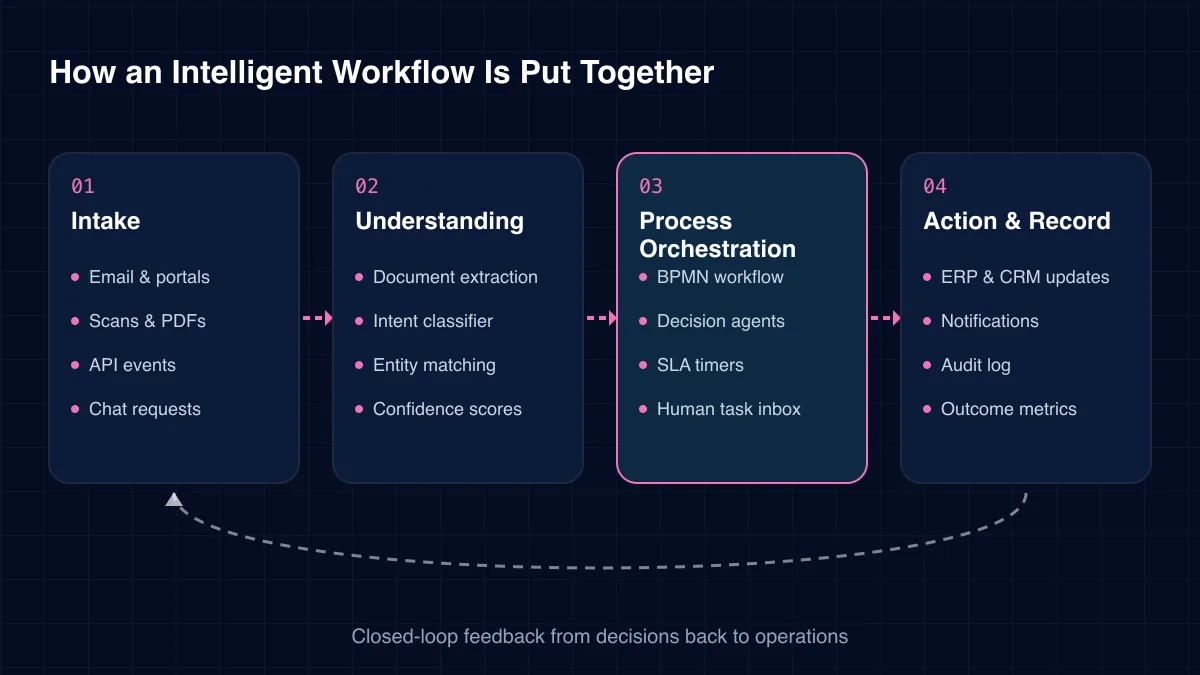
We use four layers. The process orchestration layer sits at the core and keeps every case on track, while agents work inside individual steps.
01
02
03
04
Challenges we solve
Most teams we meet already automate something. These are the walls that intelligent workflow automation is designed to remove.
A moved button or new form version stops an RPA script. Someone fixes it by hand, again.
Emails, scans and free text cannot be handled by rules alone, so they pile up in shared inboxes.
Anything slightly unusual goes to a person, often with no context. The queue never shrinks.
Staff copy data between ERP, CRM and spreadsheets. Errors creep in and nobody owns them.
When a case goes wrong, nobody can say who decided what, or why.
Each team built its own scripts. Nothing is shared, and nothing is monitored.
The right variant depends on how varied your inputs are and how much judgement each case needs.
Each approach has a place. This table shows where intelligent workflow automation adds most.
| Criterion | RPA | Workflow engine | Intelligent |
|---|---|---|---|
| Reads unstructured input | No | No | ✓ Yes |
| Survives UI changes | No | ✓ Yes | ✓ Yes |
| Makes judgement calls | No | No | Partial |
| Explains each decision | No | Partial | ✓ Yes |
| Best for | Fixed screens | Fixed rules | Varied cases |
The benefits of intelligent workflow automation grow as more workflows share the same extraction, decision and integration layers.
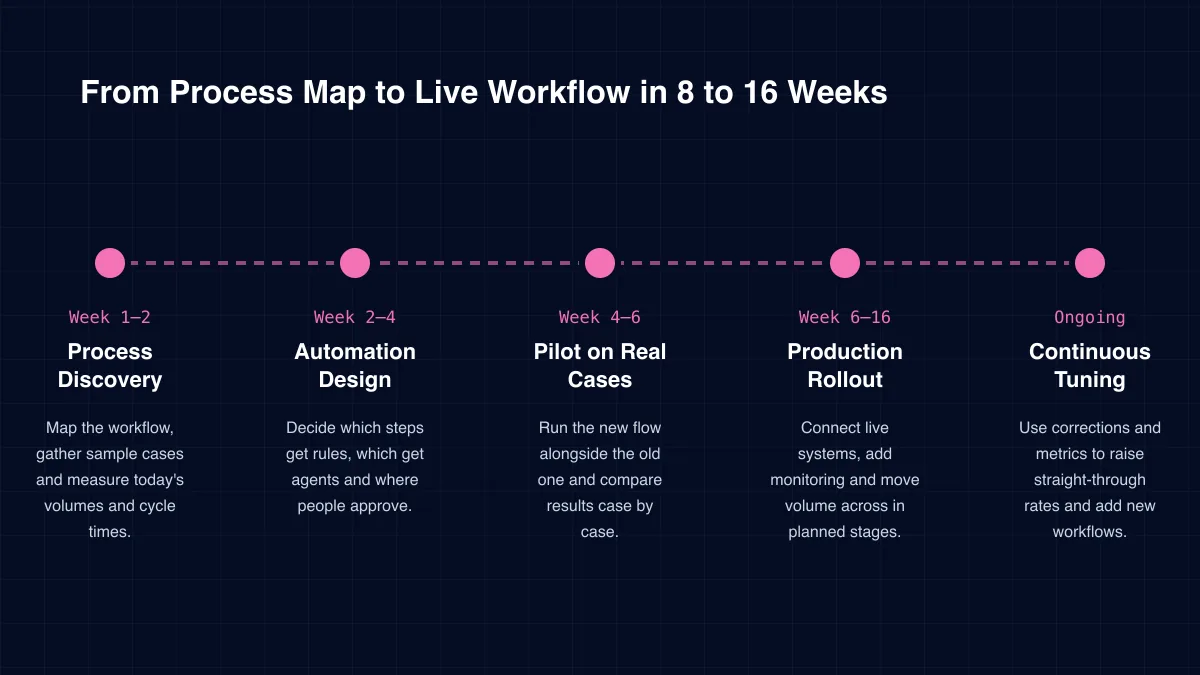
Delivery
Week 1–2
Map the workflow, gather sample cases and measure today's volumes and cycle times.
Week 2–4
Decide which steps get rules, which get agents and where people approve.
Week 4–6
Run the new flow alongside the old one and compare results case by case.
Week 6–16
Connect live systems, add monitoring and move volume across in planned stages.
Ongoing
Use corrections and metrics to raise straight-through rates and add new workflows.
Specialist services within our agenticops practice.
We recommend judging partners on these five points before you sign.
In our experience, exception design decides adoption. If staff trust the handoff, they trust the whole workflow.
Workflows touch sensitive data: bank details, health records, personal IDs. We mask fields agents do not need, encrypt data in transit and at rest, and keep documents inside your chosen region.
Every automated action uses a service identity with least-privilege access. High-value or irreversible steps wait for a named approver, and the approval is stored with the case.
ICANIO works under ISO 9001 and ISO 27001 certified processes. Where rules such as GDPR or HIPAA apply, we design retention, access and logging to support them from the start.
Agents also face risks of their own. Text inside an email or PDF can try to steer the model, a pattern known as prompt injection. We treat every document as untrusted input, limit what each step may change and check outputs against policy before any system update. In intelligent workflow automation, the process engine, not the model, has the final say on what happens next.
Pick one process and measure it for two weeks: cases per month, handling minutes per case, rework rate and cycle time. That baseline is your yardstick.
After launch, track straight-through rate, exception rate, human override rate and cost per case, including model usage. These numbers show where intelligent workflow automation is earning its keep.
Count the knock-on effects as well. Faster invoice handling can capture early-payment discounts. Faster onboarding gets new staff productive sooner. Faster replies reduce repeat contacts.
Keep the cost side honest too. Model calls, document processing and hosting all carry a price per case. We size these during the pilot, route simple steps to small models and cache repeated lookups. That way intelligent workflow automation stays cheaper per case than the manual process it replaces, even as volume grows.
Technology stack
We are tool-neutral and often extend what you already own.
Process Engines
Camunda
Agents & Models
OpenAI GPT modelsOpen-source LLMs
Documents
OCR enginesVision-language modelsSchema validation
Integration
REST APIsERP & CRM connectors
Human Tasks
Task inboxSlack and Teams approvalsEmail actions
Monitoring
Process dashboardsAudit logs
Intelligent workflow automation combines a process engine with AI agents and document understanding. The workflow reads unstructured inputs, makes routine decisions and sends exceptions to people with context attached.
RPA repeats fixed steps on screens and breaks when inputs vary. Intelligent workflow automation reads varied inputs, reasons about them and acts through APIs. Many clients keep RPA for stable steps and add agents around it.
It removes data entry and routine checks, not judgement. People move to exceptions, approvals and customer conversations. In our experience that makes roles more interesting, not redundant.
Good first candidates are high-volume processes with varied documents or messages: accounts payable, claims intake, service inboxes, KYC refresh and employee onboarding.
Every extraction and decision carries a confidence score. Low scores go to a person. Human corrections are logged and used to improve prompts and rules, and we track override rates every week.
Yes. We integrate through APIs and message queues wherever possible, and use screen automation only as a last resort. Our team has connected ERP, CRM and back-office tools across many stacks.
How we deliver intelligent workflow automation and the wider agenticops practice in each sector.
Rules and bots took automation as far as clean inputs allow. Intelligent workflow automation takes it into the messy middle of real business: emails, scans, exceptions and judgement calls.
ICANIO maps your process, adds AI only where it earns its place and keeps people in charge of the decisions that matter. From manufacturing purchase orders to IoT-triggered predictive maintenance work orders, the same pattern applies, with machine learning models and cloud services working inside a governed flow. Contact us to find your best first workflow.
By ICANIO AgenticOps Engineering Team · Published · Updated
Send us the process that eats the most hours. We will tell you which steps AI should handle, which should stay with people and what a pilot would look like.
Contact Our Automation Team