When a 502 Bad Gateway error appears in production, the first priority is restoring service. The second priority is often neglected under incident pressure. Users should see something useful, not a blank or default error page. How you handle a 502 Bad Gateway says as much about your operational culture as how fast you fix it. A blank page signals indifference. A clear, branded nginx maintenance page shows the team knows, is working on it, and respects the user's time.
ICANIO's DevOps and cloud engineering practice builds resilient nginx reverse proxy setups, fallback pages and alerting for enterprise platforms. This guide covers what causes a 502 Bad Gateway, how to build a production-grade fallback, and the practices that protect users during downtime.

Key Takeaways
- A 502 Bad Gateway means the proxy is working but received no valid response from the upstream server.
- Five causes cover most incidents: crashes, deployments, resource exhaustion, network faults and timeouts.
- An nginx maintenance page served through
error_pageturns a raw error into a helpful message. - Pair the fallback with monitoring, alerting and a status page so engineers act before users complain.
- Health checks, load testing and graceful degradation reduce how often users ever see the error.
What Causes a 502 Bad Gateway Error?
A 502 Bad Gateway occurs when a server acting as a gateway or reverse proxy gets an invalid or missing response from upstream. The status code is defined in RFC 9110, the core HTTP semantics standard. MDN's 502 reference gives a plain-language summary.
In a typical nginx reverse proxy, nginx itself is healthy. It simply cannot get a valid answer from the application server behind it. Knowing the exact cause matters, because the right response differs for each one.
| Cause | What happens | First check |
|---|---|---|
| App crash | Process stopped or exited | systemctl or docker ps |
| Deployment | New container not ready yet | Container startup logs |
| Resource exhaustion | Out of memory, CPU or file handles | Host resource metrics |
| Network fault | DNS or firewall blocks upstream | Test from the nginx host |
| Timeout | Backend too slow to respond | Error log and latency |
502 Bad Gateway vs 503 and 504
A 502 Bad Gateway is distinct from a 503 Service Unavailable. A 502 means nginx received an invalid response, or none at all, which points to a communication failure. A 503 means the server is temporarily refusing requests, usually because of overload or planned maintenance. A 504 Gateway Timeout means the upstream did not answer within the configured time.
All three mean the backend is not working normally. The distinction still matters for diagnosis. Our team always starts a 502 Bad Gateway investigation in the nginx error log. The upstream error message there usually tells you which of the five causes is responsible.
Reading the Nginx Error Log
Common messages map neatly to causes:
connect() failed (111: Connection refused)usually means the app is down or listening on another port.upstream prematurely closed connectionoften points to a crash or a worker restart mid-request.upstream timed outpoints to slow responses or a proxy timeout that is set too low.no live upstreamsmeans every server in the upstream group is marked as failed.
How to Diagnose a 502 Bad Gateway Step by Step
A calm, repeatable sequence shortens every 502 Bad Gateway incident. Our team uses this order:
- Confirm the scope: one route, one host or the whole site.
- Read the nginx error log for the upstream message.
- Check the application process or container status.
- Test the upstream directly from the nginx host with
curl. - Check memory, CPU and file descriptor usage on the upstream.
- Review recent deployments and configuration changes.
Most 502 Bad Gateway incidents resolve in the first four steps. Recent changes are a frequent cause, so keep deployment history easy to find. Structured logs make this much faster, as our guide to structured logging and observability explains.
Nginx Maintenance Page: Building the User-Facing Fallback
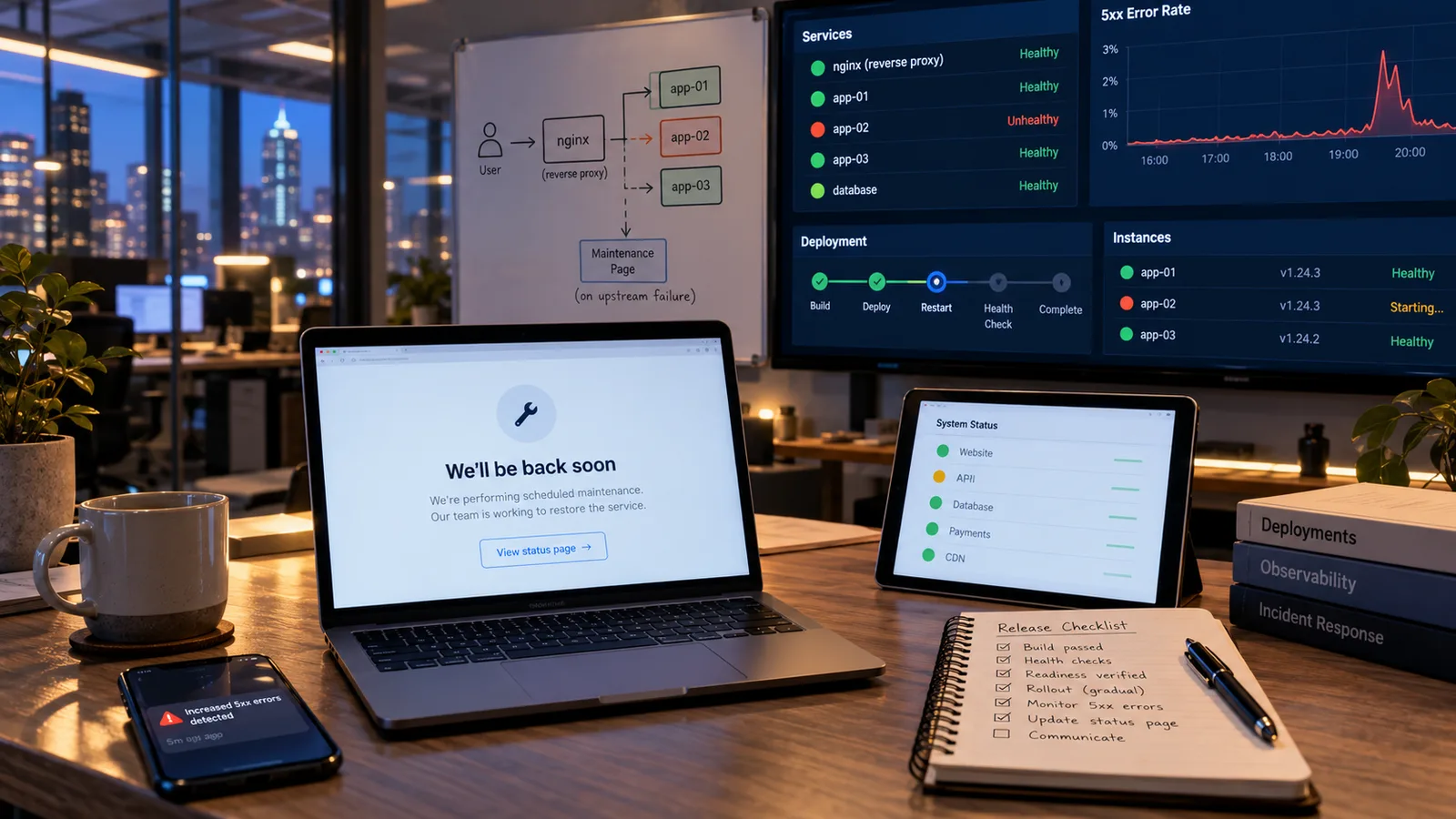
An nginx maintenance page is a static HTML file that nginx serves when the backend returns a 502 Bad Gateway, 503 or 504. A raw default error gives users nothing. A well-designed nginx maintenance page explains that work is in progress, when service should return, and where to get help.
An effective page does three jobs at once:
- Manages expectations. Users stop refreshing a blank screen and wondering whether their connection is the problem.
- Protects the brand. A professional, on-brand message replaces a generic server error.
- Reduces support load. A status page link and contact channel route urgent requests to the right place.
Keep the page fully static. It should load no scripts, fonts or images from the failing application. Inline the CSS so the page renders even when every backend service is down. For platforms with SLA commitments, linking to a status page is often a contractual expectation during downtime.

Nginx Configuration: Reverse Proxy With Fallback
A production nginx configuration for upstream errors combines a normal reverse proxy with error page directives. These intercept upstream failures and serve the static fallback instead. Even when the backend is completely unavailable, users get a meaningful response rather than a 502 Bad Gateway screen.
Core Nginx Configuration Structure
The pattern has three parts. The main location uses proxy_pass to reach the upstream. The error_page directive catches 502, 503 and 504 responses. A named location then serves the static nginx maintenance page.
server {
    listen 80;
    location / {
        proxy_pass http://app_backend;
        proxy_connect_timeout 5s;
        proxy_read_timeout 60s;
        error_page 502 503 504 = @maintenance;
    }
    location @maintenance {
        root /var/www/maintenance;
        try_files /index.html =503;
    }
}
The fallback is transparent. Users hit the same URL, and nginx swaps in the maintenance HTML without a visible redirect. Returning 503 from the fallback also tells search engines the outage is temporary. If you also want to intercept errors that the application itself returns, add proxy_intercept_errors on;.
The Duplicate Protocol Prefix Bug
One common nginx configuration mistake is a doubled protocol, such as http://http://localhost:PORT. It appears when an upstream address variable already contains http:// and the proxy_pass line adds it again. The same bug shows up in rewrite rules that include the protocol in both pattern and replacement.
The fix is simple: make sure the protocol appears exactly once. This bug is silent in normal operation. It only shows when that path is triggered, so it is easy to miss in testing. Our team adds an explicit check for it to proxy configuration reviews. Teams running Windows hosts meet the same issue in IIS, covered in our IIS URL Rewrite and reverse proxy guide.
Nginx Error Page and Alert Integration
An nginx error page on its own is a passive measure. A full response to a 502 Bad Gateway connects the fallback to active monitoring. Engineers must hear about rising error rates before users do.
Status Page Integration
Status pages such as Statuspage, Cachet and Uptime Kuma show the current state of each component. They also show the incident timeline and updates as work progresses. Linking to one from the nginx error page gives users current information instead of a static message. For customer-facing platforms with published SLAs, updating the status page within minutes of a 502 Bad Gateway is standard practice.
Automated Alerting
Monitor the upstream error rate continuously. Tools such as Prometheus, Datadog and New Relic can trigger PagerDuty or Slack alerts when 5xx responses spike. The goal is a response window measured in seconds between the first 502 Bad Gateway and the first engineering action. This automation is a core part of modern DevOps practice.
Nginx Reverse Proxy: Operational Best Practices
Handling errors in the moment is only half the job. A set of operational practices reduces how often upstream failures happen and how much they hurt.
Planned Maintenance Windows
Schedule maintenance during low-traffic periods. Notify users by email or in-app banner beforehand. This turns a surprise outage into a managed, expected event. You can also switch on the nginx maintenance page deliberately during the window, for example with a flag file checked in the configuration.
Upstream Health Checks
Open-source nginx uses passive health checks. The max_fails and fail_timeout parameters in the upstream module mark a server as unavailable after repeated failures. Traffic then goes to healthy instances. Active health checks that probe servers on a schedule are part of the commercial NGINX Plus product, or can come from your load balancer or orchestrator.
For multi-instance deployments behind an nginx reverse proxy, health checks are essential. One failed instance should never expose a 502 Bad Gateway to every user.
Zero-Downtime Deployments
Deployments are a leading cause of short 502 Bad Gateway errors. Rolling or blue-green releases keep old instances serving until new ones pass readiness checks. On Kubernetes, readiness probes do this job. Our guide to continuous testing in CI/CD covers the pipeline side.
Post-Incident Communication
After resolving an incident, send a short summary. Cover what happened, the impact and what changes will prevent a repeat. Google's guidance on postmortem culture is a useful model. Combined with a well-designed nginx maintenance page, this turns a failure into evidence of a well-run operation.
502 Bad Gateway in Containers and the Cloud
Modern stacks often place several proxies in a row. A request might pass through a CDN, a cloud load balancer, an ingress controller and then an nginx reverse proxy inside a pod. Any hop can return a 502 Bad Gateway, so the first job is finding which one did.
Check the response headers and the style of the 502 Bad Gateway page. A cloud load balancer and nginx produce visibly different default pages. Then follow the logs hop by hop, starting from the edge.
Common cloud and container causes include:
- Keepalive timeouts on the backend that are shorter than the load balancer's idle timeout.
- Containers that report ready before the application can accept connections.
- Pods killed for exceeding memory limits, which drops in-flight requests.
- Security groups or network policies that block the proxy from reaching the upstream.
On AWS, the Application Load Balancer documentation lists the specific reasons it returns a 502. On Kubernetes, ingress-nginx behaves like any nginx reverse proxy, so the same error log messages apply. Software development teams should treat readiness probes and graceful shutdown as part of the application, not as an afterthought for operations. For more on cloud cost and capacity trade-offs that affect these limits, see our post on Kubernetes cost optimization.
Building Operational Resilience Around Nginx
The fallback page is one part of a resilient posture against a 502 Bad Gateway. The full program also includes monitoring that spots failures early. It includes runbooks that define what each engineer does when an alert fires. And it includes post-incident reviews that feed improvements back into the proxy and upstream services.
Avoiding Alert Fatigue
Alert fatigue is one of the most common failures in 502 Bad Gateway monitoring programs. When too many rules fire for minor events, engineers start ignoring notifications. The next real incident gets lost in the noise.
Alert only on events that need immediate action. Route different severities to different channels. Our team calibrates thresholds at the start of an engagement and reviews them after every significant incident.
Load Testing the Proxy Layer
Load testing before release confirms the nginx reverse proxy handles realistic traffic without becoming a bottleneck. Worker connections, buffer sizes, proxy timeouts and upstream keepalive settings all matter. Poor values can cause a 502 Bad Gateway under peak load even when the application could cope.
Graceful Degradation
Graceful degradation extends the maintenance page idea into a wider strategy. Mature teams use tiers:
| Failure level | Response | User impact |
|---|---|---|
| Minor | Serve cached responses | Barely noticed |
| Partial | Reduced feature set | Some limits |
| Severe | Read-only mode | No changes saved |
| Total | Nginx maintenance page | Clear message |
This approach limits the impact of partial failures. Users see the full nginx error page far less often. ICANIO's DevOps and cloud engineering services build these tiers into wider resilience programs.
Conclusion
A 502 Bad Gateway is a symptom, not a root cause. Read the error log, map it to one of the five causes, and fix the upstream. Meanwhile, make sure users see a clear, branded message instead of a raw error.
The best setups combine an nginx maintenance page with health checks, alerting, a status page and zero-downtime deployments. Together they reduce both how often errors happen and how much they hurt.
If you want a review of your proxy, monitoring or incident response setup, contact ICANIO and our team will be glad to help.
References
- RFC 9110: HTTP Semantics
- MDN: 502 Bad Gateway
- Nginx proxy module documentation
- Nginx core module documentation (error_page)
- Nginx upstream module documentation
- Prometheus overview
- Google SRE Book: Postmortem Culture
Frequently asked questions
What is a 502 Bad Gateway error?
A 502 Bad Gateway occurs when a gateway such as nginx receives an invalid response, or no response, from the upstream server it proxies. Common causes include application crashes, deployments in progress, resource exhaustion, network faults between nginx and the backend, and timeouts. It means nginx itself works but cannot get a valid answer from the application behind it.
How do you fix a 502 Bad Gateway error in nginx?
Check that the backend application is running. Confirm that the proxy_pass address and port match where the backend actually listens. Read the nginx error log for the specific upstream message, and check that the backend is not short of memory, CPU or file handles. Meanwhile, serve a static nginx maintenance page through error_page so users see a helpful message.
How do you create an nginx maintenance page for 502 errors?
Create a static HTML file with your branded message and inline CSS, and save it in a dedicated directory. Add an error_page 502 503 504 = @maintenance; directive to the proxied location. Then define a named @maintenance location that serves the file with try_files. Users will see your nginx maintenance page whenever the upstream is unavailable.
What is the difference between 502 and 503 errors?
A 502 Bad Gateway means the gateway received an invalid response from upstream, which points to a communication failure between nginx and the backend. A 503 Service Unavailable means the server is temporarily refusing requests, usually because of overload or planned maintenance. Both deserve a friendly nginx error page, but their diagnosis differs because the root causes differ.
What nginx configuration is needed for a reverse proxy fallback?
You need three elements. First, a proxy_pass directive pointing to the upstream application. Second, an error_page directive that catches 502, 503 and 504 and sends them to a named location. Third, a named fallback location that serves the static maintenance HTML. This nginx configuration handles upstream errors at the proxy layer before raw errors reach users.
How can you prevent 502 errors during deployments?
Use rolling or blue-green deployments so existing instances keep serving until new ones pass readiness checks. Configure upstream health checks so nginx stops sending traffic to failed instances. Drain connections gracefully before stopping old processes. With these practices in place, deployments should rarely cause a 502 Bad Gateway that users can see.