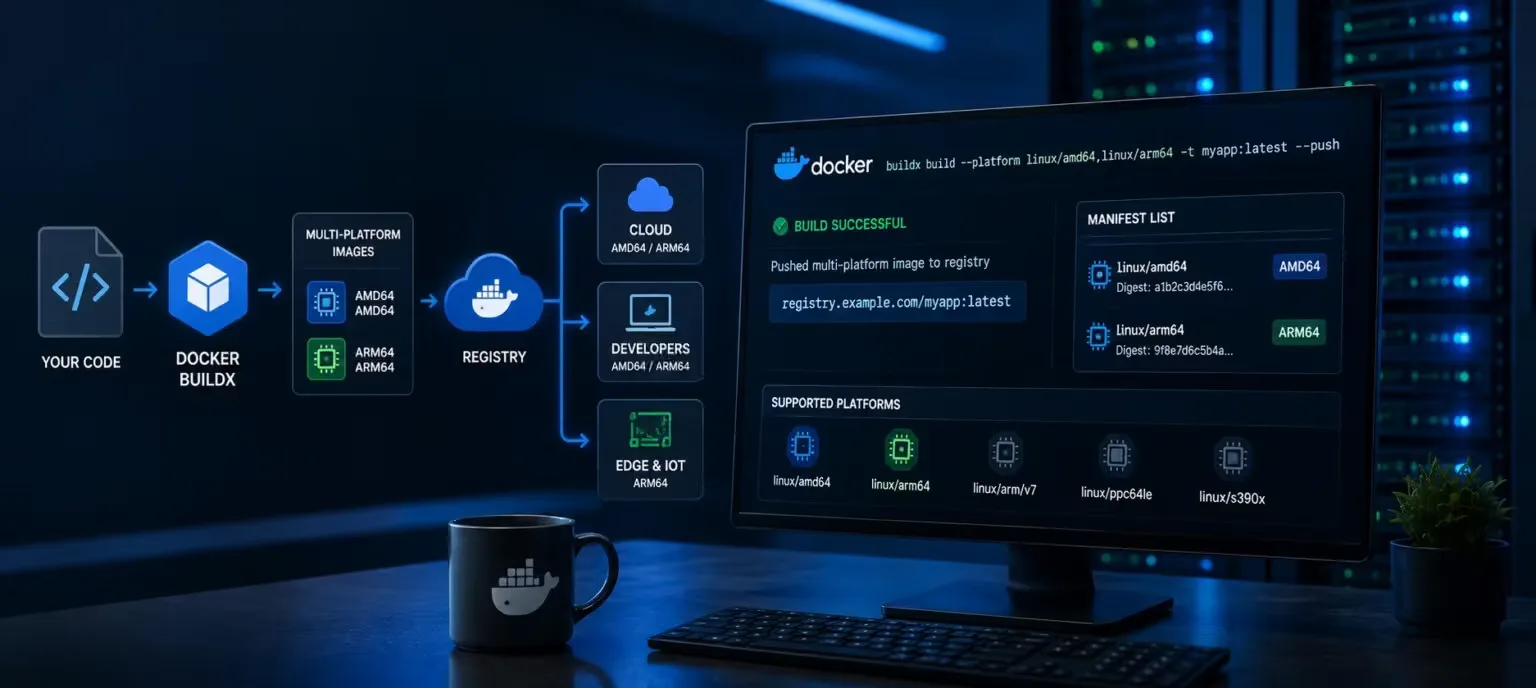
Docker Buildx exists because modern deployment spans more hardware architectures than it did a few years ago. Developer laptops with Apple Silicon use arm64 processors. Cloud providers offer arm64 instances such as AWS Graviton and Azure Ampere-based VMs. Edge, IoT and on-premises environments may need arm64 images too. A standard docker build on an amd64 machine produces an image that only runs on amd64. Deploying it to arm64 either fails or relies on slow emulation. Docker Buildx solves this by producing images for both architectures in one build step.
ICANIO's DevOps and Cloud Engineering practice builds automation pipelines, registry management and multi-architecture Docker frameworks for enterprise teams. This guide covers the full Docker Buildx workflow: setting up a builder, producing multi-platform images, handling arm64 quirks and publishing to a container registry.
Key Takeaways
- Docker Buildx is a CLI plugin that uses BuildKit to build one image for several CPU architectures.
- A multi-platform build needs a builder with a driver that supports it, such as docker-container.
- Cross-architecture builds rely on QEMU emulation registered on the host through binfmt_misc.
- The result is a multi-architecture manifest in a container registry that resolves to the right image on pull.
- Base images and native binaries must support every target, or the arm64 container will fail.
- CI/CD templates make multi-architecture Docker builds consistent across every repository.
Docker Buildx: What It Is and Why It Matters
Docker Buildx is a Docker CLI plugin that extends docker build with the full feature set of BuildKit. The classic build path creates images tied to the architecture of the host. Docker Buildx adds multi-platform build capability. One command can build for linux/amd64 and linux/arm64 together and push a single manifest to the registry. The official Docker multi-platform build guide describes the model in detail.
Several forces drive the move toward multi-architecture Docker deployment. Cloud providers market arm64 instances on price-performance, as AWS does on its Graviton product page. For teams running large container fleets, arm64 container support can therefore be a cost lever worth testing. Teams with mixed hardware also benefit. When some engineers use Apple Silicon and others use Intel machines, one pipeline that serves both avoids architecture-specific workarounds.
IoT and edge deployments add a third reason. Devices such as Raspberry Pi or NVIDIA Jetson boards need arm64 images. Docker Buildx produces them without a separate build pipeline.
Multi-Platform Build: Setting Up Docker Buildx
The default docker driver has limited multi-platform support. With the classic image store, it only builds for the host architecture. For a reliable multi-platform build, create a builder that uses the docker-container driver. That driver runs BuildKit inside a dedicated container. The Docker builders documentation explains each driver and its capabilities.
Cross-architecture steps also need emulation. BuildKit uses QEMU to run foreign-architecture binaries. On Linux, QEMU handlers are registered with the kernel's binfmt_misc mechanism. Docker Desktop ships with this already configured. On a plain Linux host or CI runner, you may need to register the handlers first, for example with the setup-qemu step described below.
Creating a Docker Buildx builder instance
Creating a builder takes one command with a few flags. The name flag gives the builder an identifier. The driver flag selects docker-container. The bootstrap flag starts the builder immediately. The use flag makes it the active builder.
docker buildx create --name multi --driver docker-container --bootstrap --use
docker buildx ls
Running docker buildx ls confirms the builder is active. It lists the platforms the builder can target, which should include linux/amd64 and linux/arm64 once emulation is available.
Building and pushing multi-platform images
The core Docker Buildx command combines three flags. The platform flag lists target architectures. The tag flag names the registry destination. The push flag sends the result straight to the container registry.
docker buildx build --platform linux/amd64,linux/arm64 -t registry.example.com/app:1.0 --push .
Push is needed because the classic local image store cannot hold a multi-architecture manifest. Listing both platforms produces one manifest in the registry. Docker then pulls the matching image automatically on each machine.
The platform flag accepts targets such as linux/amd64, linux/arm64, linux/arm/v7, linux/386, linux/ppc64le and linux/s390x. For most enterprise workloads, amd64 and arm64 cover cloud instances, developer machines and modern edge devices. Our team usually wires this command into GitHub Actions or Azure Pipelines, so every main branch commit builds and pushes both architectures automatically.
Container Registry: Publishing and Verifying Images
After a successful build, the container registry holds a manifest list, also called an image index. It references a separate image for each platform. The structure is defined by the OCI image index specification, maintained by the Open Container Initiative.
Verify the result before you deploy. The docker buildx imagetools inspect command reads the manifest from the registry and lists each platform. A correct multi-architecture Docker image shows separate entries for linux/amd64 and linux/arm64. The imagetools inspect reference lists the output options.
Registry choice matters too. Docker Hub, Amazon ECR, Azure Container Registry and Google Artifact Registry all support multi-architecture manifests. Self-hosted options such as Harbor and JFrog Artifactory support them when configured correctly. Organisations with data residency rules often run a private container registry. In that case, confirm manifest list support as part of the build infrastructure setup.

Arm64 Container Architecture: Key Considerations
A multi-platform build only works if every base image supports every target. Most official images, including node, python, golang and ubuntu, publish multi-architecture manifests. If a Dockerfile uses an amd64-only base image, the arm64 container build fails. There is simply no compatible base layer. Check the OS/Arch list on Docker Hub before adopting a base image.
Native code needs more care. If a Dockerfile copies pre-compiled binaries, those binaries must exist for each target architecture. Docker Buildx sets build arguments such as TARGETPLATFORM, TARGETOS and TARGETARCH automatically. A Dockerfile can use them to download or copy the right binary per platform.
Using TARGETARCH this way lets one Dockerfile serve both amd64 and arm64 container targets cleanly. Our team uses this pattern when moving workloads with native dependencies onto arm64 cloud instances. It keeps a single source of truth instead of two diverging Dockerfiles.
Common arm64 pitfalls
- Base images that only publish linux/amd64.
- Pre-compiled binaries or language extensions fetched for the wrong architecture.
- Install scripts that hard-code x86_64 download URLs.
- Tests that run only on amd64, so arm64 failures appear in production first.
Docker Buildx in CI/CD: 5 Essential Steps
Integrating Docker Buildx into CI/CD makes multi-architecture output automatic on every change. A typical pipeline follows five steps:
- Register emulation with docker/setup-qemu-action or an equivalent binfmt step.
- Create the builder with docker/setup-buildx-action or docker buildx create.
- Log in to the container registry with stored credentials.
- Build and push for linux/amd64 and linux/arm64 in one command.
- Verify the manifest with imagetools inspect before deployment.
GitHub Actions provides first-class Docker Buildx support through the setup-qemu-action and build-push-action. Azure Pipelines can achieve the same with Docker tasks or inline script steps. GitLab CI/CD works with Docker-in-Docker or shell executors that can reach a Docker daemon.
For organisations with many repositories, our team recommends shared pipeline templates. Teams then reference one maintained multi-architecture Docker template rather than configuring each repository by hand. This is a common pattern in platform engineering, where golden paths reduce duplicated DevOps effort.
Docker Build vs Docker Buildx: Key Differences
| Capability | Classic build | Docker Buildx |
|---|---|---|
| Architectures | Host only | Many via QEMU |
| Manifest list | No | Yes |
| Registry push | Separate step | Same command |
| Cache backends | Local | Local, registry, inline, cloud |
| Platform builds | One | Parallel |
| arm64 on amd64 host | No | Yes, via emulation |

Docker Buildx in Enterprise Container Strategies
For enterprises running containers on mixed infrastructure, Docker Buildx is more than a convenience. It is a foundation of a consistent container strategy. Without multi-platform build capability, adopting arm64 cloud instances means one of two compromises. Either maintain separate pipelines per architecture, or run amd64 images under emulation and lose much of the expected saving. Docker Buildx removes that tradeoff. Multi-architecture support becomes a property of the image itself.
Registry governance completes the picture. Useful practices include tagging conventions that make architecture coverage clear and retention policies that control storage growth from multi-platform manifests. Access controls should limit which pipelines may push to which repositories. These standards help image management scale as images and architectures multiply. If cost is the main driver, our guides to Kubernetes cost optimisation and FinOps for AI workloads show where arm64 nodes fit in a wider plan.
Moving to Docker Buildx is usually straightforward for apps built on standard runtimes and official base images.
Apps with native binaries, compiled extensions or architecture-specific system libraries need Dockerfile changes. For these, our team recommends a short Dockerfile architecture review before switching pipelines. The review identifies amd64-only dependencies and adds TARGETARCH-based handling. It prevents the most common Docker Buildx adoption failure: a build that completes cleanly but yields an arm64 container that crashes at runtime because of an amd64-only binary.
BuildKit and the Infrastructure Behind the Build
Knowing what happens inside a Docker Buildx build helps engineers debug failures and tune performance. With the docker-container driver, Docker launches a container running the BuildKit daemon. BuildKit has been the default builder in Docker Engine since version 23.0, according to the BuildKit documentation. The daemon handles cross-architecture execution, concurrent layer builds and advanced caching.
QEMU emulation enables cross-architecture work on a single host. When the target differs from the host, RUN instructions execute under emulation. Compilation, package installs and any command run inside the build happen in the emulated environment. Emulation overhead is noticeable for compile-heavy builds but small when a build mostly copies pre-built artifacts. For heavy compilation, consider cross-compiling with the BUILDPLATFORM argument or using native arm64 build nodes.
Caching across architectures
BuildKit caching helps multi-architecture builds. Steps that do not depend on architecture, such as copying static files, can often be reused. Cache exporters can also store the cache in a registry or a cloud cache backend. Fresh CI runners then reuse layers without a persistent local volume. The cache backends documentation lists the supported options.
Build secrets
BuildKit also supports secret mounts, which the legacy builder did not. Secrets passed with a secret mount are available to RUN instructions during the build but are not written into any image layer. That keeps credentials out of the published image. Use them for authenticated package installs or private repository access. The Docker build secrets guide shows the syntax. Our team treats secret mounts as standard practice whenever a build needs credentials.
Why push instead of load
The BuildKit daemon keeps its own internal store, separate from the host's image store. The load flag copies a built image into the host store. With the classic store, that only supports a single architecture. The push flag sends output directly from BuildKit to the registry, which supports manifest lists natively. That is why full multi-architecture Docker output usually goes to a registry. Docker Desktop's newer containerd image store can hold multi-platform images locally, so check which store your environment uses.
How to Troubleshoot Common Docker Buildx Failures
Most Docker Buildx problems fall into a handful of patterns. Recognising them saves hours of trial and error.
| Symptom | Likely cause | First check |
|---|---|---|
| "exec format error" in a RUN step | QEMU not registered | Run the binfmt or setup-qemu step |
| Platform not listed by buildx ls | Builder lacks emulation | Recreate the builder after QEMU setup |
| arm64 build fails on FROM | amd64-only base image | Check the base image OS/Arch list |
| Image crashes only on arm64 | Wrong native binary | Review TARGETARCH handling |
| "multi-platform not supported" | Wrong driver or store | Switch to docker-container driver |
A few habits also prevent repeat issues. Pin base images by digest, so a tag change cannot silently drop an architecture. Run a quick smoke test of each platform image in CI, even if only a version command. Keep the builder definition in code rather than creating it by hand on a single machine. Finally, log the output of imagetools inspect with every release. That record makes it easy to prove which platforms each tag contained when someone asks later.
When a failure is hard to reproduce, increase BuildKit output with the progress flag set to plain. The full log shows which platform and which step failed. That usually points straight at the cause, whether it is an emulation gap, a missing package for one architecture or a network issue reaching the container registry.
Conclusion
Docker Buildx turns multi-architecture support from a special project into a routine build flag. With a docker-container builder, QEMU emulation and a push to a container registry, one Dockerfile can serve amd64 servers, arm64 cloud instances, Apple Silicon laptops and edge devices.
The work that remains is mostly hygiene. Choose multi-architecture base images. Handle native binaries with build arguments. Verify manifests before deploying. Put the whole flow into shared CI/CD templates so every team gets it for free.
If you are planning a move to arm64 infrastructure or want to standardise container builds across many repositories, our team can help design the pipeline. You can see how we approach build automation in our DevOps automation case study, or contact ICANIO to discuss your setup.
References
- Docker Docs: Multi-platform builds
- Docker Docs: Builders
- Docker Docs: BuildKit
- OCI Image Index Specification
- Open Container Initiative
- QEMU
- Wikipedia: binfmt_misc
Frequently asked questions
What is Docker Buildx and how does it differ from docker build?
Docker Buildx is a Docker CLI plugin that exposes BuildKit features such as multi-platform builds, advanced caching and direct registry push. The classic build path creates images for the host architecture only. Docker Buildx can build for several architectures in one run, which makes it the standard tool for images that must run on both amd64 and arm64 machines.
Why is the docker-container driver used for multi-platform builds?
The default docker driver, with the classic image store, only builds for the host architecture. The docker-container driver runs BuildKit in its own container, which supports building several platforms and exporting a manifest list. Combined with QEMU emulation registered on the host, it lets an amd64 machine produce an arm64 container image and the reverse.
How do you verify a multi-architecture image in the registry?
Run docker buildx imagetools inspect followed by the image reference. The command reads the manifest list from the container registry and prints each platform entry with its architecture and operating system. A successful multi-platform build shows both linux/amd64 and linux/arm64. Check this in CI before promoting the image to production.
Can multi-platform images be loaded locally before a push?
With the classic image store, no, because it cannot hold a manifest list. Push the multi-platform build to a registry instead. To test one architecture locally, run Docker Buildx with a single platform and the load flag. Docker Desktop's containerd image store can store multi-platform images locally, so behaviour depends on your configuration.
What architectures does Docker Buildx support?
Docker Buildx can target any platform that BuildKit and QEMU support. The most common enterprise targets are linux/amd64 and linux/arm64, which cover cloud instances, developer workstations and modern edge hardware. Other options include linux/arm/v7 for 32-bit ARM, linux/386, linux/ppc64le and linux/s390x for specialised infrastructure.
Is QEMU emulation slow for production builds?
Emulation adds overhead whenever RUN steps execute for a foreign architecture. Builds that mainly copy pre-built files barely notice it. Compile-heavy builds can slow down considerably. Common remedies are cross-compiling on the build platform using the BUILDPLATFORM and TARGETARCH arguments, or attaching native arm64 nodes to the Docker Buildx builder.