Digital twin cloud deployment introduces a category of infrastructure challenge that sits between standard software deployment and specialised GPU workload management. The simulation and rendering engines behind high-fidelity digital twin visualization are GPU-intensive and graphically interactive. They behave differently on headless cloud servers than on local workstations with physical displays attached.
Teams that plan a digital twin cloud deployment as a simple software installation often find the harder problems are not in the AI or simulation layer at all. They are in the infrastructure plumbing. OS compatibility, GPU driver configuration, display server requirements and remote streaming each need deliberate attention. Only then can the platform run reliably on GPU cloud infrastructure and be observed by the engineers and operators who use it.
ICANIO's DevOps and Cloud Engineering practice designs digital twin cloud deployment architectures, GPU configurations and remote visualization setups. This guide explains the deployment patterns, infrastructure choices and visualization strategies our team uses.
Key Takeaways
- GPU rendering containers for a digital twin platform need a Linux host with the NVIDIA Container Toolkit.
- Verify drivers, CUDA, Docker and GPU passthrough explicitly before installing any simulation software.
- Headless cloud servers need a GPU-accelerated virtual display and a streaming tool for live viewing.
- The most failure-prone step is GPU binding: a software-rendering fallback produces a silent black window.
- A four-layer architecture (ingestion, simulation, rendering, visualization) lets each layer scale on its own.
What Is a Digital Twin Cloud Deployment?
A digital twin is a virtual model of a physical asset, process or system that is kept in sync with real-world data. In manufacturing and logistics, that data usually comes from IoT sensors and cameras. A digital twin cloud deployment runs the simulation, rendering and data services for that model on cloud infrastructure rather than on local workstations.
The benefits of a digital twin cloud deployment are clear: elastic compute, remote access for distributed teams, and easier integration with cloud data services. The trade-off is that cloud GPU servers have no monitors attached. That single fact drives much of the complexity described below.
Digital Twin Cloud Deployment: OS and GPU Constraints
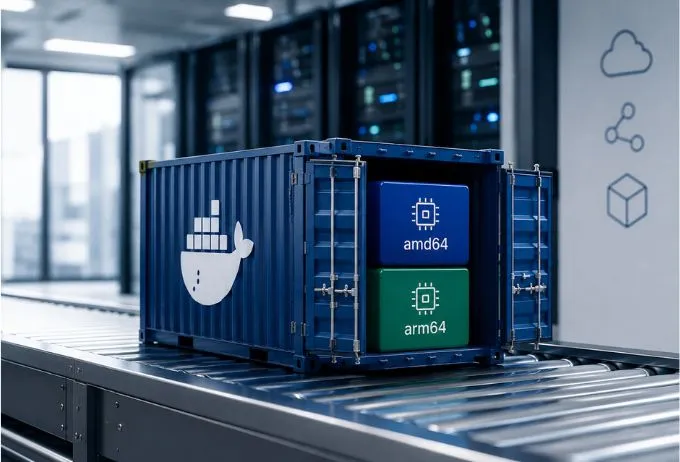
The first infrastructure decision in any digital twin cloud deployment is the operating system. This is not a matter of preference. The GPU rendering containers behind modern digital twin visualization rely on the NVIDIA Container Toolkit for GPU passthrough into Docker containers. That toolkit is built for Linux hosts.
A digital twin platform that depends on containerised rendering therefore needs a Linux base OS. Ubuntu 22.04 LTS is one of the most widely tested and supported distributions for GPU cloud infrastructure today.
Sizing the GPU
In a digital twin cloud deployment, GPU selection must account for both rendering and simulation workloads. A deployment running physics simulation alongside photorealistic rendering needs memory headroom for both. A mid-range cloud GPU such as the NVIDIA T4, with 16 GB of memory, is enough to validate that a deployment works end to end and to run lower-resolution workloads.
For production digital twin visualization at high resolution with several concurrent camera feeds, a higher-memory GPU from the A-series or L-series range gives a noticeably better experience. Our team sizes GPU cloud infrastructure from three inputs: the number of concurrent camera feeds, the target rendering resolution, and the physics simulation complexity. It should never be a default pick from a provider catalogue.
GPU Cloud Infrastructure: Container Configuration
GPU cloud infrastructure for a digital twin platform needs four confirmed dependencies before any simulation work begins:
- NVIDIA GPU drivers at the version required by the container's CUDA toolkit.
- Docker Engine installed and configured with the NVIDIA Container Toolkit.
- A CUDA version that matches the rendering framework (current frameworks often expect CUDA 12.8 or later).
- Verified GPU passthrough, confirmed by running nvidia-smi inside a container.
Each dependency in a digital twin cloud deployment has version compatibility requirements. Validate them explicitly rather than assuming they line up.
Why passthrough verification matters
The NVIDIA Container Toolkit exposes the host GPU to Docker containers. Installing Docker without it produces a setup that runs CPU workloads in containers but fails quietly when a rendering container tries to use the GPU. There is often no visible error.
Running a containerised nvidia-smi check before installing the platform removes this class of silent misconfiguration. In our deployment runbooks, this check is a required gate before any simulation layer installation in a digital twin cloud deployment.
Environment variables
Environment variables are the other common failure point in a digital twin cloud deployment. Rendering containers rely on specific variables to locate images and allocate GPU resources. When these are unset or wrong, rendering fails without an obvious message. The result is a blank output rather than an error.
Our team documents every required variable and its correct value in the deployment specification. Interactive configuration during installation is avoided. This simple discipline prevents a whole category of digital twin cloud deployment failures.
Digital Twin Visualization: The Headless Display Problem
Digital twin visualization in the cloud presents a challenge that local workstations never face. A headless cloud server has no physical display. Simulation and rendering engines that open graphical windows cannot work in a text-only SSH session, because there is no display server for those windows.
This is not a setting you can tweak in the simulation software. It is a basic property of how graphical applications work on Linux, which typically relies on the X Window System or a successor. Any digital twin cloud deployment that needs live visual output requires a dedicated solution.
The right solution
The correct approach is a virtual display server with GPU acceleration, combined with a remote desktop streaming tool. Amazon DCV (formerly NICE DCV) is a practical option on AWS. It creates a GPU-accelerated virtual desktop on the server and streams it to a viewer on the engineer's local machine.
Keep viewing separate from installing
The virtual display is only needed for live viewing. Installation, configuration, dataset download and environment setup all run correctly over plain SSH. Treating the display problem as an installation problem is a common source of unnecessary complexity in digital twin cloud deployment projects. Our team keeps these workstreams explicitly separate.
Remote Visualization GPU: Configuring the Streaming Layer
Remote visualization GPU configuration involves three components, set up in this order:
- A lightweight desktop environment on the server, so the display server has something to manage.
- A GPU-accelerated display server or virtual framebuffer bound to the instance's physical GPU.
- A streaming tool that sends the display to a remote viewer over the network.
For a digital twin cloud deployment, each component must be configured correctly, and in sequence, before the streaming layer produces usable output. The Amazon DCV administrator guide documents the server-side requirements in detail.
The GPU binding trap
The GPU binding step is the most failure-prone part of remote visualization GPU setup. A misconfigured virtual display may quietly fall back to software rendering. The desktop appears to work, but simulation output shows as a black window with no error.
That missing output is easily mistaken for a simulation problem rather than a display problem. Running a lightweight GPU-accelerated benchmark inside the virtual display before starting the platform prevents this misdiagnosis. In a well-run digital twin cloud deployment, GPU binding verification sits in the runbook alongside the Container Toolkit check.
The runtime workflow
Once streaming works in your digital twin cloud deployment, the workflow splits into two parallel processes. One runs the simulation engine, which handles asset physics, spatial logic and operational rules. The other runs the rendering engine, which produces photorealistic output. A bridge script connecting them runs in the background.
Live output from all camera feeds renders into the virtual desktop. The streaming tool then sends it to the remote viewer in real time. This design separates simulation infrastructure from visualization concerns, so each part can be tested and debugged on its own. It also makes the digital twin cloud deployment easier to upgrade, because one engine can change without touching the other.
Digital Twin Platform: Production Deployment Considerations
A digital twin platform built for a proof of concept and one built for continuous production have different infrastructure needs. Understanding this before finalising the digital twin cloud deployment architecture prevents rework when a PoC setup is promoted to production.
Production hardening for a digital twin cloud deployment usually covers five areas:
- Persistent storage: keep sensor data and reconstruction outputs off the compute instance so nothing is lost if it stops.
- Network security: restrict rendering ports and streaming endpoints to authorised IP ranges.
- Monitoring: track GPU utilisation, memory, frame rates and process health.
- Automated restarts: recover simulation and rendering processes after crashes without manual steps.
- Runbooks: document every verification gate and recovery procedure.
Our team scopes these requirements into every digital twin cloud deployment from the first sprint. They should not sit in a post-launch backlog.
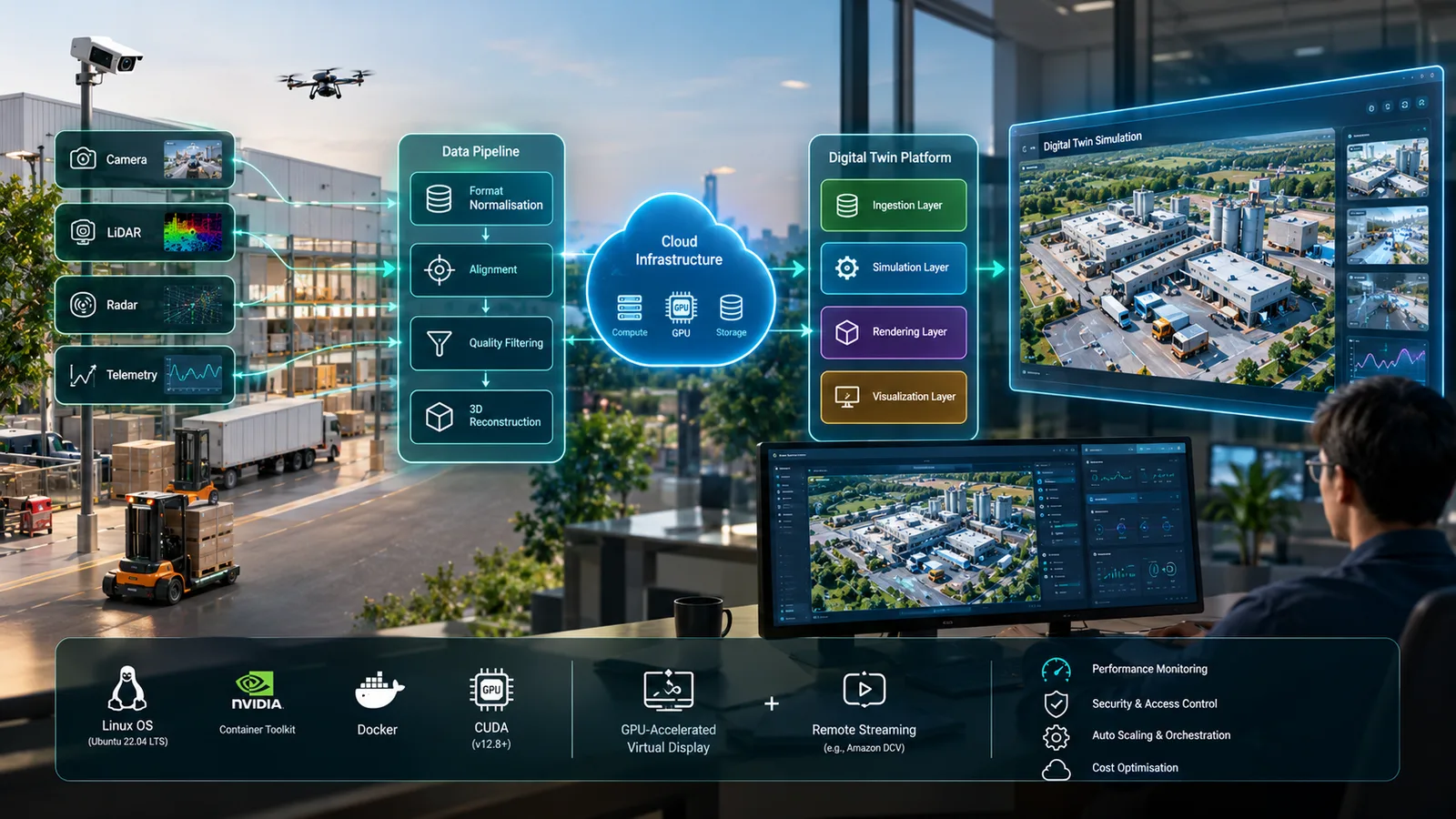
Digital Twin Platform Architecture: Four Layers
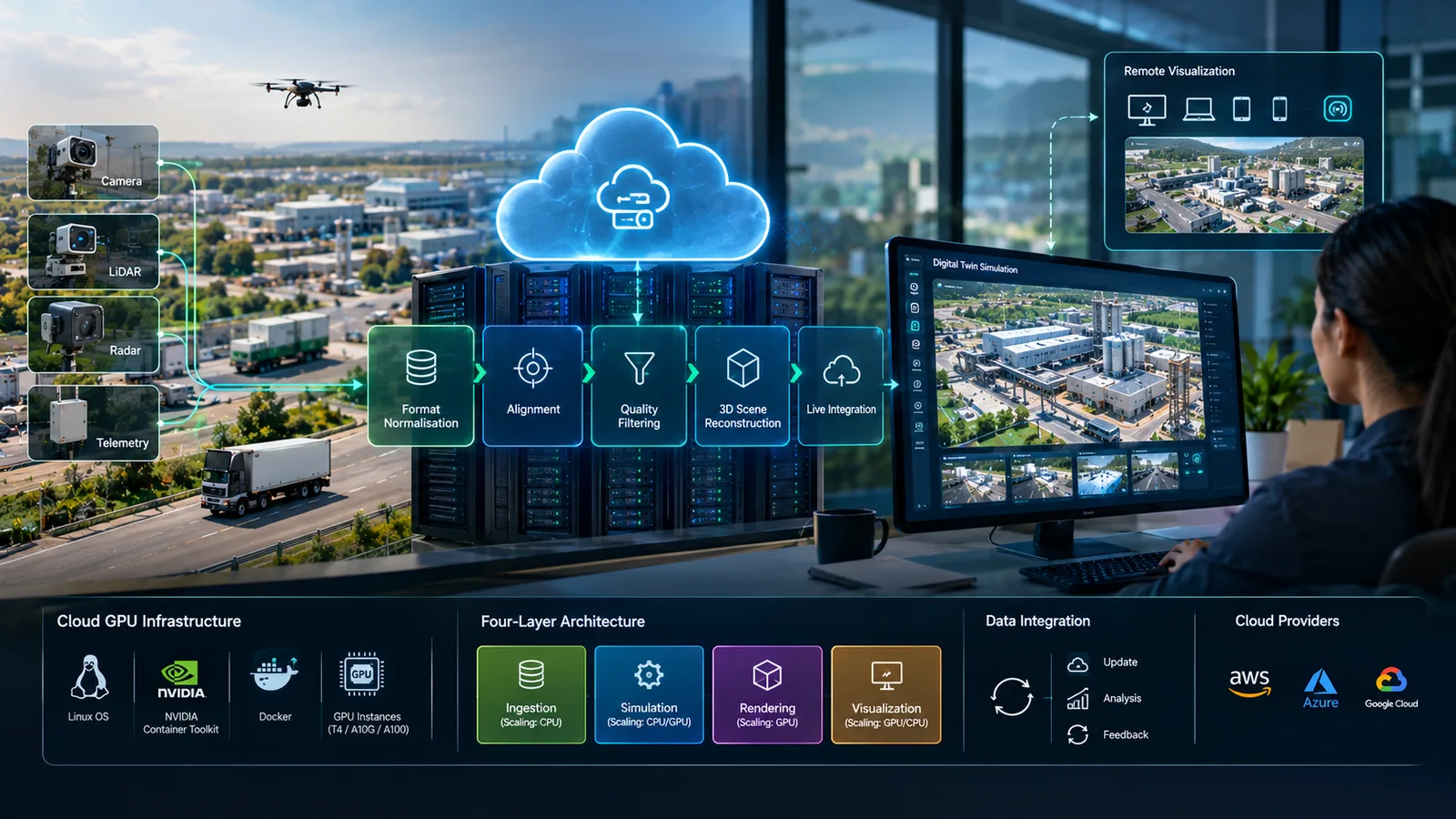
A well-designed digital twin platform on cloud GPU infrastructure separates concerns across four layers. Each has its own scaling and operational profile. This structure lets a digital twin cloud deployment grow without locking into a design that cannot evolve.
| Layer | Main job | Compute |
|---|---|---|
| Data ingestion | Normalise and route sensor feeds | CPU |
| Simulation | Physics, spatial logic, rules | CPU, GPU for AI |
| Rendering | Photorealistic camera views | GPU |
| Visualization | Streaming and dashboards | GPU or web |
Data ingestion layer
In a digital twin cloud deployment, the ingestion layer handles incoming IoT sensor feeds. It normalises formats, validates data quality and routes streams to downstream consumers. It runs on CPU compute, because its work is transformation and routing rather than rendering. Scaling it separately lets the platform absorb more sensor feeds without raising GPU costs. For large facilities with many feeds, our team often builds this layer as a dedicated microservice cluster.
Simulation layer
The simulation layer runs the physics engine, spatial logic and operational rules. It is computationally intensive, but physics alone often does not need GPU acceleration in industrial use cases. The exception is AI-driven simulation, such as training reinforcement learning agents or running neural physics models. Those machine learning workloads benefit from GPUs. Separating simulation from rendering lets teams run simulation on CPU-optimised compute and focus GPUs on rendering.
Rendering layer
The rendering layer produces photorealistic output from the simulation state. This is where the GPU cloud infrastructure investment is concentrated, and it drives the remote visualization GPU requirements. It generates camera views and feeds them to the live display and to any recording or AI training consumers. For many high-resolution feeds, rendering may span several GPU instances behind a load balancer.
Visualization and interaction layer
The visualization layer is what engineers and operators see. Remote engineering users usually get full interactive control through the streaming infrastructure. Operational users often need dashboards instead, served through a web interface that pulls rendered views and telemetry via the platform API. Matching each user group to the right delivery method is a key design decision in any digital twin cloud deployment. Getting it wrong either wastes GPU streaming capacity on dashboard users or frustrates engineers who need full control.
Choosing a Cloud Provider
AWS, Azure and Google Cloud each offer different GPU instance types, container runtimes and networking features. AWS G-series and P-series instances provide GPUs such as the T4, A10G and A100, with Amazon DCV available for streaming. Azure offers NC and NV series instances, with Azure Virtual Desktop as an alternative streaming path. Google Cloud offers A2 instances with A100 GPUs.
Before committing to a digital twin cloud deployment on any one provider, our team assesses each against the client's GPU performance needs, networking, compliance requirements and existing cloud estate. For orchestrated workloads, Kubernetes can also schedule GPUs through device plugins, which helps when a digital twin cloud deployment spans several GPU nodes.
Operating a Digital Twin Cloud Deployment
Post-deployment operations need ongoing attention to cost, performance and security. A digital twin cloud deployment is never finished on launch day; it is a running system that changes as sensors, users and models change.
GPU instances are among the most expensive resources in any cloud catalogue. An underused GPU running around the clock is avoidable spend. Rightsizing based on observed utilisation, auto-stop policies for non-production environments, and spot or preemptible instances for batch reconstruction jobs all help keep costs in check. Our guide on FinOps for AI workloads covers these practices in more depth.
Performance monitoring tracks GPU utilisation, memory pressure, frame rates and simulation step times. It shows when the current configuration is nearing its limits. Security reviews keep streaming endpoints, container registries and sensor data storage protected as the deployment grows from pilot to production.
Conclusion
A successful digital twin cloud deployment depends less on the simulation software and more on infrastructure discipline. Choose a Linux host, verify drivers and GPU passthrough, solve the headless display problem with a GPU-accelerated virtual display, and check GPU binding before you trust the output. Then structure the platform in four layers so each can scale independently.
These practices turn a fragile demo into a reliable digital twin platform. For related reading, see our posts on digital twin simulation and sensor data pipelines and the vehicular health monitoring digital twin PoC. You can also explore our digital twin solutions and DevOps and cloud engineering services.
If you are planning a digital twin cloud deployment, our team is happy to review your architecture. Contact ICANIO to start the conversation.
References
- Digital twin (Wikipedia)
- CUDA (Wikipedia)
- X Window System (Wikipedia)
- NVIDIA Container Toolkit installation guide
- Amazon DCV
- Amazon DCV administrator guide
- Schedule GPUs (Kubernetes documentation)
Frequently Asked Questions
Why does digital twin cloud deployment need Linux?
The GPU rendering containers behind digital twin visualization rely on the NVIDIA Container Toolkit for GPU passthrough, and that toolkit is built for Linux hosts. Windows cloud instances are not a practical base for these GPU-accelerated rendering containers. Ubuntu 22.04 LTS is one of the most widely tested distributions for this kind of GPU cloud infrastructure.
What is remote visualization GPU and why does it matter?
Remote visualization GPU is the pattern that lets engineers see live digital twin output from a headless cloud server with no display attached. A GPU-accelerated virtual desktop on the server renders the simulation output. A streaming tool such as Amazon DCV then sends that display to a viewer on the engineer's local machine in real time.
What GPU cloud infrastructure does a digital twin platform need?
It needs a Linux instance with NVIDIA drivers at the right CUDA version and Docker Engine with the NVIDIA Container Toolkit. It also needs enough GPU memory for both simulation and rendering workloads. Finally, it needs persistent storage separate from the compute instance for sensor data and reconstruction outputs, so data survives instance changes.
What is the most common digital twin cloud deployment failure?
GPU binding in the virtual display is the most common failure point. A misconfigured display falls back to software rendering and shows a black window with no error. Teams often mistake this for a simulation fault. Running a GPU-accelerated benchmark inside the virtual display before starting the platform confirms the binding and prevents the misdiagnosis.
How does cloud digital twin visualization work?
Cloud digital twin visualization runs two parallel processes: a simulation engine for physics and spatial logic, and a rendering engine for photorealistic output. A bridge script connects them, and their output renders into a GPU-accelerated virtual display. The streaming tool sends that display to a remote viewer, so teams can observe the twin from any location.
How can teams control GPU costs after deployment?
Rightsize instances using observed utilisation data, apply auto-stop policies to non-production environments, and use spot or preemptible instances for batch reconstruction jobs. Separating CPU-bound layers such as ingestion and simulation from GPU-bound rendering also helps, because it keeps expensive GPU capacity focused on the work that genuinely needs it.