AKS certificate management works smoothly until it suddenly does not. Ingress resources look correct, cert-manager is installed and the ClusterIssuer is defined. Then a deployment stalls because the expected TLS secret was never created. The ingress controller throws errors and the application is unreachable. When engineers read the cert-manager logs, the root cause is often something invisible during setup: a Let's Encrypt rate limit triggered by earlier requests for the same domain. This guide covers the full diagnostic process for AKS certificate issues, how the limits work, why they hit development environments hardest, and the practical fixes for each case.
ICANIO's DevOps and Cloud Engineering practice manages Kubernetes TLS automation, cert-manager configuration and certificate governance on Azure Kubernetes Service. The diagnostic steps and configuration patterns below reflect what our team uses on real AKS clusters.
Key Takeaways
- Most AKS certificate failures surface as a missing TLS secret at the ingress, not as a clear cert-manager error.
- Run kubectl describe on the Certificate resource first; it shows the real error from the certificate authority.
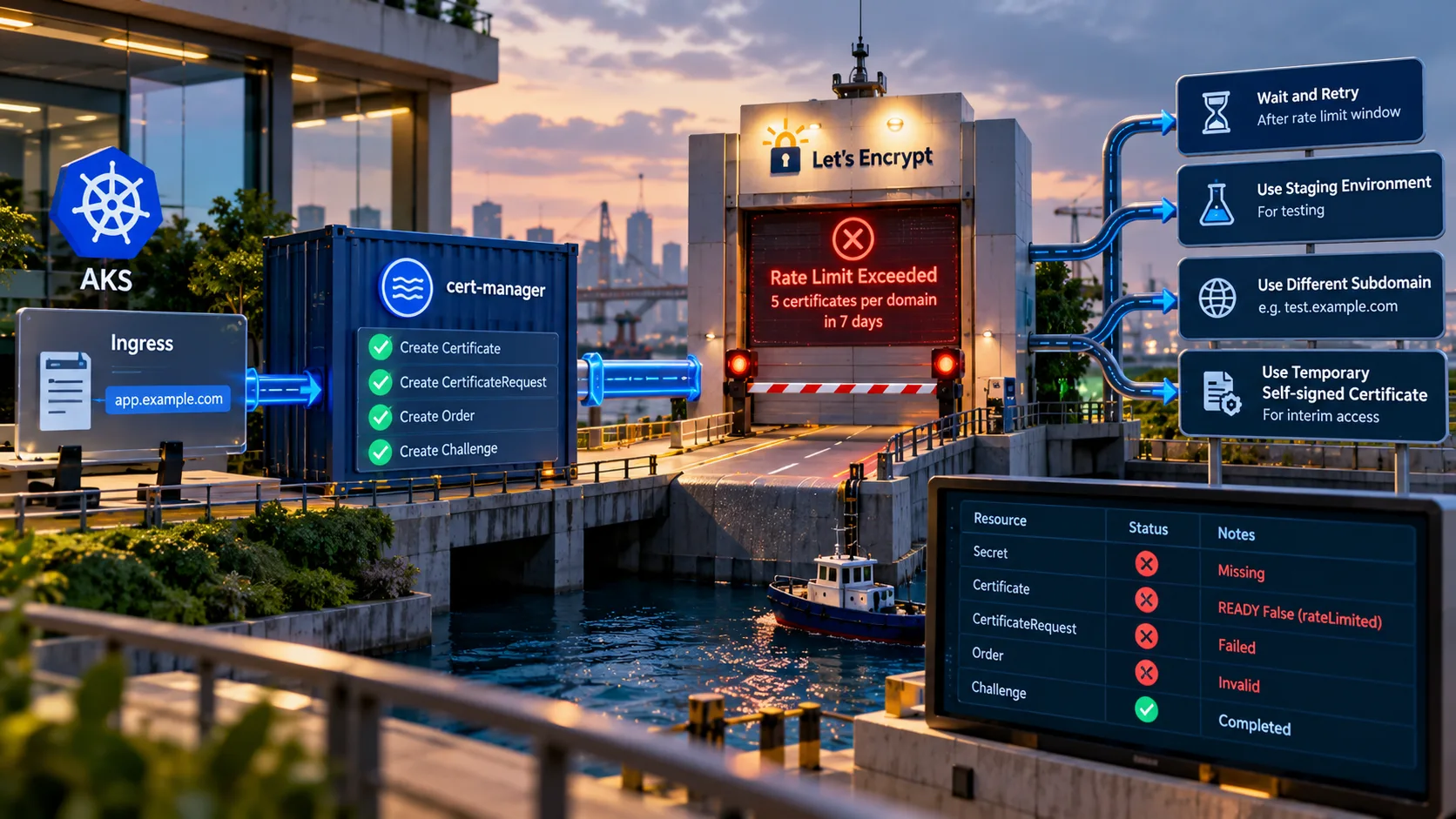
- Let's Encrypt allows up to 5 certificates per exact set of identifiers every 7 days.
- Four fixes cover most cases: wait, switch to staging, change subdomain, or use a temporary self-signed cert.
- Prevent repeat incidents with separate issuers per environment, secret backups and expiry monitoring.
What Is the AKS Certificate Provisioning Lifecycle?
Cert-manager automates certificate issuance in Kubernetes. It integrates with ACME certificate authorities such as Let's Encrypt. ACME is the protocol defined in RFC 8555 for automated domain validation and certificate issuance.
The AKS certificate flow runs in a fixed sequence:
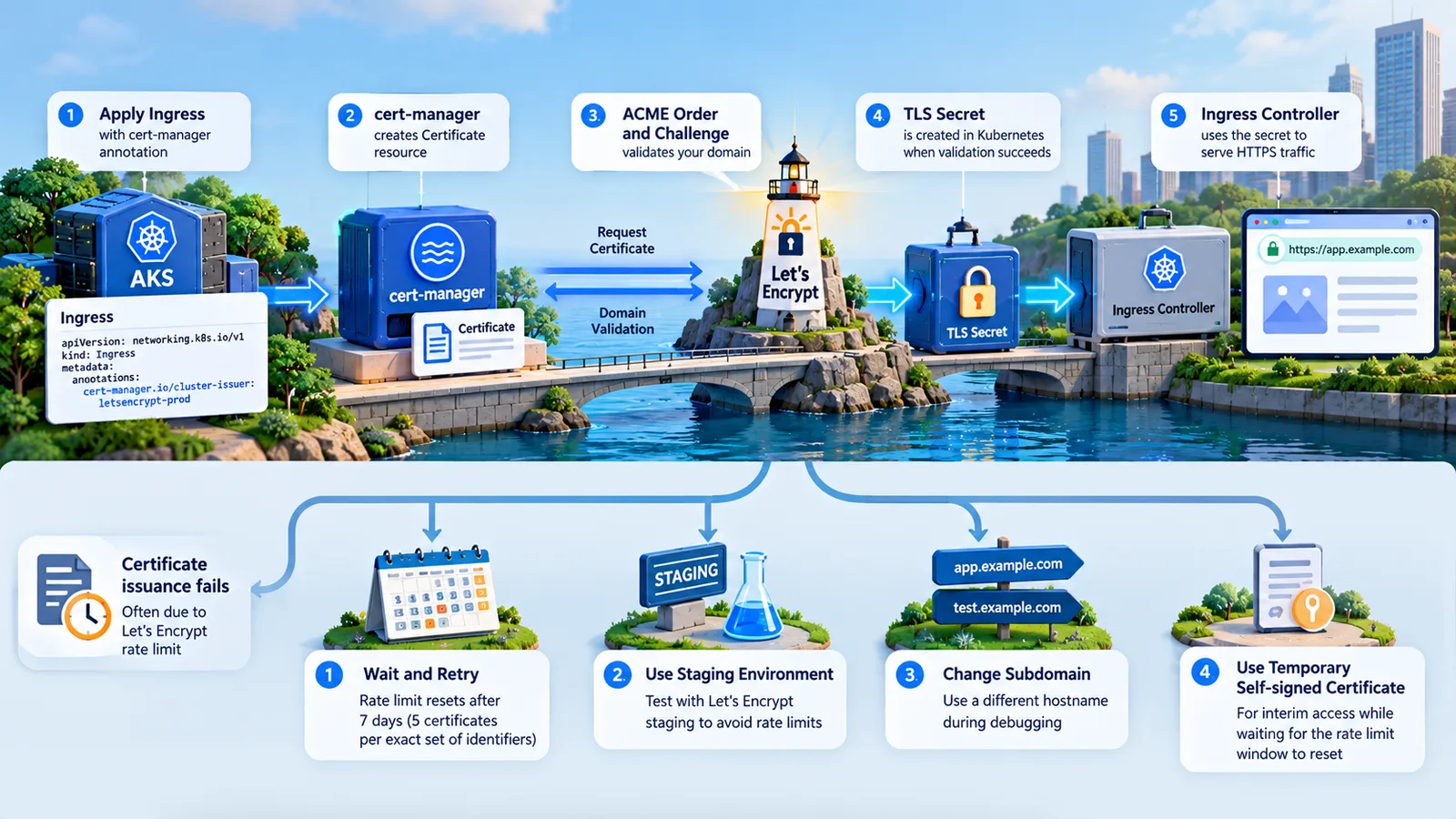
- You apply an Ingress with a cert-manager annotation that names an issuer.
- Cert-manager detects the annotation and creates a Certificate resource.
- It creates a CertificateRequest and an ACME Order with the certificate authority.
- The authority issues Challenges to prove you control the domain.
- If validation succeeds, cert-manager stores the result as a Kubernetes TLS secret.
- The ingress controller reads that secret and terminates TLS.
The cert-manager ingress guide documents the supported annotations. On AKS, the ingress controller is commonly NGINX or the Application Gateway Ingress Controller.
Why AKS Certificate Errors Are Easy to Misread
Several steps in that flow can fail silently from the ingress controller's point of view. The controller expects a Kubernetes TLS secret with the name given in the Ingress. If cert-manager has not created it yet, the controller simply reports a missing secret.
That indirect reporting is why many AKS certificate issues are misdiagnosed at first. The visible error lives at the ingress layer. The real failure lives in cert-manager. Our team's standard first step for any AKS certificate issue is to inspect cert-manager resources directly, rather than reasoning from ingress errors alone.
| Resource | What it tells you | Typical failure |
|---|---|---|
| Secret | Whether issuance finished | Missing or stale |
| Certificate | Overall status and CA error | READY False, rateLimited |
| CertificateRequest | Each issuance attempt | Denied or failed |
| Order | ACME order state | Invalid or pending |
| Challenge | Domain validation | DNS or HTTP-01 failure |
| ClusterIssuer | Account and server config | Wrong ACME URL or secret |
How to Diagnose AKS Certificate Issues Step by Step
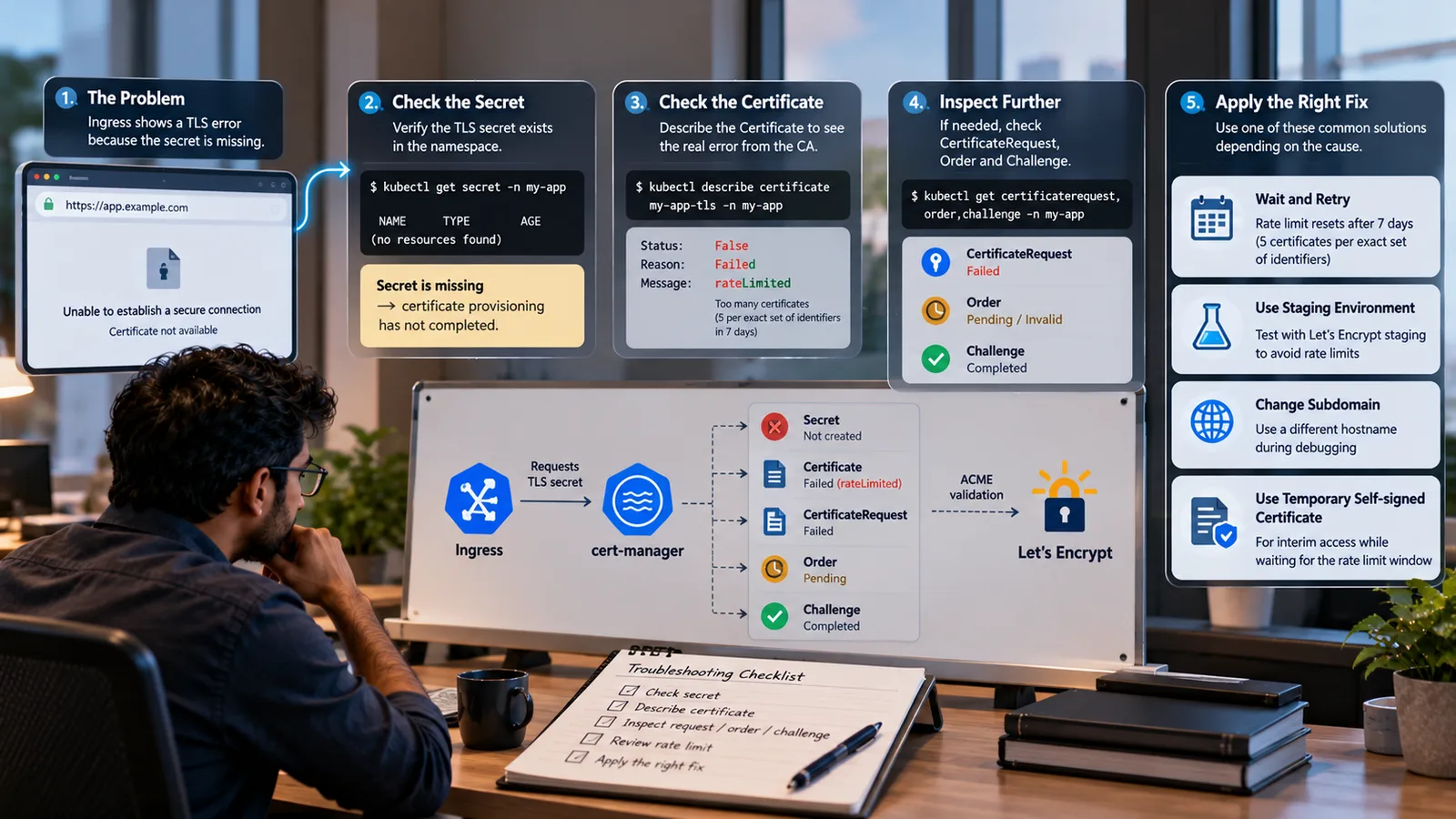
A systematic flow saves time. Confirm the secret exists. Then read the Certificate status. Finally trace through CertificateRequest, Order and Challenge resources until you find the failing layer.
Step 1: Check Whether the Secret Exists
Confirm that the Kubernetes TLS secret referenced in the Ingress exists in the right namespace. If it is absent, provisioning has either not started or has failed. This step also rules out a simple typo in the secret name.
kubectl get secret -n my-app
kubectl get certificate -n my-app
Step 2: Describe the Certificate Resource
The Certificate resource holds the current status and any error conditions. Check whether READY is True or False. Then run kubectl describe on it to read the status conditions and events.
kubectl describe certificate my-app-tls -n my-app
This is the single most useful AKS certificate diagnostic step. It surfaces the real error message from the certificate authority. When a Let's Encrypt rate limit is the cause, the message includes a rateLimited error and a retry-after time.
Step 3: Check CertificateRequest, Order and Challenge
If the Certificate error is vague, go one layer deeper. CertificateRequest resources show each issuance attempt. Challenge resources show ACME domain validation. Challenge failures point to DNS records, HTTP-01 routing or ClusterIssuer misconfiguration, not to a rate limit. The cert-manager ACME troubleshooting guide walks through each case.
kubectl get certificaterequest,order,challenge -n my-app
kubectl describe challenge -n my-app
Our team's runbooks include all three layers as standard. That way, the root cause is confirmed before anyone changes configuration.
Why the Let's Encrypt Rate Limit Happens
Let's Encrypt publishes its rate limits openly. The one that most often blocks AKS certificate issuance is "New Certificates per Exact Set of Identifiers". It allows up to 5 certificates for the same exact set of domain names every 7 days. Capacity refills gradually over that window rather than all at once.
In production, a domain is issued once and then renewed, so this rate limit is rarely reached. Development and staging are different. The same hostnames are reused across cluster rebuilds, config changes and debugging attempts.
Three habits drive most incidents:
- Rapid iteration while debugging sends many requests for one domain in a short time.
- Cluster rebuilds wipe certificate state and trigger fresh requests.
- Deleting a namespace removes the Kubernetes TLS secret, so cert-manager requests a new certificate.
The symptom looks like several other failures: a missing secret with no obvious ingress error. That is why our team checks for a rate limit early whenever cert-manager stops creating secrets in non-production clusters.
Four Essential Fixes for AKS Certificate Rate Limits
Fix 1: Wait for Capacity to Refill
The error message includes a retry-after timestamp. In production, where the hostname cannot change and the certificate must come from the trusted issuer, waiting is often the right answer. No manual action is needed once capacity returns. Cert-manager retries on its own schedule. An alert on the Certificate READY condition tells you when it succeeds.
Fix 2: Switch to Let's Encrypt Staging
For development and testing, use the Let's Encrypt staging environment. It uses a separate ACME endpoint with far higher limits. Its documentation lists 30,000 certificates per exact set of identifiers per week.
Staging certificates are signed by an untrusted test authority. Browsers will show warnings, so staging is not suitable for user-facing sites. For internal environments and automated tests, that rarely matters. The ClusterIssuer change is small: point the ACME server at the staging directory.
apiVersion: cert-manager.io/v1
kind: ClusterIssuer
metadata:
  name: letsencrypt-staging
spec:
  acme:
    server: https://acme-staging-v02.api.letsencrypt.org/directory
    email: platform@example.com
    privateKeySecretRef:
      name: letsencrypt-staging-account
    solvers:
      - http01:
          ingress:
            ingressClassName: nginx
Then update the Ingress annotation to reference the staging ClusterIssuer by name.
Fix 3: Use a Different Subdomain
The limit applies to the exact set of identifiers. Changing the hostname for the affected environment creates a new set, so issuance can proceed at once. Make environment-specific hostnames a standard. For example, use api-dev, api-staging and api for development, staging and production. This also gives clearer separation in DNS and access control.
Fix 4: Create a Temporary Self-Signed Certificate
When the app must be reachable now, create a self-signed Kubernetes TLS secret by hand. This unblocks the ingress controller while you wait.
openssl req -x509 -nodes -days 7 -newkey rsa:2048 \
  -keyout tls.key -out tls.crt -subj "/CN=api-dev.example.com"
kubectl create secret tls my-app-tls --cert=tls.crt --key=tls.key -n my-app
Users will see browser warnings. Treat it as a short bridge, not a solution. Remove it once cert-manager can issue a real certificate, or cert-manager may not replace it as expected.
How to Prevent AKS Certificate Failures
The best AKS certificate strategy is prevention. Responding after a deployment is blocked always costs more. Four practices remove most risk:
- Separate environments with distinct hostnames for development, staging and production.
- Back up TLS secrets before cluster operations, so a rebuild can restore them.
- Monitor Certificate READY status and expiry, and alert before problems reach users.
- Default non-production clusters to the staging ClusterIssuer, with explicit opt-in for production.
A clear naming convention helps with the last point. When the issuer name shows in the Ingress annotation, anyone can audit which environments use production quota. Our team treats this consistency as a reliability requirement, not a preference.
Cert-Manager Best Practices for Enterprise AKS Clusters
Fixing active failures is only half the job. Configuration standards stop failures from recurring.
Run cert-manager in its own namespace with tightly scoped RBAC. This separates certificate operations from workloads and makes logs easier to search during incidents. Keep ClusterIssuer and Certificate manifests in source control, so changes are reviewed and can be rolled back. Kubernetes Secrets documentation is worth reviewing when you set access policies for TLS secrets.
Cert-manager exposes Prometheus metrics, including certificate expiry and readiness. Scrape them and alert on certificates nearing expiry or stuck in a not-ready state. In regulated environments, expiry monitoring and configuration history are often audit requirements, not extras.
Treat cert-manager as first-class infrastructure, not a one-time install. Certificates expire. Automation can fail without user-visible errors if nobody is watching. Tracking Certificate status next to application health gives teams the visibility to catch AKS certificate issues before production feels them. Our article on structured logging and production observability covers how to fold these signals into wider monitoring.
Automation and Governance for AKS Certificate Management
Store certificate standards in the same infrastructure-as-code repositories as the ClusterIssuer and Ingress resources they govern. That way, certificate configuration is reviewed alongside application changes. It does not become a separate, undocumented concern.
Good onboarding matters too. Engineers new to Kubernetes certificate management benefit from templates, runbooks and a short checklist. With those in place, teams can diagnose and fix common AKS certificate failures on their own and apply preventive governance from day one.
AKS Certificate Checks in the Software Development Lifecycle
AKS certificate problems are cheapest to catch before a release, not after it. Treat certificate configuration as part of the normal software development lifecycle, with the same review and testing as application code. A few lightweight checks go a long way:
- Validate Ingress annotations in CI, so every manifest references an approved ClusterIssuer.
- Fail a pipeline when a production hostname points at the staging issuer, or the reverse.
- Run a post-deploy check that waits for the Certificate to report READY before traffic shifts.
- Track how many certificate requests each environment makes per week, so rate limit pressure is visible early.
These checks turn AKS certificate health into a routine signal rather than a surprise. They also give developers fast feedback. A pull request that would trigger a duplicate certificate request can be flagged before it reaches the cluster. Our team recommends keeping the checks simple at first and adding more only when a real incident shows a gap. Over time, the AKS certificate checklist becomes part of the definition of done for any service that exposes a public endpoint.
The gap between a cluster that works and one that is reliable comes from the practices around the tools. Cert-manager removes the manual work of issuance and renewal. It does not remove the need to know whether that automation is healthy. Teams that monitor expiry, status and issuer health get steady value from automation. Teams that set and forget it meet these failures under the pressure of a blocked release. For related reading, see our guides on Docker Buildx multi-platform images and platform engineering.
Conclusion
Most AKS certificate incidents follow the same pattern. A secret is missing, the ingress error is vague, and the real cause sits in cert-manager, often a Let's Encrypt rate limit. A systematic check of the Secret, Certificate, CertificateRequest and Challenge resources finds the cause quickly. Waiting, switching to staging, changing the subdomain or using a temporary self-signed certificate then unblocks the release.
Prevention is cheaper than recovery. Separate hostnames, staging issuers for non-production, secret backups and expiry alerts keep these issues from returning. If your team wants help hardening Kubernetes TLS on Azure, contact ICANIO to talk with our DevOps engineers.
References
- cert-manager documentation
- cert-manager ACME troubleshooting
- Let's Encrypt rate limits
- Let's Encrypt staging environment
- RFC 8555: Automatic Certificate Management Environment
- Kubernetes Secrets
- Application Gateway Ingress Controller overview (Microsoft Learn)
Frequently asked questions
Why is cert-manager not creating a Kubernetes TLS secret?
Common causes are a Let's Encrypt rate limit, a failed ACME challenge, a misconfigured ClusterIssuer or a cert-manager controller error. Run kubectl describe on the Certificate resource in the relevant namespace to read the exact message. That gives you the specific failure reason instead of guessing from indirect errors at the ingress layer, which only report that the secret is missing.
What is the Let's Encrypt limit for duplicate certificates?
Let's Encrypt allows up to 5 certificates for the same exact set of identifiers every 7 days. When you exceed it, new requests fail with a rateLimited error that includes a retry-after time. Capacity refills gradually. Switching to the staging environment or changing the hostname are the fastest ways around it when an AKS certificate is blocked.
How do you switch cert-manager to Let's Encrypt staging?
Create a ClusterIssuer that points the ACME server at the Let's Encrypt staging directory instead of production. Then update the issuer annotation on the Ingress to reference that staging ClusterIssuer. Staging has much higher limits and suits development and testing. Browsers will warn about staging certificates, so do not use them for public, user-facing sites.
How do you create a self-signed Kubernetes TLS secret?
Generate a certificate and key with openssl using the x509 option and your hostname as the common name. Then run kubectl create secret tls with the certificate and key files. This produces a working Kubernetes TLS secret that unblocks the ingress controller immediately. Users will see a browser warning, so replace it with a trusted certificate as soon as possible.
How can I monitor AKS certificate expiry?
Scrape the Prometheus metrics that cert-manager exposes and alert on certificates that are close to expiry or not ready. Many teams add a dashboard panel that lists every Certificate resource with its READY status and expiry date. Pair this with alerts in your existing incident tooling, so certificate problems reach the same on-call engineers as application issues.
Does the AKS certificate process differ with Application Gateway?
The cert-manager side is the same: it issues certificates and stores them as Kubernetes TLS secrets. The difference is the ingress controller. With the Application Gateway Ingress Controller, the gateway reads the secret and terminates TLS. HTTP-01 challenges must be routable through the gateway, so check its listener and rules if challenges fail.