Every .NET developer who works with an ORM long enough meets a bug that should take five minutes but stretches into hours. The EF Core unique constraint bug is one of the most disorienting, because the symptom persists after the root cause is fixed. The engineer corrects the offending value and calls SaveChanges() again. The identical error comes back. The data looks correct, yet the exception fires again. The reason is not in the data. It is in change tracking, which still holds the failed entity in EntityState.Added.
ICANIO's Application Development practice builds production .NET applications with robust error handling and database interaction patterns. The EF Core unique constraint handling, change tracker management and recovery strategies in this guide are the ones our team uses in production software development work.
Key Takeaways
- A failed SaveChanges() rolls back the database transaction but does not reset the EF Core change tracker.
- The failed entity stays in EntityState.Added, so every retry generates the same INSERT and the same EF Core unique constraint error.
- Fix 1: detach only the failed entities found in DbUpdateException.Entries.
- Fix 2: call ChangeTracker.Clear() when a full reset of the context is safer.
- Check SqlException numbers 2627 and 2601 to tell constraint and index violations apart.
- Short-lived DbContext instances, idempotent inserts and tested error paths prevent the problem recurring.
EF Core Unique Constraint: Understanding the Failure Pattern
The violation scenario starts simply. Picture a Users table with a unique index on the Email column. An engineer adds a user whose email already exists. Entity Framework Core throws a DbUpdateException wrapping a SqlException. The error number is 2627 for a unique key violation or 2601 for a unique index violation. The transaction rolls back. So far, this is expected.
The EF Core unique constraint surprise comes on the next SaveChanges() call. The engineer updates the email to a unique value. SaveChanges() throws the same EF Core unique constraint error anyway. The entity appears valid. Nothing looks wrong in the debugger. Yet the same INSERT fails again.
For engineers unfamiliar with EF Core entity state management, this is deeply confusing. The fix seems correct but has no effect. In our team's experience, change tracker retention after this exception is a frequent source of misdiagnosis in Entity Framework Core applications. Engineers chase the data when the problem is the context.
What the EF Core Change Tracker Does After a Failed Save
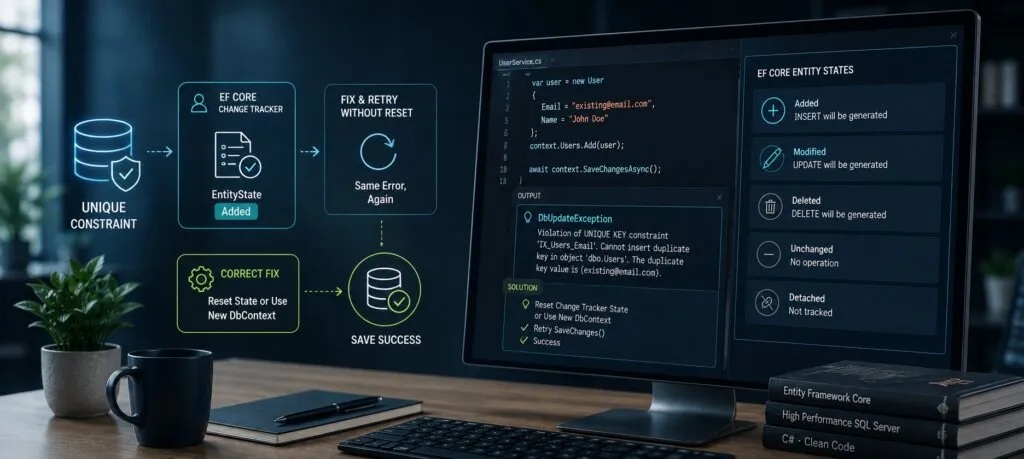
When context.Users.Add(user) runs, the framework registers the entity with the EF Core change tracker in EntityState.Added. That state tells EF Core to generate an INSERT on the next SaveChanges(). When SaveChanges() fails with an EF Core unique constraint violation, the framework rolls back the transaction. Critically, it does not reset the change tracker. The entity stays in EntityState.Added.
Every later SaveChanges() on the same DbContext therefore attempts the same INSERT for the same entity. Property changes made in application code do not alter that outcome.
The EF Core entity state decides which SQL operation the framework generates. Because the state is still Added, EF Core generates a new INSERT each time. The violation fires again and again. This is by design. The framework preserves state after a failure so developers can inspect it and decide how to proceed. It makes no assumptions about intent. Microsoft's documentation on change tracking in EF Core explains this state model in detail. The consequence is clear: error handling code must manage EF Core change tracker state explicitly.
EF Core Entity State: The States to Know
Understanding EF Core entity state is the key to resolving the EF Core unique constraint retry problem. Entity Framework Core tracks every entity in a DbContext through a set of states. Each state decides what operation runs on the next save.
| Entity state | SQL generated | When it occurs |
|---|---|---|
| Added | INSERT | After Add(); kept after a failed save |
| Modified | UPDATE | Tracked entity with changed properties |
| Deleted | DELETE | After Remove() |
| Unchanged | None | Retrieved, not modified |
| Detached | None | Not tracked at all |
When SaveChanges() fails, all entities in the failed operation keep their state. An Added entity stays Added. A Modified entity stays Modified. The only way to stop them being retried is to change their EF Core entity state to Detached. That removes them from the EF Core change tracker entirely.
Diagnosing the EF Core Unique Constraint Retry with Logging
Before applying any EF Core unique constraint fix, confirm the diagnosis.
Entity Framework Core has logging that shows the SQL being generated, which makes the retry behaviour visible at once. Calling optionsBuilder.LogTo() in the DbContext configuration sends SQL output to the console or a logging framework. Each INSERT that SaveChanges() attempts then appears in the log. The EF Core simple logging guide covers the options.
Seeing the same INSERT appear across separate SaveChanges() calls confirms the change tracker is holding the entity in Added. This makes the EF Core unique constraint problem concrete and reproducible in a test environment. It also helps justify adding exception handling to existing code. Our team includes change tracker logging as a standard step in .NET error investigation runbooks. If you want those logs to be searchable later, our guide to structured logging and production observability shows how to capture them well.
Quick diagnostic checklist
- Enable LogTo() with sensitive data logging only in development.
- Reproduce the duplicate insert in a test.
- Inspect context.ChangeTracker.Entries() after the failure.
- Confirm the failed entity still shows State = Added.
Fix 1 for an EF Core Unique Constraint: Detach the Entity
The most targeted fix for an EF Core unique constraint failure is to catch the DbUpdateException, find the failed entities and set their state to Detached. This removes only those entities from tracking. Other entities in the same DbContext are not affected.
The pattern wraps SaveChanges() in a try block. The catch block reads the exception's Entries property, which lists the entities that caused the failure. It sets each entry's state to Detached, then rethrows or handles the error.
try { context.SaveChanges(); }
catch (DbUpdateException ex)
{
    foreach (var entry in ex.Entries)
        entry.State = EntityState.Detached;
    throw;
}
This DbUpdateException handling pattern is the most precise approach. Related entities or batch entries that did not fail stay tracked and will be included in the next save. In enterprise applications where batch operations are common, that precision helps maintain correctness across mixed success and failure scenarios.
Fix 2 for an EF Core Unique Constraint: Clear the Tracker
Sometimes a complete reset is the better EF Core unique constraint recovery. EF Core 5 and later provide context.ChangeTracker.Clear(), which detaches every tracked entity at once. This suits three situations:
- A batch operation failed and several entities may be inconsistent.
- The DbContext is reused across operations and needs a clean slate.
- The recovery logic rebuilds the entity graph from scratch anyway.
The DbUpdateException handling pattern here catches the exception, calls ChangeTracker.Clear(), and then either recreates the operation with fresh entities or returns the error to the caller.
The tradeoff between the two EF Core unique constraint fixes is scope. Clear() removes all tracked entities, not just the failed one. Any other pending changes in that context are lost. That may be correct after a failure, but the intent should be explicit in code. Our team documents the expected behaviour of Clear() in post-failure paths during design reviews, so nobody is surprised later.
| Approach | Scope | Best for | Risk |
|---|---|---|---|
| Detach entries | Failed entities only | Single bad row in a batch | Must find all failed entries |
| ChangeTracker.Clear() | Whole context | Full rebuild after failure | Loses other pending changes |
| New DbContext | Whole context | Request-scoped work | Extra setup cost |
Distinguishing EF Core Unique Constraint Error Types
The DbUpdateException wraps a SqlException when the error comes from SQL Server.
Two error numbers signal an EF Core unique constraint problem. Number 2627 indicates a violation of a primary key or unique constraint defined in the table schema. Number 2601 indicates a duplicate key in a unique index that is not declared as a constraint. Microsoft lists both in its reference of Database Engine errors 2000 to 2999.
Both surface as a DbUpdateException. Telling them apart allows more precise user-facing messages, for example "this email is already registered" versus "duplicate record". Walk the InnerException chain to the SqlException and check its Number property inside the catch block. Our team adds this check whenever an application must show different messages or take different recovery actions per constraint. For background on how relational databases define these keys, see the unique key article on Wikipedia. You can define the index itself in EF Core using the guidance on indexes in EF Core modelling.
Production Patterns for Entity Framework Core Error Handling
Beyond the immediate EF Core unique constraint fix, enterprise applications benefit from a standard approach to Entity Framework Core errors. Production code meets unique violations, foreign key violations, optimistic concurrency conflicts and connectivity failures. Each needs a different recovery. All share one requirement: manage EF Core entity state correctly after the failure.
A common pattern wraps every save in a service-layer method. That method catches DbUpdateException and inspects the inner exception to classify the error. It performs the right state cleanup. Then it returns a typed result object rather than rethrowing the raw database exception.
Calling code can then respond to specific failure modes without coupling business logic to Entity Framework Core exception types. Change tracker cleanup is centralised instead of copied into every repository method. Our team treats this exception translation layer as a standard part of .NET application design.
Idempotent inserts
Idempotency makes EF Core unique constraint errors manageable at the service level. An idempotent operation gives the same result whether it runs once or several times. The concept is described in the Wikipedia article on idempotence.
For entity creation, idempotency usually means checking whether the entity exists before inserting. That can be an explicit query or a conflict-aware upsert. Combined with proper DbUpdateException handling, idempotent operations remove most duplicate-insert retry failures. The cost is typically one extra read per insert. In distributed systems, where retries make duplicate attempts routine, that cost is usually worth paying. A check-then-insert can still race under concurrency, so keep the unique index and the exception handler as the final safety net.
Operational Best Practices for EF Core in Production
Enterprise applications built on Entity Framework Core run at higher volume and concurrency than development environments. EF Core unique constraint handling is one part of a broader discipline: design for failure, not just the happy path.
DbContext lifetime
DbContext lifetime is the most consequential design decision in any EF Core application. Long-lived contexts accumulate tracked entities. Entities from earlier operations then sneak into later saves. In ASP.NET Core, a scoped lifetime creates one context per HTTP request and disposes it afterwards. That limits change tracking to a single request. It prevents the cross-request state build-up behind some of the hardest production bugs. Microsoft's DbContext lifetime and configuration guide explains the options.
Retry policies
Retry policies must respect change tracking state. When a transient error such as a timeout makes SaveChanges() fail, retrying the same operation on the same entities is correct. For non-transient errors, including an EF Core unique constraint violation, retrying the same data will always fail.
Classify errors before retrying, so an EF Core unique constraint violation is never retried blindly. Separate transient retry logic from non-transient handling, so retries improve reliability without creating infinite loops. This is the same principle DevOps teams apply to cloud service calls: only retry what can succeed on a second attempt.
Testing the error paths
Testing Entity Framework Core error handling needs care. The InMemory provider does not enforce unique constraints, so it cannot test EF Core unique constraint handling. SQLite with the correct schema does enforce them, as the SQLite CREATE INDEX documentation describes for unique indexes. Microsoft's EF Core testing guidance discusses these tradeoffs.
Alternatively, a mocking framework can throw a DbUpdateException with the inner exception structure production code expects. That exercises the catch branches with no database at all. Our team recommends covering every exception path in unit tests before deployment, and adding these tests to CI automation so regressions are caught early.
Keep an incident knowledge base
Keeping a written log of known Entity Framework Core error patterns is an underused practice.
After an EF Core unique constraint incident, record the root cause, the query context, the entity state at failure and the resolution. Similar incidents then resolve faster. Over time the log reveals patterns. Some operations trigger violations under specific concurrency. Some context configurations cause unexpected state build-up. Some flows need careful transient versus non-transient handling. Our team recommends leaving this kind of knowledge base with the client engineering team at the end of a project, so they can diagnose issues independently.
Related Concurrency and Tracking Topics
The EF Core unique constraint bug often appears alongside other tracking and concurrency issues. If your application tracks large entity graphs, our article on entity tracking performance optimisation covers no-tracking queries and context sizing. If duplicates appear only under load, transaction isolation may be involved. Our SQL Server ACID and isolation levels guide explains how concurrent transactions see each other's data.
Conclusion
The EF Core unique constraint retry loop is confusing until you understand the change tracker. A failed save rolls back the database, not the context. The entity stays Added, and every retry repeats the same INSERT.
The EF Core unique constraint fix is straightforward. Detach the failed entries, or clear the tracker when a full reset is safer. Then build the surrounding habits: short-lived contexts, classified errors, idempotent inserts and tested exception paths.
If your team is fighting persistent data-access bugs or planning a .NET modernisation, our engineers can help review the design and harden it for production. Contact ICANIO to talk it through.
References
- Microsoft Learn: Change Tracking in EF Core
- Microsoft Learn: Indexes in EF Core
- Microsoft Learn: Database Engine errors 2000 to 2999
- Microsoft Learn: Testing EF Core applications
- Wikipedia: Unique key
- Wikipedia: Idempotence
- SQLite: CREATE INDEX
Frequently asked questions
Why does an EF Core unique constraint error repeat after the fix?
Entity Framework Core does not reset entity state when SaveChanges() fails. The entity stays in EntityState.Added after a DbUpdateException, so the change tracker retries the same INSERT on every later save, whatever you changed on the entity. The fix is to set the failed entity's state to Detached, or call ChangeTracker.Clear(), inside the catch block.
What is DbUpdateException and when does it occur?
DbUpdateException is the exception Entity Framework Core throws when SaveChanges() hits an error during an INSERT, UPDATE or DELETE. It wraps the underlying database exception, usually a SqlException on SQL Server. For unique violations the inner error number is 2627 for a constraint or 2601 for a unique index, which you can read through the InnerException chain.
Detach or ChangeTracker.Clear(): which should I use?
Setting an entry's state to Detached removes only the failed entity from tracking and leaves other tracked entities ready for the next save. Use it when one row failed in an otherwise valid batch. ChangeTracker.Clear() removes every tracked entity at once, giving a full reset. Use it when the whole operation will be rebuilt from scratch after the failure.
Does EF Core roll back the change tracker when SaveChanges fails?
No. Entity Framework Core rolls back the database transaction, but the change tracker keeps every entity state, including the Added entities that caused the failure. This is deliberate, so developers can inspect and recover. Your DbUpdateException handling code must manage tracker state explicitly to avoid the EF Core unique constraint retry loop.
How do you handle EF Core unique constraint errors in production?
Wrap SaveChanges() in a try-catch for DbUpdateException. Read the Entries property to find failed entities, check the inner SqlException number to distinguish 2627 from 2601, and detach the failed entities. Then return a typed result or rethrow. Add idempotent insert checks and keep the unique index as the final safety net.
Can I test unique constraint handling with the InMemory provider?
Not reliably for an EF Core unique constraint. The InMemory provider does not enforce unique constraints, so a duplicate insert will succeed and your catch block never runs. Use SQLite with the real schema, a test instance of your production database engine, or a mock that throws a DbUpdateException with the expected inner exception. Each approach exercises the error path properly.