REACT 18 · FRONTEND MODERNIZATION · DEVELOPER PRODUCTIVITY
This React application modernization upgraded a legacy frontend from React 16.3.1 to 18.3.1, resolving 186 outdated packages, migrating deprecated APIs, and refactoring UI components for React 18 compatibility.
Quick Answer
What Is React Application Modernization?
React application modernization upgrades a legacy React version, resolves outdated dependencies, and migrates deprecated APIs to restore compatibility, performance, and developer productivity. ICANIO completed this React application modernization by upgrading from React 16.3.1 to 18.3.1 and resolving 186 outdated packages, tripling developer productivity and optimizing application performance by 40%.
Executive Summary
Turning a Legacy React 16 Frontend Into a Modern, Stable Platform
Modernizing the frontend required upgrading React from 16.3.1 to 18.3.1 while resolving numerous outdated dependencies, deprecated APIs, and ensuring UI stability, performance, and compatibility. ICANIO’s partner was facing exactly that gap: a legacy React version that created compatibility issues with modern libraries, 186 outdated packages causing dependency conflicts and build instability, deprecated APIs like useHistory and Switch requiring migration, and Storybook and UI components incompatible with React 18 architecture.
ICANIO addressed this by executing a structured React modernization rather than a risky big-bang rewrite. The objective was to incrementally upgrade React from 16.3.1 to 18.3.1 safely, replace deprecated APIs using React Router v6 hooks, refactor UI components and Storybook for React 18 compatibility, and implement regression testing and monitoring to ensure stability, scalability, and performance throughout the migration.
The result was a modernized tech stack architecture foundation with a future-ready system architecture, improved code maintainability, and a seamless user experience delivery platform, alongside a threefold increase in developer productivity and a 40% optimization in application performance efficiency.
“186 outdated packages is not a backlog item, it is 186 separate reasons the next feature release could break in production.”
The Challenge
Five Risks of a Legacy React 16 Frontend
Modernizing the frontend required upgrading React from 16.3.1 to 18.3.1 while resolving numerous outdated dependencies, deprecated APIs, and ensuring UI stability, performance, and compatibility.
Legacy React Made a React Application Modernization Urgent
The legacy React version created compatibility issues with modern libraries, blocking adoption of current frontend tooling.
186 Outdated Packages Caused Conflicts
186 outdated packages caused dependency conflicts and build instability, turning routine builds into unpredictable failures.
Deprecated APIs Required Migration
Deprecated APIs like useHistory and Switch required migration before the application could run on React 18 at all.
Storybook and UI Incompatible With React 18
Storybook and UI components incompatible with React 18 architecture threatened to break the team’s component development workflow.
Migration Risked Breakages and UX Regression
Migration risked performance issues and application breakages, and ensuring a seamless user experience throughout the upgrade was equally critical.
React Application Modernization Solutions Provided
A Six-Part React Application Modernization
Icanio executed a structured React modernization by upgrading dependencies, refactoring deprecated APIs, updating UI components and Storybook, and implementing testing and monitoring to ensure stability, scalability, and performance. The solutions included:
React Application Modernization via Incremental React 18 Upgrade
Incrementally upgraded React from 16.3.1 to 18.3.1 safely, avoiding a single high-risk cutover in favor of staged, verifiable steps.
React Application Modernization Included React Router v6
Replaced deprecated APIs using React Router v6 hooks, retiring useHistory and Switch in favor of current routing patterns.
UI Components Refactored for React 18
Refactored UI components for React 18 compatibility, resolving the rendering and lifecycle changes the new version introduced.
Storybook Upgraded for New Architecture
Upgraded Storybook to support the updated component architecture, keeping the component development workflow intact after the upgrade.
Regression Testing for Stable Functionality
Implemented regression testing for stable feature functionality, catching breakages before they reached production.
Monitoring for Runtime Stability
Applied monitoring and error handling for runtime stability, giving the team visibility into how the modernized frontend performed live.
Business Outcomes
Measurable Results Across Stability, Productivity, and Performance
This React application modernization delivered outcomes across every dimension of the original legacy-frontend problem, converting an unstable, conflict-prone codebase into a modern, maintainable, and high-performing platform.
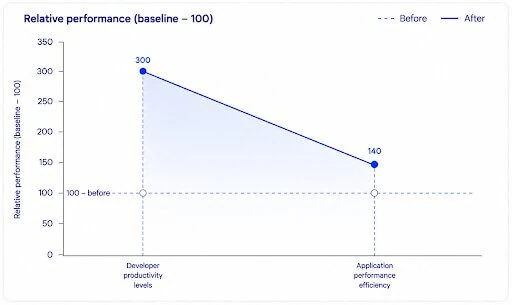
React application modernization outcomes: three times higher developer productivity, 40% better application performance and more maintainable, stable code.
Modernized Tech
Stack architecture foundation
Future-Ready
System architecture scalability
Improved
Code maintainability and stability
Seamless User
Experience delivery platform
3xHigher
Developer productivity levels
40%Optimized
Application performance efficiency
Key learnings
What This Engagement Proves for Legacy Frontend Upgrades
React Application Modernization Favors Incremental Upgrades
Jumping from React 16.3.1 to 18.3.1 in one step across 186 outdated packages would have made root-causing any single failure nearly impossible. Upgrading incrementally and safely is what kept the migration debuggable at every stage.
Deprecated API Migration Has to Happen Before the Version Bump
Leaving useHistory and Switch in place until after upgrading React would have meant a broken application the moment the new version shipped. Migrating to React Router v6 hooks first is what made the version bump itself uneventful.
Tooling Has to Upgrade Alongside the Framework
Storybook and UI components incompatible with React 18 would have quietly broken the team’s own development workflow even after the application itself worked. Upgrading tooling in step with the framework is what kept productivity gains real instead of theoretical.
Conclusion
From a Legacy React 16 Frontend to a Modern Platform
A React 16.3.1 frontend might have been workable while its dependencies stayed current, but with 186 outdated packages and deprecated APIs accumulating, it had become a real risk to every future release. This engagement demonstrates that a single React application modernization can resolve compatibility, stability, and productivity gaps within one structured programme rather than three separate initiatives.
By completing a React 18 migration, adopting React Router v6, and upgrading Storybook alongside better frontend dependency management, ICANIO helped this partner triple developer productivity and optimize application performance by 40%. The modernized architecture and regression-tested stability delivered through this engagement are the foundation every future feature this frontend ships will run on.
Related Resources
This React application modernization is part of ICANIO's software development practice. Our team runs frontend upgrades like this through application development services. Monitoring and release work connects to our DevOps and cloud engineering services. Regression testing pairs well with QA automation for faster releases. To plan a similar upgrade, contact ICANIO.
- Application Development Services
- Industries We Serve
- Java Application Modernization: JDK 17
- Front End Development (React, 2026)
References
- How to Upgrade to React 18: the official React team guide to upgrading to React 18.
- Upgrading from v5: React Router documentation on moving to v6 hooks and routes.
- Storybook documentation: official docs for building and testing UI components in isolation.
- React (software): Wikipedia overview of the React JavaScript library.
- Regression testing: Wikipedia overview of testing that existing features still work after changes.
Frequently asked questions
Common Questions About This React Application Modernization
What is React application modernization and why was it needed here?
React application modernization upgrades a legacy React version and resolves outdated dependencies, needed here because React 16.3.1 created compatibility issues and 186 outdated packages caused dependency conflicts and build instability.
What does the React 18 migration involve beyond the version number?
The React 18 migration involved resolving 186 outdated packages, migrating deprecated APIs, refactoring UI components, and upgrading Storybook, not just bumping the version number in package.json.
Why replace useHistory and Switch with React Router v6?
React Router v6 replaced useHistory and Switch because those APIs were deprecated and incompatible with the routing patterns React 18 applications need going forward.
How did the Storybook upgrade affect the development workflow?
The Storybook upgrade kept the component development workflow intact by updating it to support the same architecture the refactored UI components now used under React 18.
How does frontend dependency management prevent future conflicts?
Frontend dependency management resolved the 186 outdated packages that were causing conflicts, establishing a cleaner dependency baseline that reduces the risk of similar conflicts recurring.
How much did developer productivity improve after this upgrade?
Developer productivity increased threefold after this React application modernization, alongside a 40% optimization in application performance efficiency.